


Cybersecurity researchers from Malwarebytes have uncovered a new malware campaign targeting Windows users with a fake CCleaner installer.
Instead of cleaning system files, the spoofed executable launches a multi-stage infection. It hijacks Google Chrome and installs a browser extension called GhostDesk.
What Happened?
Cybercriminals set up a fake ccleaner website (`ccleanerwind[.]top`) to download. Whether victims clicked the standard or “Pro” download button, the site delivered a malicious executable (`fake CCleaner.exe`).
Once launched, the malware executes a sequence of unobtrusive background commands to hijack the user’s browser:
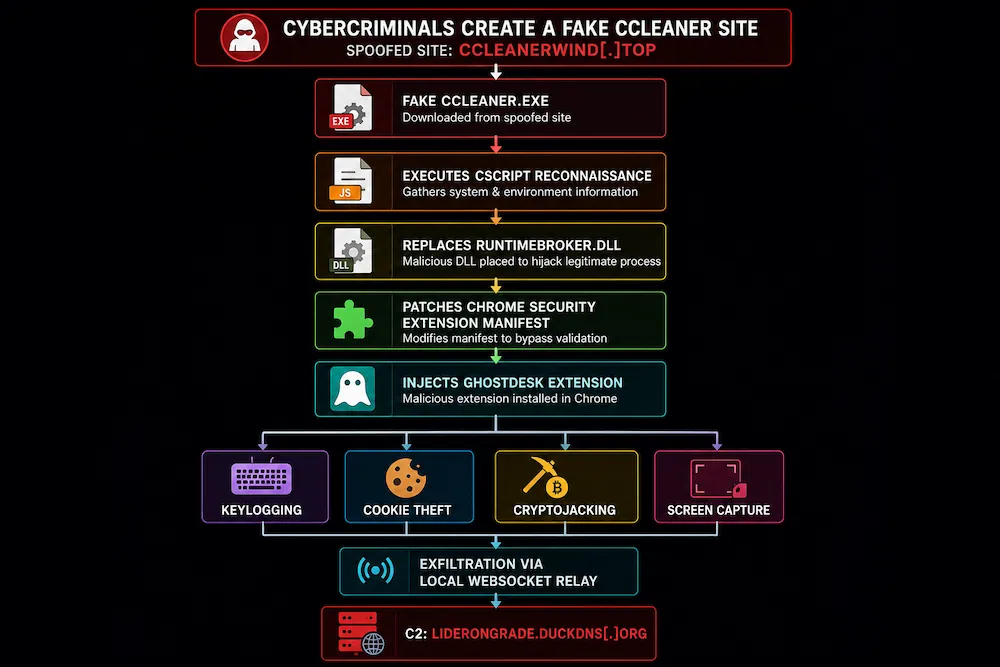
1. CScript Dropper: The malicious executable drops a legitimate copy of `cscript.exe` to run system reconnaissance (harvesting GUID, hostname, and system language).
2. DLL Replacement: It replaces `runtimebroker.dll` in the user’s `AppData` folder with a reflexive loader.
3. Chrome Manifest Patching: The loader alters Chrome’s internal extension manifest file, allowing it to secretly inject two malicious scripts (`content.js` and `background.js`) directly into Chrome.
4. GhostDesk Deployment: The scripts run inside Chrome as an extension named GhostDesk—masquerading under the name of legitimate AI screen-sharing software to mask its background activity.
What Does GhostDesk Do?
Once embedded inside Chrome, GhostDesk transforms the browser into an active surveillance and credential-harvesting tool:
- Form & Credential Harvesting: Scans outgoing POST requests and form submissions for keywords related to passwords, authentication tokens, and financial data.
- Keystroke Logging: Records keystrokes entered into text fields and buffers them for exfiltration.
- Cookie & Session Theft: Uses `chrome.cookies.getAll` to extract active session cookies, bypassing multi-factor authentication (MFA).
- Clipboard Cryptojacking: Monitors clipboard paste events for cryptocurrency wallet addresses and swaps them with attacker-controlled addresses.
- Tab Screen Captures: Periodically captures screenshots of active browser tabs via a custom `captureTab` routine.
- Persistent WebSocket C2 Relay: Opens a local WebSocket server (`127.0.0.1:7345/ext`) to maintain a persistent connection to the attacker’s command-and-control server at `liderongrade.duckdns[.]org`.
Broader Campaign Impact
Malwarebytes researchers noted that the threat actors behind GhostDesk are not limiting themselves to CCleaner impersonation. Identical CScript loading mechanisms and shared C2 infrastructure were also spotted powering fake installers for 7-Zip and Adobe Acrobat.
Key Mitigation Advice
- Verify URLs & Sources: Download utility software directly from verified publisher domains or official app stores rather than clicking search engine ad links or social media redirects.
- Watch Out for Sponsored Search Ads: Malicious actors frequently buy search engine ads to push spoofed download sites to the top of search results.
- Deploy Web & Endpoint Protection: Endpoint protection solutions like Malwarebytes block malicious domains (`ccleanerwind[.]top`) and detect the fake installer payload as `Trojan.Dropper`.