


In 2020, the SolarWinds attack — one of the most consequential breaches in history — gave Russian SVR intelligence officers access to the networks of 100 US federal agencies and 18,000 private organisations. The initial intrusion used a supply chain compromise to plant a backdoor.
But the reason the attackers could move so freely once inside — reading emails, accessing source code, pivoting between cloud and on-premises environments for months without detection — came down to IAM failures: excessive permissions on service accounts, no separation between administrative and regular identity tiers, and federation trust relationships that allowed a compromised on-premises identity to escalate into cloud administrative access.
Identity and Access Management is simultaneously the most foundational and most underestimated domain in enterprise security. Every action in a modern IT environment — opening a file, querying a database, calling an API, logging into a SaaS application — involves an identity making a request and an access control decision about whether to grant it. Get IAM right and you can contain a breach to a single compromised account.
Get it wrong and a single compromised credential can become a total organisational compromise in hours.
This guide covers what IAM is and how it works, authentication versus authorisation, every access control model from RBAC to ABAC to PBAC, privileged access management, Single Sign-On, MFA, federation, Zero Trust IAM, identity governance and lifecycle management, and the enterprise IAM platforms used in 2026.
- What is IAM? Core definition and scope
- Authentication vs authorisation — the two pillars
- Access control models — RBAC, ABAC, PBAC, and MAC
- Multi-factor authentication — types and implementation
- Single Sign-On and identity federation
- Privileged access management (PAM)
- Identity lifecycle management
- Zero Trust IAM — never trust, always verify
- Active Directory and Entra ID in enterprise IAM
- Identity Governance and Administration (IGA)
- Enterprise IAM platforms — 2026
- Frequently asked questions
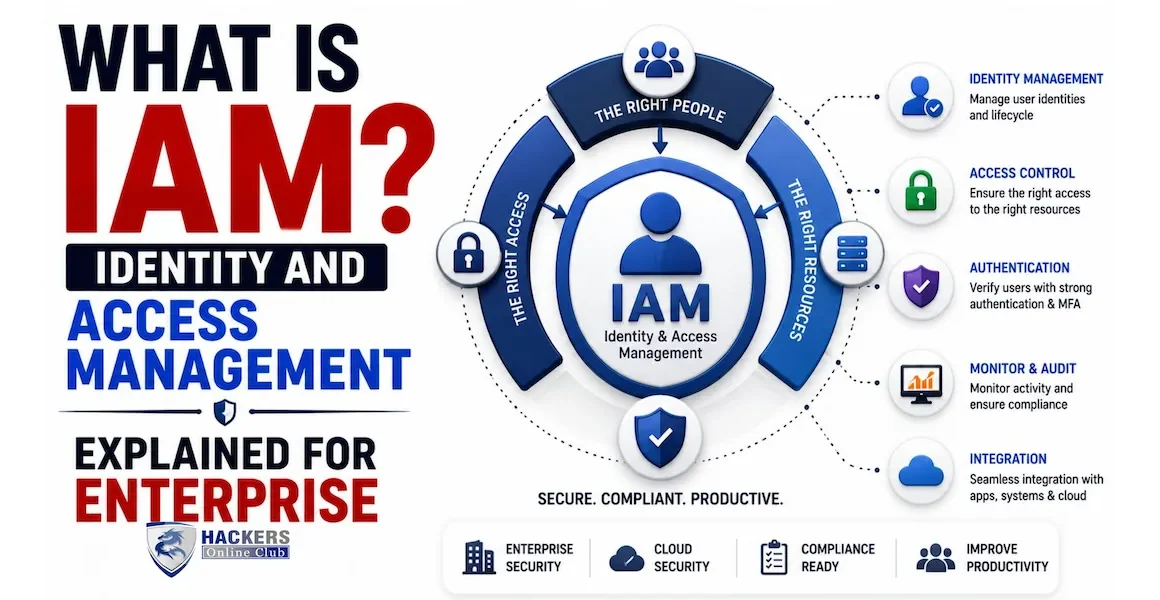
Identity and Access Management (IAM) is the discipline and the set of technologies that ensures the right people and systems have the right access to the right resources at the right time — and that no one else does. It encompasses every aspect of managing digital identities and controlling what those identities can do.
In practical terms, IAM answers four questions for every access request: Who are you? (Identity) Are you who you claim to be? (Authentication) What are you allowed to do? (Authorisation) Are you actually doing what you are allowed to do? (Audit). These four questions apply to every identity in the enterprise: employees, contractors, partners, service accounts, APIs, IoT devices, and cloud workloads.
Managing identities for employees and contractors — creation of accounts when they join, modification when their role changes, and deletion when they leave. This includes their authentication credentials, the groups and roles they belong to, and the applications and data they can access. Workforce IAM is typically built around Active Directory or Entra ID (formerly Azure AD) for on-premises and hybrid environments, or an Identity Provider (IdP) like Okta or Ping Identity for cloud-first organisations.
Managing identities for external customers of digital products. CIAM differs from workforce IAM in scale (millions of users versus thousands), in tolerance for friction (customers abandon if authentication is too complex), and in regulatory requirements (GDPR consent management, right to be forgotten). CIAM platforms include Auth0, AWS Cognito, and Ping Identity's customer product.
Managing identities for non-human entities — service accounts running applications, API keys for integrations, certificates for servers, workload identities for cloud services. This is the fastest-growing and often most poorly managed IAM category. Service accounts frequently have excessive permissions, rarely rotate credentials, and their activity is rarely audited with the same rigour as human accounts. The SolarWinds attack exploited exactly this gap — privileged service accounts with no monitoring and excessive federation trust.
Managing identities with elevated privileges — domain administrators, database administrators, root accounts, and cloud super-admin roles. These identities can cause catastrophic damage if compromised and require additional controls: vaulted credentials, session recording, just-in-time access, and enhanced monitoring. PAM is often treated as a separate discipline and product category.
Authentication and authorisation are distinct steps that both happen on every access request. Confusing them — or implementing only one — is a fundamental IAM failure that leads to breaches. They answer different questions and use different mechanisms.
Authentication is the process of verifying that someone is who they claim to be. A user presenting a username and password is making a claim ("I am jsmith@company.com") and providing evidence to support that claim (the password). The authentication system verifies the evidence and either accepts or rejects the claim.
| Factor type | What it is | Examples | Strengths | Weaknesses |
|---|---|---|---|---|
| Something you know | A secret only the user should know | Password, PIN, security question answer | Familiar, no hardware needed, easy to implement | Can be stolen (phishing), guessed (weak passwords), or leaked in breaches |
| Something you have | A physical or digital object the user possesses | Hardware token (YubiKey), TOTP authenticator app, SMS code, smart card | Requires physical possession — harder to steal remotely | Can be lost, phished (OTP phishing), or SIM-swapped (SMS) |
| Something you are | A biometric characteristic of the user | Fingerprint, face recognition, iris scan, voice recognition | Cannot be forgotten or lost; unique to the individual | Cannot be changed if compromised; privacy concerns; false acceptance/rejection rates |
| Something you do | A behavioural pattern (continuous auth) | Typing rhythm, mouse movement patterns, location patterns | Passive — no user action needed; detects account takeover mid-session | Requires data collection, complex to implement, can be affected by injury or illness |
| Protocol | Used for | How it works | Token type |
|---|---|---|---|
| Kerberos | On-premises Windows/AD environments | Ticket-granting service issues time-limited service tickets. User authenticates once to KDC; receives TGT; exchanges TGT for service-specific tickets. No password sent over the network after initial auth. | Kerberos tickets (TGT + ST) |
| SAML 2.0 | Enterprise SSO — especially legacy web apps | XML-based. User authenticates to IdP; IdP issues signed XML assertion; assertion presented to Service Provider for access. Browser redirect-based flow. | SAML assertion (XML) |
| OAuth 2.0 | API authorisation — "allow app to access my data" | Framework for delegated authorisation. Resource owner grants a client application limited access to their resources via an authorisation server. Issues access tokens and refresh tokens. | Access token (opaque or JWT) |
| OpenID Connect (OIDC) | Modern web/mobile app authentication | Built on OAuth 2.0 — adds an identity layer. Authenticates the user AND provides identity information via ID token. Used by Google, Microsoft, Okta for consumer and enterprise SSO. | ID token + access token (JWT) |
| FIDO2 / WebAuthn | Passwordless authentication | Public-key cryptography. Authenticator (hardware key or device biometric) creates a key pair per site; private key never leaves the device; server verifies signature. Phishing-resistant by design. | Cryptographic assertion |
Authorisation determines what an authenticated identity is permitted to do. It happens after authentication succeeds. Authentication says "this is jsmith@company.com." Authorisation says "jsmith@company.com can read the Finance folder but not write to it, and cannot access the HR system at all." These are two completely separate decisions, enforced by separate mechanisms.
A modern authorisation policy engine evaluates multiple inputs simultaneously to reach an access decision:
- Identity attributes — who the user is: department, job title, seniority level, location, employment type
- Resource attributes — what they are trying to access: data classification, business system, sensitivity label
- Action — what they want to do: read, write, delete, execute, admin
- Context — circumstances of the request: device compliance status, network location, time of day, geographic location, risk score
- Policy — the rules that govern the decision: RBAC rules, ABAC conditions, regulatory requirements
Different access control models are appropriate for different environments and use cases. Most modern enterprises use a hybrid — typically RBAC as the base layer with ABAC conditions added for context-sensitive decisions.
RBAC sounds simple but becomes complex at enterprise scale. Common failure modes: role explosion (hundreds of fine-grained roles that are impossible to manage), role sprawl (users accumulating roles over time without ever having them removed), and role ambiguity (different teams creating overlapping roles with unclear boundaries).
A critical RBAC design principle: no single identity should have permissions that allow them to complete a sensitive process end-to-end without a second person's involvement. The classic example is financial controls — the person who can create a vendor in the accounts payable system should not also be able to approve payments to that vendor. SoD violations are a major financial fraud risk and a common audit finding. Identity Governance platforms include SoD analysis engines that flag conflicting role assignments.
MFA requires a user to provide two or more authentication factors from different categories. It is the single highest-ROI security control available — Microsoft's data shows MFA blocks 99.9% of automated account compromise attacks. Understanding the different MFA types is important because they are not equally resistant to attack.
A six-digit code sent via SMS. Still better than no MFA, but vulnerable to SIM swapping (attacker social-engineers the mobile carrier to transfer the phone number to their SIM), real-time phishing (attacker sets up a fake login page that captures both the password and the SMS OTP and immediately replays them), and SS7 network interception. NIST SP 800-63B deprecated SMS OTP as a "restricted" authenticator in 2017. If SMS is all that is available, it is better than nothing — but it should be treated as a stepping stone to stronger MFA.
Time-Based One-Time Password algorithms (TOTP — RFC 6238) generate a six-digit code that changes every 30 seconds, computed from a shared secret and the current time. Apps like Microsoft Authenticator, Google Authenticator, and Authy implement this. More secure than SMS (not vulnerable to SIM swap), but still vulnerable to real-time phishing — an attacker's fake login page can capture the TOTP code and replay it within the 30-second window. This is how most modern phishing kits work: they pass credentials and OTPs to the real site in real time, creating a session, then redirect the victim elsewhere.
The authenticator app receives a push notification when a login attempt is made. The user approves or denies. Without number matching (where a number shown on the login screen must be matched in the app), push notifications are vulnerable to MFA fatigue attacks — the attacker repeatedly sends authentication requests until the user approves one out of frustration. With number matching enabled (required in Microsoft Authenticator enterprise deployments), the user must enter a number shown on the login screen into the app, defeating automated phishing. Number matching makes push MFA significantly more phishing-resistant.
Hardware security keys (YubiKey, Google Titan, Feitian) using the FIDO2/WebAuthn standard are currently the gold standard for phishing-resistant MFA. The key performs a cryptographic challenge-response with the origin (domain) of the login page. If the domain does not match the key's registered origin — even by a single character — the authentication fails. An attacker cannot capture and replay a FIDO2 response on a different domain. This design makes phishing technically infeasible rather than just difficult. FIDO2 hardware keys are mandatory for all Google employees (zero phishing-related account compromises since 2017) and are increasingly required for privileged account access in enterprise security programmes.
Passkeys (2022–present) bring FIDO2's phishing resistance to software — a passkey is a FIDO2 credential stored on a device (phone, laptop) and protected by device biometrics (Face ID, fingerprint) or PIN. When a user authenticates, the device proves possession of the private key using biometrics. Passkeys are synced across devices via iCloud Keychain, Google Password Manager, or 1Password. They are both passwordless and phishing-resistant. Major platforms (Apple, Google, Microsoft, major banks) have deployed passkeys, and enterprise IdPs (Okta, Entra ID) support them. This is the direction the industry is moving.
| MFA type | Phishing resistant? | SIM swap resistant? | Usability | Cost | Recommended for |
|---|---|---|---|---|---|
| SMS OTP | No | No | High — familiar | Low (carrier cost) | Minimum baseline only — replace with stronger MFA |
| TOTP app (Authenticator) | No (real-time phish) | Yes | High | Free | General workforce — better than SMS |
| Push notification (with number match) | Partially | Yes | Very high — one tap | IdP licence | General workforce — good default choice |
| FIDO2 hardware key | Yes | Yes | High — one touch | $25–$60 per key | Privileged accounts, executives, high-value targets — required |
| Passkey (FIDO2 synced) | Yes | Yes | Very high — biometric | Free (device-based) | General workforce — the future standard |
| Smart card / PIV | Yes | Yes | Medium — requires reader | $15–$30 per card + reader | Government, defence, high-security environments |
Single Sign-On (SSO) allows a user to authenticate once to a central Identity Provider and then access multiple applications without re-authenticating. It improves security (fewer passwords, centralised MFA enforcement, single point for revoking access) and user experience (one login for all tools).
Federation extends SSO beyond organisational boundaries. A partner organisation's employees can access your applications using their own corporate credentials, authenticated by their own IdP. The two IdPs establish a trust relationship — your SP trusts assertions signed by the partner's IdP. This enables B2B scenarios (partners accessing shared portals), mergers and acquisitions (temporary access without migrating accounts), and multi-cloud environments (AWS, Azure, GCP trusting the same corporate IdP).
Privileged accounts — domain administrators, database administrators, root accounts, cloud super-admins — can do catastrophic damage if compromised. They can delete all data, disable all security controls, create backdoor accounts, and exfiltrate everything. They require controls far beyond standard IAM.
Privileged credentials (root passwords, service account passwords, API keys, SSH private keys) are stored in an encrypted vault — the PAM platform (CyberArk, BeyondTrust, Delinea). Users never see the actual passwords. When an administrator needs to connect to a privileged system, they check out the credential from the vault for a defined session window, use it, and the vault automatically rotates the password after the session ends. Even if the administrator's workstation is compromised, the attacker cannot capture credentials they were never shown.
No administrator holds standing privileged access. When a task requires elevated permissions, the administrator requests access through the PAM platform, specifying the target system, the reason, and the duration. Approval may be automatic (for low-risk tasks) or require a human approver (for high-risk actions). At the end of the session, access is revoked. This eliminates standing admin accounts that are permanently compromised if credentials are stolen — if no privileged session is active, there is nothing to hijack.
All privileged sessions are recorded — full video recording of screen activity plus keystroke logging. Recordings are tamper-evident (stored in the vault, not on the admin's machine) and searchable. This serves forensic purposes (what exactly did the administrator do during the session?) and compliance purposes (evidence that all privileged actions were reviewed). Some PAM platforms add real-time monitoring that can terminate sessions if suspicious commands are detected (e.g. if an administrator starts a command that would delete all database tables, the session is paused and routed for approval).
Before you can protect privileged accounts you must find them all. PAM platforms scan the environment to discover local administrator accounts on workstations and servers, service accounts in Active Directory, hardcoded credentials in scripts and configuration files, SSH keys used for server-to-server authentication, and cloud IAM accounts with administrative permissions. Shadow IT and legacy systems often harbour privileged accounts that IT does not know about. Discovery typically reveals 30–50% more privileged accounts than IT had catalogued.
Identity lifecycle management governs how identities are created, maintained, and removed over time. It is where IAM most directly touches HR processes — and where most organisations have their greatest gaps, because manual processes inevitably leave orphaned accounts, stale permissions, and late de-provisioning that create security risk.
When a new employee joins, an identity must be created and provisioned with the correct initial access. The provisioning process should be triggered automatically from the HR system (Workday, SAP SuccessFactors, BambooHR) — not a manual ticket. The identity governance platform reads the HR record (department, job title, location, manager) and automatically assigns the appropriate RBAC roles. On day one, the employee has exactly the access their role requires — no more, no less. Provisioning that depends on manual requests results in new employees waiting days for access and IT helpdesk tickets requesting broader-than-necessary access.
When an employee changes roles, departments, or locations, their access must be updated. This is where most organisations accumulate the dangerous pattern of access accumulation: the employee's old access is never removed, and new access is added. After a few role changes, a standard employee holds permissions from three previous departments. Automated mover processes triggered by HR role-change events remove old access before granting new access — maintaining least privilege through the employee's tenure. Access reviews (below) catch any gaps.
When an employee leaves — voluntarily or involuntarily — their access must be revoked immediately. For involuntary terminations (dismissals), this must happen at the same moment the employee is notified or before — a dismissed employee with active access to customer data, source code, or financial systems has both the motive and the means for insider threat activity. For voluntary departures, access revocation by end of last working day is standard. Manual offboarding processes miss accounts on non-standard systems, leave service accounts running under the former employee's name, and miss API keys the employee created and never disclosed.
Automated provisioning keeps access current for defined lifecycle events, but permissions also drift between events — someone is added to a distribution list that has admin access, a manager approves an exception that becomes permanent, a system is reconfigured to grant broader access than intended. Periodic access certification (also called access review or recertification) sends managers and resource owners a list of who has access to their systems and asks: "Do these people still need this access?" Automated IGA platforms orchestrate this process — routing reviews, escalating unanswered requests, and automatically revoking access where the reviewer certifies it is no longer needed.
Zero Trust is a security architecture model based on the principle that no identity — inside or outside the network — should be inherently trusted. Every access request must be verified explicitly, access is granted with least privilege, and every session is monitored. Identity is the primary security perimeter in Zero Trust because the network perimeter has dissolved — employees work from anywhere, applications run in multiple clouds, and the concept of "inside the network" no longer meaningfully corresponds to "trusted."
No identity receives implicit trust based on network location. A request from inside the corporate network is evaluated with the same rigour as a request from a coffee shop. Verification uses all available signals: identity (who), device (what), location (where), time (when), and behaviour (how). Conditional access policies encode this logic — a finance manager authenticating from their managed laptop on the corporate network during business hours may access financial systems without additional friction; the same request from an unmanaged device in a foreign country at 3 AM triggers step-up authentication or outright denial.
Grant minimum permissions for minimum time. JIT access for privileged operations. Scoped tokens for API access. Time-limited session tokens. Regular access certification to remove permissions that have accumulated beyond what is needed. The goal: if any identity is compromised, the blast radius is limited by the scope of what that identity could do.
Design and operate as if breach has already occurred. Segment access so a compromised identity cannot reach everything. Monitor all access with the goal of detecting compromised identities through anomalous behaviour — a user accessing 10,000 files in an hour when they normally access 50, or accessing systems they have never accessed before. Continuous authentication using risk signals rather than trusting a session that was authenticated hours ago.
Authentication is not a one-time event at the start of a session. Risk-adaptive authentication continuously evaluates signals throughout the session and can challenge the user or terminate the session if signals suggest compromise. Signals include: typing behaviour change (possible account takeover), sudden location change (session hijacking), unusual data access pattern (credential theft), device posture change (security software disabled).
In Zero Trust, the identity provider and its policy engine become the security control plane — the point through which all access flows and is evaluated. Network controls are complementary but identity is primary. This means the IdP must be highly available, highly secure, and integrated with threat intelligence. The IdP's conditional access policies must be the single source of truth for access decisions — not individual application access controls that may be inconsistently configured.
Active Directory (AD) is Microsoft's on-premises identity and access management platform, deployed in the vast majority of enterprise Windows environments since 2000. Microsoft Entra ID (formerly Azure AD) is its cloud-based successor and extension, providing identity services for Microsoft 365, Azure, and third-party SaaS applications.
| Aspect | Active Directory (AD DS) | Microsoft Entra ID |
|---|---|---|
| Deployment | On-premises — Windows Server Domain Controllers | Cloud — Microsoft-managed SaaS service |
| Primary protocol | Kerberos + NTLM + LDAP | OAuth 2.0 + OIDC + SAML 2.0 |
| Authentication scope | Domain-joined Windows machines, on-premises apps | Cloud apps, M365, browser-based apps, any OIDC/SAML app |
| Group Policy | Full GPO support — machine and user config, software deployment | Intune MDM/MAM for device management; no traditional GPO |
| Directory objects | Users, computers, groups, OUs, sites, GPOs | Users, groups, devices, service principals, managed identities |
| MFA | Via NPS extension or third-party (AD FS + MFA) | Native MFA — Authenticator app, FIDO2, passkeys, SMS |
| Conditional access | Limited — requires AD FS + complex policy | Native, rich conditional access policies |
| Privileged access | Requires PAM product (CyberArk, BeyondTrust) | Entra Privileged Identity Management (PIM) — JIT access |
Most enterprises run AD on-premises and sync identities to Entra ID using Microsoft Entra Connect (formerly Azure AD Connect). This hybrid model allows on-premises AD users to authenticate to cloud services (M365, Azure) without a separate cloud account. The sync is one-directional by default (AD → Entra ID) — changes made in AD are reflected in the cloud, but cloud-only attributes (MFA configuration, Conditional Access policy assignments) stay in Entra ID.
Identity Governance and Administration (IGA) is the discipline and toolset that provides visibility, control, and compliance over identities and their access rights at scale. Where IAM tools manage the mechanics of access, IGA manages the policies, processes, and governance around access decisions — ensuring access is appropriate, documented, and auditable.
- Access request and approval workflow — self-service portal where users request access to applications and resources; automated routing to appropriate approvers; approval audit trail. Eliminates the email chain and spreadsheet-based access request process.
- Role management — discovering what roles exist, what permissions they grant, who holds them, and identifying role conflicts. Role mining: analysing actual access patterns to recommend optimal role structures.
- Separation of duties analysis — automated detection of SoD violations across all identities. "User jsmith has both Create Vendor and Approve Payment rights in SAP — this is a SoD conflict that must be remediated or risk-accepted."
- Access certification campaigns — structured, scheduled reviews where managers certify their team members' access. Automated follow-up, escalation, and revocation of uncertified access.
- Audit and compliance reporting — who had access to what, when, and who approved it. Evidence for SOX, PCI DSS, HIPAA, ISO 27001 audits. Time-stamped, tamper-evident audit trail for every access change.
- Privileged account governance — discovery and lifecycle management of privileged accounts, complementing the session management capabilities of PAM platforms.
| IGA Platform | Strengths | Best fit | Integration |
|---|---|---|---|
| SailPoint IdentityNow / IIQ | Market leader; deep IGA functionality; AI-driven access recommendations; strong SoD engine | Large enterprises with complex compliance requirements (SOX, PCI) | 3,000+ pre-built connectors |
| Saviynt | Cloud-native; strong cloud IAM governance (AWS, Azure, GCP); application GRC built-in | Cloud-first enterprises; converged IGA + PAM use cases | Strong cloud platform connectors |
| One Identity Manager | Comprehensive lifecycle management; strong AD/LDAP integration; flexible data model | Microsoft-centric enterprises with complex on-premises environments | Deep AD, SAP, Exchange connectors |
| Omada Identity | Strong European data residency; good mid-market fit; compliance-focused workflows | European organisations; mid-market enterprises | 200+ standard connectors |
Okta is the market-leading cloud-native Identity Provider for workforce IAM. Its key strength is breadth of integration — over 7,000 pre-built application connectors in the Okta Integration Network, covering virtually every SaaS application. The Workflows automation engine enables no-code identity process automation (joiner/mover/leaver, access request routing, custom provisioning logic). Okta's Adaptive MFA and Behaviour Detection use risk signals to make contextual authentication decisions. Particularly strong for cloud-first and SaaS-heavy organisations. After the 2022 breach (a support contractor's laptop was compromised), Okta significantly strengthened its internal controls and customer-facing security posture.
Microsoft Entra ID is the identity foundation for Microsoft 365 and Azure, with 600M+ users globally. For organisations already invested in the Microsoft ecosystem, it is the obvious starting point — native integration with Teams, SharePoint, OneDrive, Intune, and Azure eliminates the need for separate IdP licences for most use cases. Entra ID Premium P2 (included in M365 E5) adds Privileged Identity Management (JIT privileged access), Identity Protection (risk-based conditional access), and access reviews. Entra ID External Identities handles B2B and B2C scenarios. The Entra ID Governance add-on provides lifecycle management and access certification capabilities approaching IGA platform functionality.
CyberArk is the market-leading PAM platform, used by the majority of Fortune 500 companies for privileged credential management. The Enterprise Password Vault stores and rotates privileged credentials; the Privileged Session Manager proxies and records all administrative sessions; the Application Access Manager handles non-human identities and secrets. CyberArk's Conjur (now open-source) manages secrets for DevOps and CI/CD pipelines, eliminating hardcoded credentials in application code and deployment scripts. Gartner Privileged Access Management Magic Quadrant leader every year since the category was created.
| Platform | Category | Best for | Pricing model |
|---|---|---|---|
| Okta | IdP / Workforce IAM | Cloud-first; SaaS-heavy; needs broad app integration | Per user/month |
| Microsoft Entra ID | IdP / Workforce IAM | Microsoft 365 / Azure environments; hybrid AD | Included in M365; P1/P2 add-ons |
| Ping Identity | IdP / Workforce + CIAM | Large enterprises; on-prem deployment needed; both workforce and customer IAM | Per user/month |
| CyberArk | PAM | Enterprise PAM; large privileged account inventory; session recording required | Per privileged user |
| BeyondTrust | PAM | PAM + privileged remote access; endpoint least privilege | Per seat |
| Delinea (Thycotic/Centrify) | PAM | Mid-market PAM; cloud-delivered; lower TCO than CyberArk | Per user/month (cloud) |
| SailPoint | IGA | Enterprise identity governance; SOX/PCI compliance; complex SoD | Per user/year |
| Saviynt | IGA + PAM (converged) | Cloud-native IGA; converged IGA+PAM; strong cloud app governance | Per user/month |
| HashiCorp Vault | Secrets management | DevOps secrets; API keys; dynamic credentials for infrastructure | Open-source (free) + Enterprise |
⚡ IAM improvements you can start this week
- Enforce MFA for all privileged accounts immediately — if anyone in your organisation holds domain admin, cloud super-admin, or database admin rights without MFA enforced, that account is one phishing email away from total compromise. Enforce hardware FIDO2 keys for privileged accounts — not TOTP apps, not SMS. Do this before anything else on this list. MFA guide →
- Run an access key and orphaned account audit this week — generate a credential report from your IdP (Entra ID or Okta) and identify: accounts that have not logged in for 90+ days, service accounts with passwords that never expire, and any account with administrative rights that does not have MFA. Each finding is an active risk that requires remediation.
- Implement LAPS for all Windows workstations and servers — Microsoft LAPS is free, built into Windows Server, and eliminates the same local admin password across all machines. This single control defeats one of the most common lateral movement techniques in ransomware attacks.
- Map your joiner-mover-leaver process and identify manual steps — document what happens when an employee joins, changes roles, or leaves. Identify every step that is handled manually via email or ticket. Each manual step is a gap. Prioritise automating the leaver process first — stale access from departed employees is an ongoing breach risk.
- Connect IAM to the broader security architecture — IAM is the foundation of Zero Trust. Understanding how identity integrates with cloud security (AWS IAM, Entra Conditional Access), network segmentation (ZTNA replacing VPN), and endpoint security (device compliance as an authorisation signal) gives you the complete picture. Zero Trust → | AWS IAM →
IAM (Identity and Access Management) is the discipline and set of technologies that ensures the right people and systems have the right access to the right resources at the right time. It encompasses four key functions: identity management (creating, maintaining, and removing user accounts), authentication (verifying that users are who they claim to be — via passwords, MFA, and certificates), authorisation (controlling what authenticated users can do — via RBAC, ABAC, and access policies), and audit (logging and monitoring all access decisions for compliance and forensic purposes). IAM is the primary enterprise security perimeter in 2026, responsible for defending against the credential theft and privilege abuse that are involved in 80% of data breaches.
Authentication answers "who are you?" — it verifies identity through credentials (password, MFA, certificate, biometric). Authorisation answers "what are you allowed to do?" — it controls access based on the verified identity. Authentication happens first; authorisation follows. A user can be successfully authenticated (their identity is confirmed) but still be denied access to specific resources because they are not authorised (their role does not have permission). The two use different mechanisms — authentication uses IdPs and protocols like OIDC and Kerberos; authorisation uses access control models like RBAC and ABAC with policy engines that evaluate permissions.
RBAC (Role-Based Access Control) is an access control model where permissions are assigned to roles, and users are assigned to roles. A user inherits all permissions of every role they hold. Rather than granting individual permissions to each user (which is impossible to manage at scale), administrators create roles that correspond to job functions ("Finance Analyst," "Database Administrator") and assign the appropriate permissions to those roles. When a user joins or changes roles, their access is updated by changing their role membership rather than individually editing permissions. RBAC is the most widely used enterprise access control model because it is intuitive, auditable, and scales effectively — though it requires good role design to avoid role explosion and accumulation.
PAM (Privileged Access Management) is the specialised discipline and toolset for controlling, monitoring, and securing access to privileged accounts — domain administrators, database administrators, root accounts, and cloud super-admin roles. PAM platforms provide credential vaulting (privileged passwords stored in an encrypted vault, never shown to users), just-in-time access (privileges granted on-demand for specific sessions and revoked immediately after), session recording (full video and keystroke logs of all privileged sessions), and privileged account discovery (finding all privileged accounts in the environment, including unknown ones). PAM addresses the reality that privileged accounts, if compromised, can cause total organisational compromise — they require controls far beyond standard IAM.
SSO allows a user to authenticate once to a central Identity Provider and then access multiple applications without re-authenticating. It improves security by: centralising authentication — every login goes through the IdP where MFA can be consistently enforced, rather than each application managing its own authentication; enabling centralised access revocation — when an employee leaves or is dismissed, disabling their IdP account immediately terminates access to all connected applications simultaneously; reducing credential exposure — users only enter credentials to the IdP, not to individual applications; and enabling uniform session management and logging. The security improvement comes from the centralisation — consistent controls applied at one point rather than inconsistently across dozens of applications.
Zero Trust IAM applies the Zero Trust principle ("never trust, always verify") to identity and access decisions. Rather than trusting an identity because it is inside the network, Zero Trust IAM evaluates every access request using all available signals: identity (who is requesting), device (is it a managed, compliant device), location (is this a normal login location), time (is this a normal working time), risk score (does behaviour match normal patterns), and the sensitivity of the requested resource. Conditional access policies encode these rules — granting access, requiring step-up MFA, or blocking access depending on the risk context of each request. Zero Trust IAM treats identity as the primary security perimeter and assumes that network location is not a reliable indicator of trustworthiness.