



Security researchers at Zimperium’s Labs have exposed a highly aggressive, newly discovered Android banking trojan named Rokarolla. Packing an astonishing 137 remote commands, this malware goes far beyond typical credential theft—it effectively hands threat actors complete, interactive control over compromised Android smartphones.
Key Points
- Massive App Target List: Rokarolla actively targets 217 distinct banking and cryptocurrency wallet applications.
- Unprecedented Command Library: Its library of 137 remote commands outnumbers older, prominent banking trojans like HOOK, making it one of the most operationally versatile mobile threats seen this year.
- Bypasses Screen-Casting Warnings: To spy on victims without triggering Android’s native, highly visible “screen recording” warning prompts, Rokarolla quietly snaps rapid screenshots framework-by-frame via accessibility features.
- Distribution Strategy: It relies heavily on social engineering, disguised as fake updates for mainstream apps like Google Chrome or TikTok hosted on malicious third-party websites.
What is It?
Rokarolla is a mobile banking trojan and Remote Access Trojan (RAT) hybrid. Named after its command-and-control (C2) server structure, the malware relies on a two-step infection process.
First, the user downloads an unofficial app from a website. The app presents itself as a Google Play Protect update. After installation, it asks the user to grant Accessibility Services permissions.
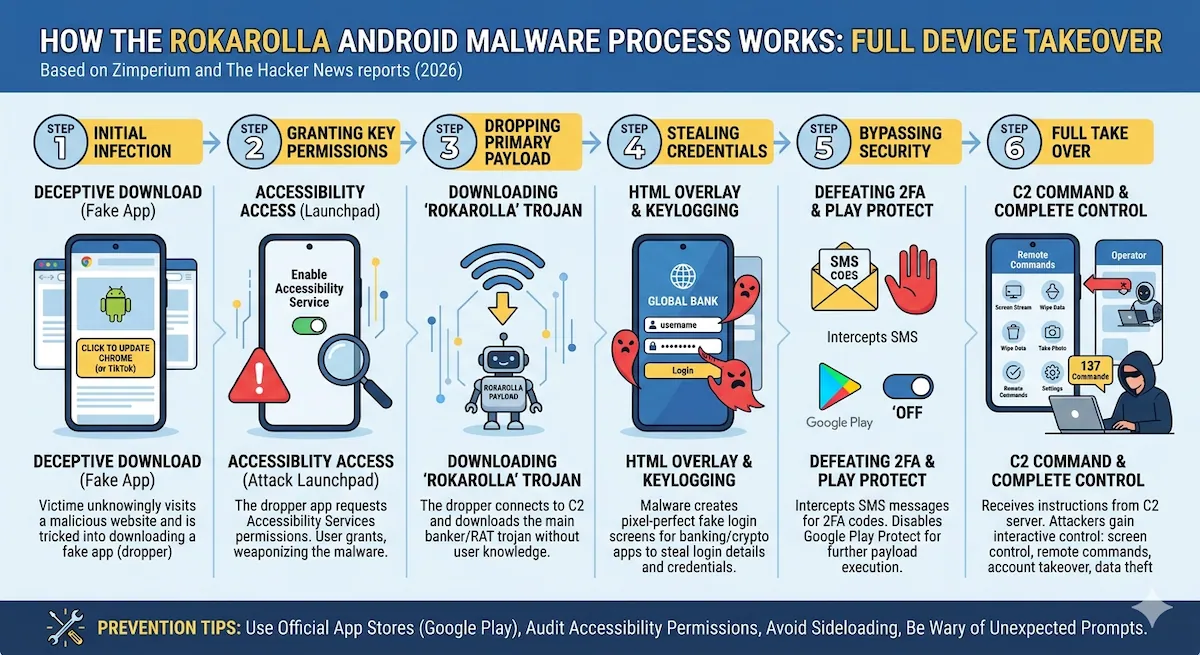
As soon as accessibility access is weaponized, the dropper downloads the primary Rokarolla payload. The malware then uses its broad permissions to perform its core technical routine:
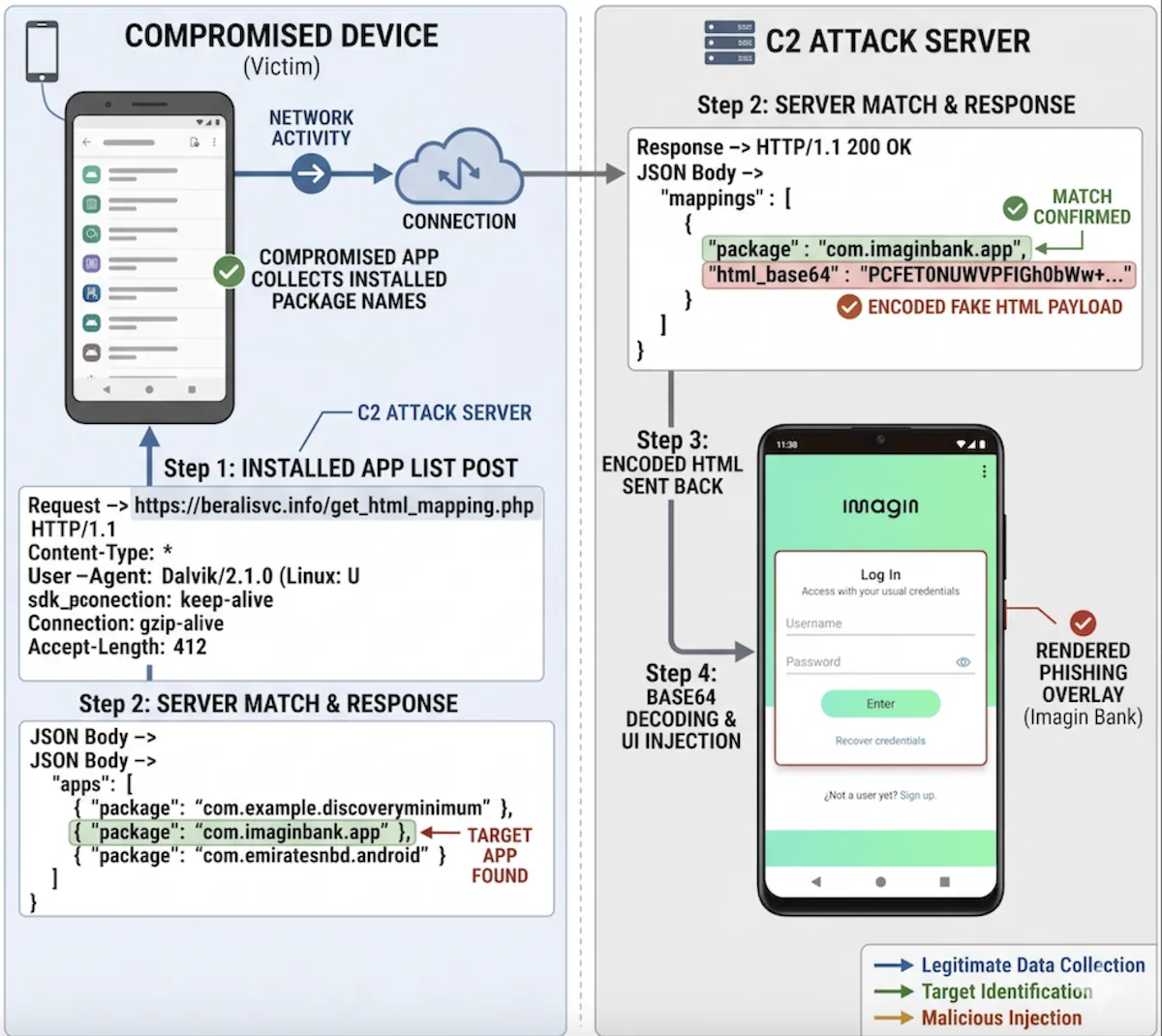
- HTML Overlays: It constantly monitors which apps are open. When the victim opens an target banking or crypto app, Rokarolla pulls a matching, pixel-perfect fake HTML login screen from its local database and drops it right over the real application to siphon credentials and credit card details.
- Lock Screen Spoofing: It overlays a fake lock screen to capture the device’s actual PIN, pattern, or password.
- Infrastructure Resilience: The trojan utilizes multiple hardcoded fallback C2 domains and can receive new ones dynamically, meaning taking down a single server will not kill the botnet.
The Impact: Full Device Takeover
The consequences of a Rokarolla infection are severe, as the malware systematically strips away the user’s control over their own device:
- Financial and Crypto Drain: By logging keystrokes and using phishing overlays, attackers can completely drain bank accounts. Furthermore, Rokarolla constantly monitors the device clipboard—if you copy a cryptocurrency wallet address, it silently rewrites it with the attacker’s address, hijacking your transactions.
- Defeating Two-Factor Authentication (2FA): The malware requests permission to be the device’s default SMS and phone handler. It intercept all incoming texts to steal 2FA one-time codes.
- Silencing the Victim’s Bank: By controlling telephony functions, it can intercept and block incoming phone calls from a bank’s fraud department, preventing the victim or financial institutions from realizing a theft is in progress.
- Neutralizing Security: One of Rokarolla’s priority commands is to physically toggle Google Play Protect to “Off” within the device settings, leaving the phone entirely exposed to further malware payloads.
Protection & Mitigation
Because Rokarolla is a malware campaign exploiting user behavior rather than a software vulnerability, there is no system patch to fix it.
Through its on-device, AI-powered detection engine, Zimperium identifies key behaviors associated with this malware family, including unauthorized use of Accessibility Services and the sideloading of additional payloads.
Protecting your devices requires strict operational security habits:
- Stick Strictly to Official Stores: Never download Android applications (`.apk` files) from web browsers, third-party sites, or pop-up advertisements. Only install applications directly from the official Google Play Store.
- Audit Accessibility Permissions: The entire attack chain depends on the user enabling Accessibility Services for the fake app. Treat any app asking for Accessibility access with extreme skepticism—legitimate apps rarely need this unless they are dedicated tools for users with disabilities.
- Do Not Trust Setup Prompts for Play Protect: Google Play Protect runs quietly in the background of your device. Google will never require you to download a standalone file or secondary application from a website to update or run Play Protect.
- Verify Account Transactions Independently: If you notice unexpected behavior when opening a banking app (such as the app looking slightly different, reloading unexpectedly, or demanding a lock screen PIN inside the app), close it immediately and check your account using a separate, secure device.