



HOC Shorts |
What Happened: A massive supply-chain attack dubbed OPTIMJACK hijacked Optimizely Web snippets across 178+ major organizations (including the BBC, CNN, Zoom, HSBC, and IKEA), injecting malicious JavaScript that served credit card skimmers, crypto-wallet address swappers, and iOS exploit kits.
- The Aftermath: Although Optimizely closed the signup vulnerability and cleaned up the active snippets, the threat doesn’t end when the patch goes live.
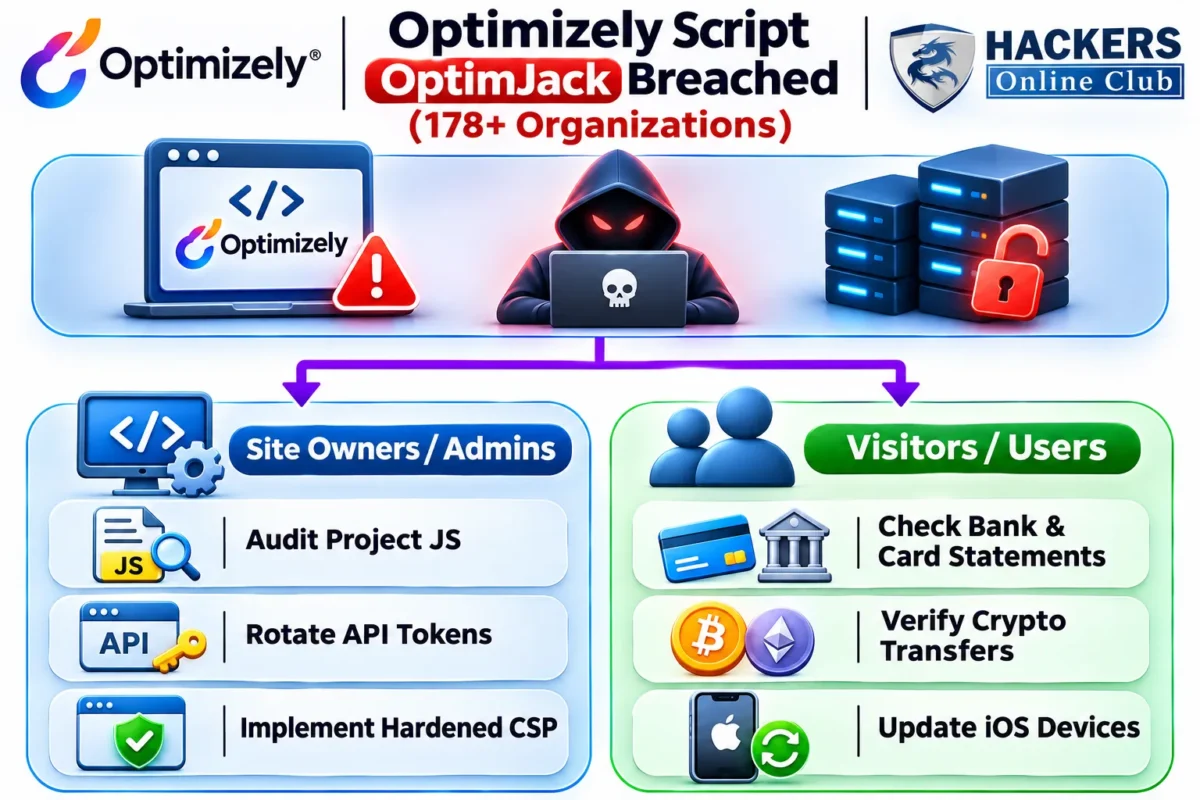
- For Website Owners: You must audit custom project code for hidden base64-encoded strings (`atob`), rotate administrative API tokens, and implement stricter Content Security Policies (CSP).
- For Visitors: Anyone who browsed an affected site during the incident window needs to check bank statements, verify crypto transactions, and update Apple devices immediately.
What to Do After the Optimizely (OPTIMJACK) Script Hijacking
A supply chain campaign like OPTIMJACK—where attackers compromised Optimizely’s account signup flow to inject malicious JavaScript into giants like the BBC, CNN, Zoom, and IKEA—the immediate panic centers on taking the malicious script down.
Optimizely has fixed the signup security flaw and removed the malicious code. However, website administrators whose sites hosted the code and users who visited those sites still need to take further steps. Simply removing the code is not enough.
Optimizely identified a security incident in which an unauthorized party exploited a vulnerability in Experimentation and used it to add malicious JavaScript to some customer projects. We’ve fixed the vulnerability and removed the injected code from affected projects.
Here is your practical, no-nonsense checklist on what needs to happen next.
Part 1: If You Manage a Website Using Optimizely (Or Tag Managers)
Even though the injected code has been purged from most platforms, threat actors may have left behind persistent access tokens, or your visitors might still be executing cached versions of the script.
1. Audit All Project JavaScript & Custom Experiments:
Open every Optimizely project and custom experiment code block. Search specifically for strings like `1688360`, `atob(`, or any external script tags loading unverified domains. Some injection variants hid payloads inside base64 encoding or inline `eval` functions.
2. Revoke and Rotate API Tokens & Credentials:
Assume that any administrative user token, API key, or integration connected to your Optimizely account during the exposure window was compromised. Immediately revoke existing tokens, force session logouts, and generate fresh credentials.
3. Deploy a Hardened Content Security Policy (CSP):
Traditional CSP rules allowing `cdn.optimizely.com` were insufficient because the trusted host itself delivered the malicious code. Implement strict `script-src` and `connect-src` directives, avoiding `unsafe-eval` or `strict-dynamic` settings that allow arbitrary script execution.
4. Transparency Check:
If your site served the skimmer or crypto-swapper script to users on Monday, review your legal and compliance obligations regarding customer data exposure (especially under PCI DSS for checkout pages).
Part 2: If You Visited an Affected Website
Because the malicious script deployed multiple modules depending on user device and activity, visitors need to verify they weren’t silently impacted:
1. Check Your Payment Cards and Bank Statements:
The injected card skimmer harvested form submissions and POST requests on direct checkout fields (though hosted iframes like Stripe or Adyen remained safe). If you entered a credit card on an affected site during the attack window, monitor your statements closely or proactively replace the card.
2. Scrutinize Recent Cryptocurrency Transfers:
The script actively scanned pages and clipboard data for cryptocurrency wallet addresses (BTC, ETH, Solana, TRON, etc.), swapping legitimate destination hashes with the attacker’s wallet. If you sent crypto while visiting an affected site, double-check the recipient address against your intended destination.
3. Update Your Apple Devices (iOS/iPadOS):
The attack payload attempted to trigger mobile exploit kits (Coruna and DarkSword) via hidden iframes targeting iPhones and iPads. Ensure your device is running iOS 18.7.3 / 26.3 or later, where these attack vectors are fully patched.