



Mobile Security 2026: Ethical Protection Tips & Best Practices
Why “Mobile Hack Tricks” Are a Misconception
Many online articles promise “tricks” to monitor or control another person’s phone—but these often involve malware, phishing, or physical access, all of which are illegal without consent. Even parental monitoring apps require installation on the target device and full transparency.
Instead, ethical mobile security means:
- Understanding real threats (phishing, malware, lost devices)
- Hardening your own device against attacks
- Using built-in security features correctly
- Recognizing social engineering attempts
Top Mobile Threats in 2025
- Smishing (SMS Phishing): Fake texts from “banks” or “delivery services” trick you into clicking malicious links.
- Malicious Apps on Third-Party Stores: Sideloading apps bypasses Google Play and Apple App Store security checks.
- Public Wi-Fi Snooping: Unsecured networks let attackers intercept your data.
- Zero-Click Exploits: Rare but dangerous—malware that installs without any user interaction (e.g., via iMessage).
- Lost or Stolen Devices: Physical access can lead to data theft if your phone isn’t locked.
How to Secure Your Mobile Device (Android & iOS)
1. Use Strong Authentication
Enable a strong PIN (6+ digits), password, or biometrics (fingerprint/face ID). Avoid simple patterns or 4-digit codes.
2. Keep Your OS and Apps Updated
Install security patches immediately. iOS and Android regularly fix critical vulnerabilities—delaying updates leaves you exposed.
3. Review App Permissions Monthly
Go to Settings > Privacy and revoke unnecessary permissions (e.g., a flashlight app shouldn’t need your contacts).
4. Never Sideloading Unknown Apps
Only install apps from the Google Play Store or Apple App Store. Disable “Install Unknown Apps” on Android.
5. Enable Remote Locate & Wipe
Use “Find My iPhone” (iOS) or “Find My Device” (Android) to locate, lock, or erase your phone if lost.
6. Use a Reputable Mobile Security App
Consider trusted apps like Bitdefender, Malwarebytes, or Norton for extra phishing and malware protection.
What to Do If You Suspect Your Phone Is Compromised
- Run a malware scan using a trusted security app
- Check for unusual battery drain or data usage
- Review installed apps for anything unfamiliar
- Factory reset your device if threats persist
- Change all passwords from a trusted computer
Frequently Asked Questions
3. Can someone spy on my phone remotely?
Mobile can be vulnerable to cyber attacks. following Mobile hack tricks helps you to understand its potential weaknesses.
Top 7 Hacks To Speed Up Your Android Mobile Device
1. Uninstall Unused Apps
2. Clean up your Device Storage
3. Clean up your Cache data
4. Monitor those Apps which are consuming your smartphone Power.
5. Remove Widgets
6. Always Keep your Smartphone updated
7. Factory Reset of your Android device
MobileAudit – Malware Analysis Lab Setup For APKs
Mobile Audit- SAST And Malware Analysis lab setup For Android APKs.
Django Web application for performing Static Analysis and detecting malware in Android APKs
Malware Analysis lab setup
- Application Info
- Security Info
- Components
- SAST Findings
- Best Practices Implemented
- Virus Total Info
- Certificate Info
- Strings
- Databases
- Files
Mobile Audit Malware Analysis- Download
Advanced Mobile Forensics Investigation Software.
What is Mobile Phone Forensics?
Mobile phone forensics is a type of electronic data gathering for legal evidence purposes. It is a useful software for investigators as a method of gathering criminal evidence from a trail of digital data, which is often difficult to delete.
MOBILedit Forensics is advanced phone forensic software, it is Extract and deeply analyze phone content including, deleted data, application’s data, passwords, geolocations, and anything that might reside in the phone. Professional software for authorities as well as for enterprise and end-users. It’s also able to bypass the passcode, PIN, and phone backup encryption.
Advanced Mobile Forensics Investigation Software 2023
Quark Engine – Android Malware Research System
Quark Engine – Android Malware Research Engineer System for API Penetration Testing.
- Quark Engine is also bundled with BlackArch.
- An Obfuscation-Neglect Android Malware Scoring System.
A trust-worthy, practical software that’s ready to boost up your malware reverse engineering.
1. Permission requested.
2. Native API call.
3. Certain combination of native API.
4. Calling sequence of native API.
5. APIs that handle the same register.
Quark Engine – Android Malware Research System
Android Root Detection Bypass – Tutorial
Root detection bypass by Objection and Frida Tutorial by Sakshi Sharma, a Cyber Security consultant.
What is Root Bypass?
When an application is developed, developers implement root detection mechanism to prevent the user from using that in the rooted android device. When a user tries to install some application, it throws an error message and doesn’t allow the application to install on rooted device. While performing the root bypass we make changes in the code and restricts the application from closing which further leads to installation of the application on rooted android device. So for performing this first of all I will install frida and after that i will bypass the root detection.
Android Root Detection Bypass – Tutorial
GDA (GJoy Dex Analyzer) – Android Reverse Engineering Suite
- Android Malware Static Analysis
- File loading and decompiling
- Variable Trace
- XML decoder
Fully self-implemented decoding function can bypass the Anti-decoding technology, successfully parse XML.
GDA is a new Dalvik bytecode decompiler written entirely in c++, so it does not rely on the Java platform, which is succinct, portable and fast, and supports APK, DEX, ODEX, oat.
GDA is completely self-independent and very stable. It supports APK, DEX, ODEX, oat files, and run without installation and Java VM support. You can use GDA in any newly installed windows system and virtual machine system without additional configuration.
GDA- Android Reverse Engineering Suite
Jadx – Dex to Java Decompiler
A Command line and GUI suits to convert Java source code from Android Dex and Apk files.
Main features:
- decompile Dalvik bytecode to java classes from APK, dex, aar and zip files
- decode AndroidManifest.xml and other resources from resources.arsc
- deobfuscator included.
Jadx – Android Reverse Engineering Suite To Convert Android DEX To Java Source Code
Call Forging:
To call someone from their own number or any number.
1. Go to www.mobivox.com and register there for free account.
2. During registration, remember to insert Victim mobile number in “Phone number” field as shown below.
3. Complete registration and confirm your email id and then login to your account.
click on “Direct WebCall”.

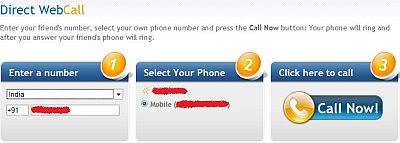
4. You will arrive at page shown below. In “Enter a number” box, select your country and also any mobile number(you can enter yours). Now, simply hit on “Call Now” button to call your friend with his own number.
5. That’s it. Your friend will be shocked to see his own number calling him. I have spent last two days simply playing this cool mobile hack prank.
Note: This trick will only knowledge purpose…
Just try this trick only known person.
Get USER info of any reliance No.
http://myservices.relianceada.com/captureInstantRecharge.do
1. Enter the number of whom u want details..
2. Enter any fake email id.
3. And then click Continue.
And now u will get a screen with the number and customer name.
Note :-
Please Don’t misuse or over use it 😐
Read Articles:
Are You Using WhatsApp Web? Your Account Can Be Hack.
Android Phones Can Be Hacked With Just A Text Message
Mobile Bluetooth Hacking:
Here is a list of what you can do when you have hacked the other phone. Have Fun!
- Read Messages. (They are no more personal!)
- Read Contacts. (Check your lover’s phone-book to see what name he/she has saved your name. Hey, please don’t suicide when you see he/she has saved your number as lover no. 9! HeHe)
- Change Profile (Change the other’s profile to silent mode when you are on a date!)
- Play Ringtone even if the phone is silent (Annoy your classmates!)
- Play songs from the hacked phone in the same phone.
- Restart the phone (Show some magic to your friends!)
- Switch off the phone (Ultimate thing that you can do!)
- Restore Factory Settings (Do this to the most organized one and run away quickly!)
- Change Ringing Volume (You have enough experience how to use it. Don’t you?)
Follow these steps to hack any Bluetooth enabled mobile phone.
- Download Super Bluetooth Hack 1.8
www.brothersoft.com/mobile/super-bluetooth-hack-download-135.html
and also check that your mobile is in the list of supported handsets from the link provided. After you have downloaded the .jar file, install it in your mobile.
- There is no need to install the software in the mobile which you want to hack.
- Turn on the Bluetooth of your handset and open the Super Bluetooth Hack Application.
- Select the connect option and then Inquiry Devices to search for any of mobile that has its Bluetooth turned on nearby.
- Your friend’s Bluetooth must also be turned on to be found. Pairing between the devices is also necessary sometimes.
- Once your friend’s phone has been found, try out its functions!
100% Working Reliance GSM free GPRS Trick..
just DiAl *123*099#
That’s Done..!!!
Enjoy..!!
U will shortly Receive a massage saws successfully recharged with Rs.99..!!
It’s working fine..!!!
Here is new trick..!!
First go here and give the required information
http://rcom.co.in/rcom/rworld/music/mobileCallerUser_screen1.jsp?plan=postMobileNet
-> Enter your name and reliance mobile number and you will get password by sms to the that given mobile no. ( Note :- Use 0 before your mobile no. like 0xxxxxxxx )
And Then you will receive some pin like password in your mobile by sms.
->Keep the message open in mobile and get to computer
-> Now go to the below link and enter your mobile number and received pin.
http://rcom.co.in/rcom/rworld/music/MobileAuthentication.jsp?AppID=109&plan=postMobileNet%2099
Now Take Your mobile and dial *367 and here the balance
Now enjoy free gprs for 1 month in mobile and pc.
Use Rcomnet Setting
After One month after the data or validity gets over deactivate the plan by calling customer care and then again click on the second link and get your plan activated.
⚠️ Notice: Hacking, spying on, or accessing someone else’s mobile device without explicit consent is a criminal offense in most countries. This article promotes only ethical, legal, and defensive security practices. This article is for educational and defensive purposes onl