

Imagine you’re learning to be a digital detective, and you need the right tools to uncover vulnerabilities. That’s where Armitage comes in! It’s not just a powerful program; it’s your personal assistant for ethical hacking, making complex tasks surprisingly simple.
What is Armitage? Your Visual Gateway to Ethical Hacking
If you’re into infosec community, you’ll can easily known Metasploit – a framework used by security professionals worldwide. But what if you’re not a fan of endless lines of code? That’s where Armitage comes in!
Armitage is a powerful, intuitive graphical user interface (GUI) of Metasploit.
Think of it this way:
- Armitage is the easy-to-use, visual control panel for that toolbox.
- Metasploit is like a highly sophisticated toolbox filled with all the specialized instruments you need for penetration testing.
Instead of requiring you to memorize and type complex commands, Armitage provides a point-and-click environment. This means that both seasoned security professionals and those just starting their journey in ethical hacking can visually interact with Metasploit’s extensive capabilities. It dramatically simplifies the process of identifying, exploiting, and assessing vulnerabilities in computer systems, making advanced security tasks more accessible and efficient.

Let’s explore how Armitage helps you master the art of penetration testing.
Key Features of Armitage:
1. See It to Believe It: The Power of Armitage’s Visual Interface (GUI)
Have you ever tried to navigate a computer program just by typing endless commands? It can be a bit like trying to find your way in a dark room! That’s why Armitage is a game-changer. Instead of typing commands, you get a clear, Intuitive Graphical User Interface (GUI).
- Point, Click, Conquer: Think of it like playing a strategy game. You simply point and click your way through tasks. This is a huge contrast to Metasploit’s command-line interface, which is powerful but can feel like speaking a secret code!
- Your Network, Visualized: Armitage doesn’t just show you text; it draws you a map! You’ll see all the discovered targets and active “sessions” (where you’ve gained access) laid out clearly on a network map. This visual overview helps you understand exactly what’s happening in your target environment at a glance. It’s like having an x-ray vision for your network!
2. Finding Your Targets: Efficient Host and Network Discovery
Before you can explore a system, you need to know what’s out there, right? Armitage makes this initial reconnaissance a breeze.
- Seamless Scanning Integration: Armitage works hand-in-hand with powerful network scanning tools like Nmap (think of Nmap as your digital radar).
- Automatic Insights: It can automatically import the results from these scans, giving you a quick and clear list of:
- Active hosts: Which computers are actually online?
Operating systems: Are they running Windows, Linux, or something else?
Open ports: Which “doors” are open on these computers, potentially allowing access? This efficiency means you spend less time sifting through data and more time planning your next move.
3. Delivering the Payload: Access Methods
Once you’ve identified a vulnerability, you need a way to get inside. Armitage provides you with a comprehensive arsenal from Metasploit, allowing you to choose the perfect suite for the job.
- Powerful Payloads at Your Fingertips: Armitage offers a wide selection of Metasploit’s powerful “payloads.” These are like specialized tools designed to gain access. Some popular examples include:
– Reverse shells: Imagine this as creating a secret communication channel back to your computer.
– Meterpreter sessions: This is like getting a full control panel on the target system, giving you deep access.
- Flexible Deployment Options: You can deploy these payloads in different ways:
– Through identified exploits: If you find a software flaw, Armitage helps you exploit it.
– Via social engineering techniques: Sometimes, the easiest way in is by cleverly tricking someone (e.g., through a malicious link). Armitage can assist in crafting these attacks. This versatility gives you numerous options for gaining that initial foothold in target systems.
4. Beyond the Breach: Comprehensive Post-Exploitation Tools
Gaining access is just the first step! Once you’re inside, Armitage provides a rich set of tools to help you navigate, gather information, and achieve your objectives. This is what we call “post-exploitation.
- Taking Control: Armitage offers a powerful suite of modules for various actions, allowing you to:
– Browse files: Look through documents and folders on the compromised system.
– Log keystrokes: See what the user is typing (for legitimate testing purposes, of course!).
– Capture screenshots and webcam feeds: Get a visual understanding of the target’s activity.
– Escalate user privileges: Gain higher levels of access, moving from a regular user to an administrator. - Customization Made Easy: It also simplifies the execution of your own custom post-exploitation scripts. This means if you have a specific task in mind, Armitage helps you run your specialized code without hassle.
Installation Guide in Kali Linux:
To begin using Armitage, follow these step-by-step instructions for installation on a Kali Linux system:
Step 1: Open the Terminal and Gain Superuser Privileges
Open your Kali Linux terminal. To execute administrative commands, you’ll need superuser privileges. Enter the following command and press Enter:
Bash
sudo su
You will likely be prompted to enter your password.
Step 2: Install Armitage (if necessary)
If Armitage is not already installed on your Kali Linux system (this might be the case with older versions), use the following command to install it:
Bash
apt-get install armitage
Press Enter. The system will download and install Armitage with its dependencies.
Step 3: Start the PostgreSQL Service
Armitage relies on the PostgreSQL database service. Before launching Armitage, ensure this service is running. Execute the following command in the terminal:
Bash
service postgresql start
Press Enter to start the PostgreSQL service.
Step 4: Launch Armitage
Once PostgreSQL is running, you can launch Armitage using the following command:
Bash
armitage
Press Enter.
Step 5: Connect to the Metasploit Database
A “Connect…” dialog box (Figure 1) will appear. The default values are usually correct. Simply click the “Connect” button to proceed.

Step 6: Start the Metasploit RPC Server
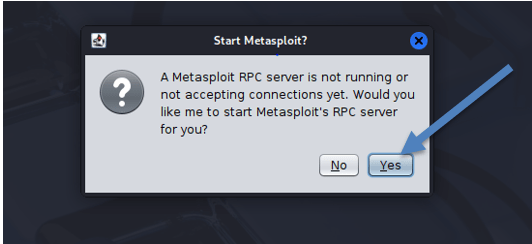
After clicking “Connect,” another dialog box (Figure 2) will appear, prompting you to start the Metasploit Remote Procedure Call (RPC) server. Click “Yes”.
Step 7: Observe Initialization Messages (Optional)
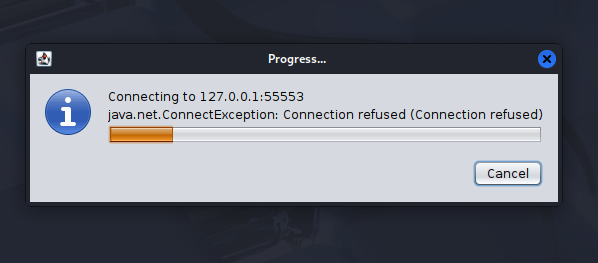
During Armitage’s startup, you might observe messages in the terminal or a dialog box, such as “Connected: connecting to database” or even a “java.net.ConnectionException: Connection refused.” These messages are typically part of the normal initialization process for Armitage and Metasploit, indicating background operations.
Step 8: Armitage GUI Launch
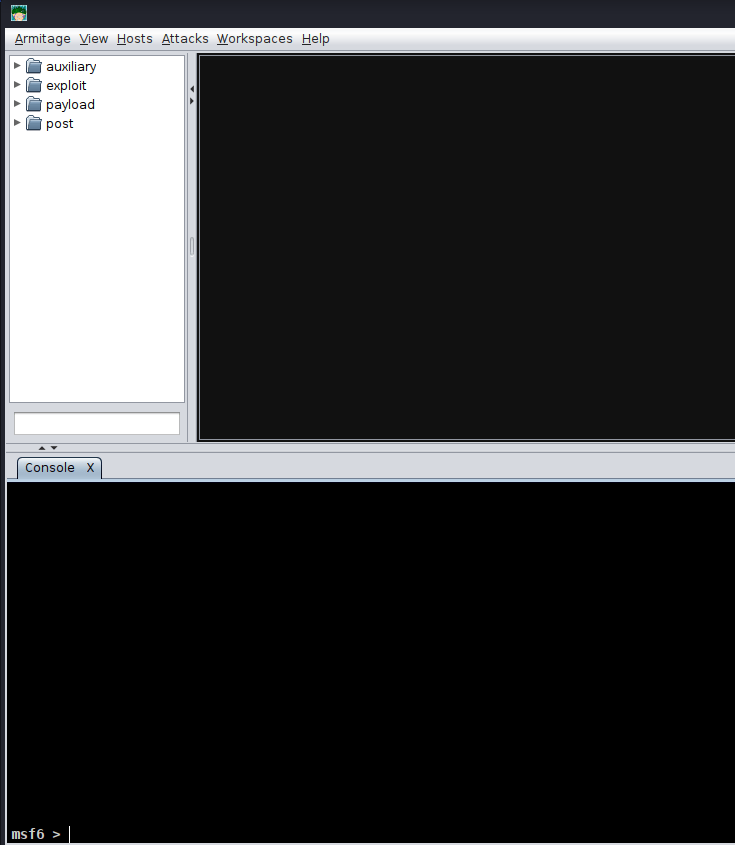
Once the initial setup is complete and the database connection is successfully established, the Armitage interface will launch, presenting its Graphical User Interface (GUI) (Figure 4), ready for your security assessments.
DONE.