



In web security, the browser’s address bar (also called the Omnibox) is the main way users check if a website is real. Before entering passwords, bank details, or other sensitive information, people look at the website address to make sure they are on trusted sites like Google, PayPal, or their bank.
Pwn AI security researchers found a high-severity UI implementation flaw that weakens this important protection. “Select Your Own Origin: Spoofing Chrome’s Address Bar with Native UI.”
The research explains how an attacker can use built-in HTML and browser features to trick the browser’s address bar (Omnibox). This makes it show a real and trusted website address, even though the attacker is actually running malicious code from their own website.
Key Points of the Vulnerability
- Trust Boundary Manipulation: The flaw permits a malicious web page to force Google Chrome’s address bar to render a trustworthy destination URL (e.g., `[https://accounts.google.com](https://accounts.google.com)`) while the page beneath it remains completely controlled by an attacker.
- Native UI Element Abuse: Rather than using fake popups or simulated DOM-based windows (such as “Browser-in-the-Browser” attacks), the exploit takes advantage of improper implementation state handling in Chrome’s native `Select` UI component and preview rendering interfaces.
- Zero User Warnings: Because the address bar displays the spoofed origin as legitimate and secure (complete with HTTPS security indicators), standard browser security checks and anti-phishing warnings fail to trigger.
- Cross-Platform Scope: The researchers demonstrated that variations of the underlying rendering state flaw impacted Chrome across desktop OS environments (macOS/Windows) and Android mobile devices.
- Credential Harvesting Risk: The primary vector for this vulnerability is spear-phishing and credential theft. Attackers can present legitimate-looking login forms directly beneath a spoofed, trusted Omnibox URL, rendering visual inspection useless for victims.
How the Attack Operates
Unlike other spoofing methods that use lookalike website addresses (homograph attacks) or fake browser windows, this vulnerability makes the browser’s real address bar show the wrong website address while a different page is actually running.
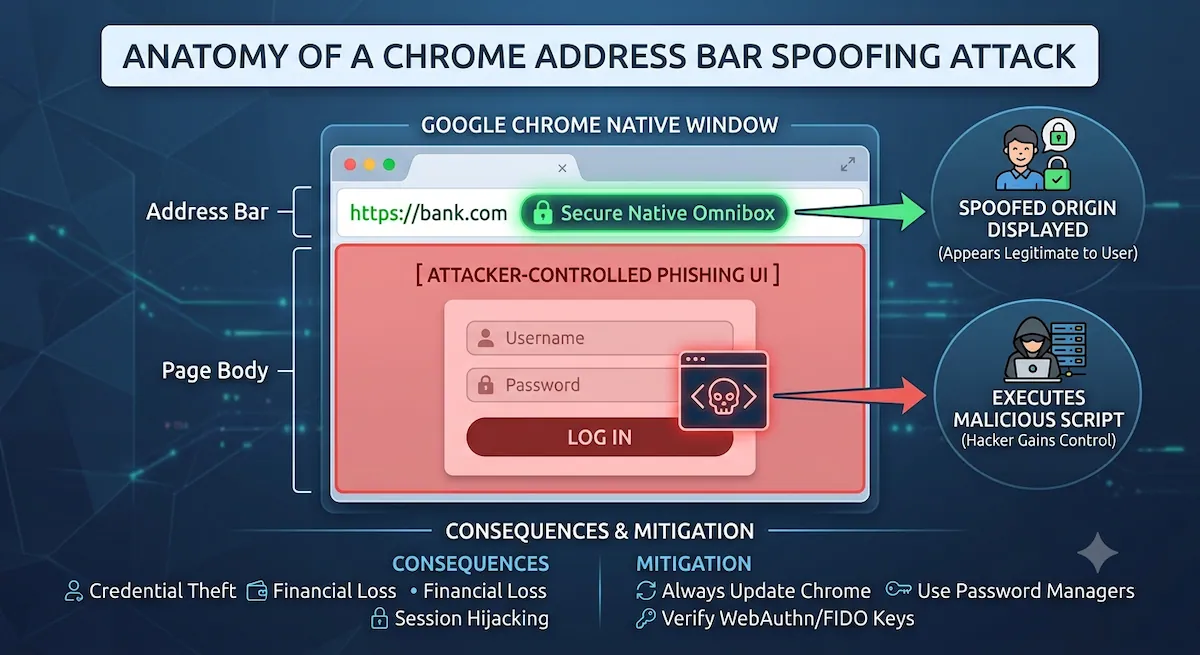
1. Interaction Trigger: The user visits an attacker-controlled landing page or clicks a malicious link.
2. Native Component Abuse: The page invokes specific UI gestures or native HTML `Select` component rendering sequences that interrupt the Omnibox update pipeline.
3. State Desynchronization: While the browser shifts focus or renders the native overlay, the rendering engine updates the display text of the URL bar without transitioning the actual security context of the active tab.
Mitigation and Defense
Google has addressed the underlying logic flaws in recent updates to Chrome’s rendering engine and Omnibox UI handlers.
For Users and Administrators
- Update Immediately: Ensure Google Chrome is updated across desktop and mobile devices to the latest release to patch the component state handling.
- Rely on Password Managers: Hardware security keys (FIDO2/WebAuthn) and browser-integrated password managers rely on the underlying cryptographic domain binding rather than visual URL text. If your password manager refuses to auto-fill credentials on a page that appears legitimate, do not manually type your password.
The research highlights an important lesson for browser security: the browser’s visual indicators, such as the address bar, must always match the website that is actually running. Even a small mismatch can confuse users and make it easier for attackers to steal sensitive information.