



This is the first release of the Wireshark 4.4 version. The world’s most popular open source network protocol analyzer.
What is Wireshark?
Wireshark is the world’s most popular network protocol analyzer. It is used for network troubleshooting, analysis, development and education.
What’s New In Wireshark 4.4.0
Many improvements and fixes to the graphing dialogs, including I/O Graphs, Flow Graph / VoIP Calls, and TCP Stream Graphs.
Wireshark now supports automatic profile switching. You can associate a display filter with a configuration profile, and when you open a capture file that matches the filter, Wireshark will automatically switch to that profile.
Support for Lua 5.3 and 5.4 has been added, and support for Lua 5.1 and 5.2 has been removed. The Windows and macOS installers now ship with Lua 5.4.6.
Improved display filter support for value strings (optional string representations for numeric fields).
Display filter functions can be implemented as plugins, similar to protocol dissectors and file parsers.
Display filters can be translated to pcap filters using Edit › Copy › Display filter as pcap filter if each display filter field has a corresponding pcap filter equivalent.
Custom columns can be defined using any valid field expression, such as display filter functions, packet slices, arithmetic calculations, logical tests, raw byte addressing, and protocol layer modifiers.
Custom output fields for tshark -e can also be defined using any valid field expression.
Wireshark can be built with the zlib-ng instead of zlib for compressed file support. Zlib-ng is substantially faster than zlib. The official Windows and macOS packages include this feature.
Graph Dialogs
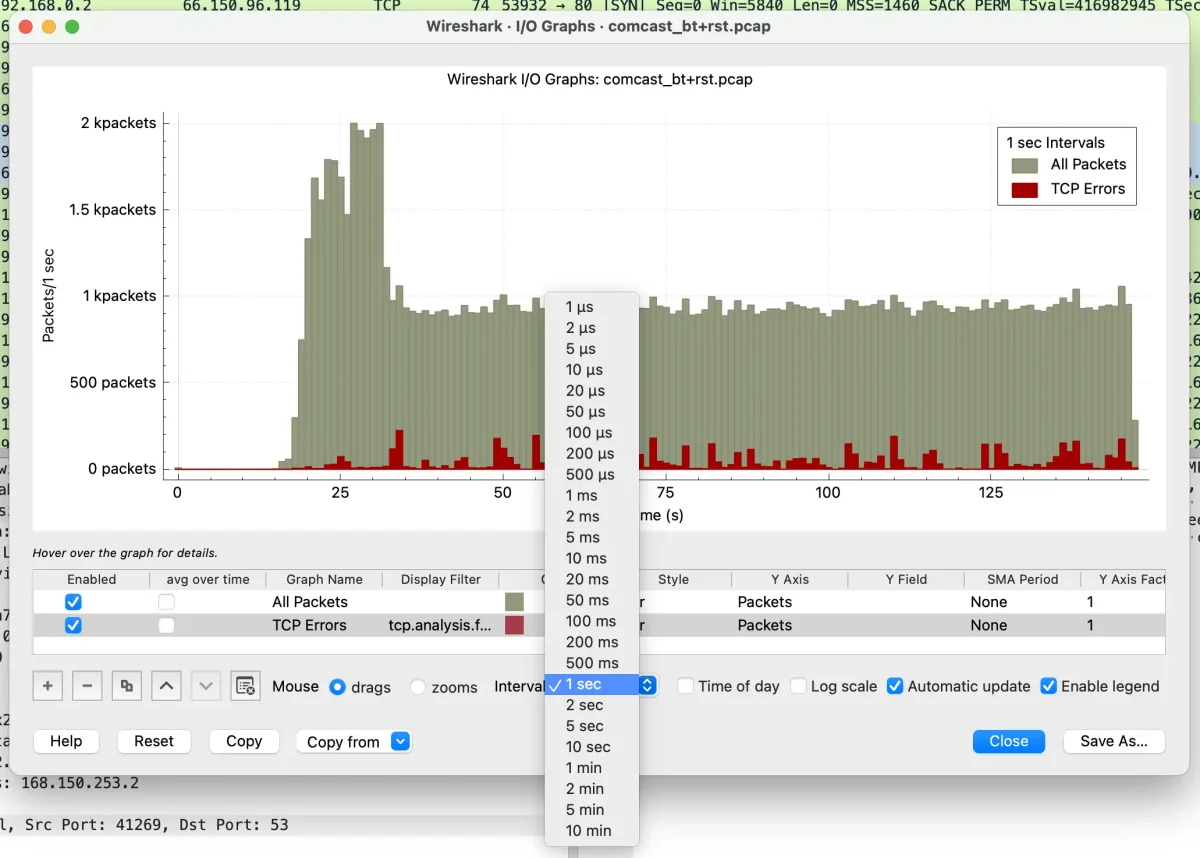
Many bugs have been fixed in the graph dialogs (I/O Graphs, Sequence Diagrams, and TCP Stream Graphs), and performance has been improved.
The following improvements have been made to the I/O Graphs dialog:
- The minimum interval is now 1 microsecond.
- The Y axis now uses SI prefixes.
- Bar graphs are rendered more sensibly.
- The graph list can be reordered by dragging and dropping items.
- Graph legends and layer orders always match the graph list order.
- The legend can be moved by right-clicking on it.
The Sequence Diagram (Flow Graphs and VoIP Calls) dialog has been improved as well:
- The entire graph can be exported as an image. Previously, only the items on screen were exported.
- Endpoints with the same address are now displayed correctly.
- The TCP Stream Graphs dialog does a better job of identifying the client and server sides of connections.
Custom Columns
You can now add custom columns that do the following:
Use arithmetic. For example, frame.len * 8 will show the frame length in bits instead of bytes.
Show the raw bytes of fields using the @ operator. For example, @ip.src will show the raw bytes of the IPv4 source address.
Logical tests like tcp.port == 443 will show a check mark in the column when the check matches.