

Security researchers at Microsoft Threat intlligence have uncovered a new campaign called TerminalFix. A new type of ClickFix attack. It shows users a fake Cloudflare CAPTCHA on a webpage.
The fake CAPTCHA tricks users into copying and running a malicious PowerShell script. Instead of using the usual Windows Run dialog (Win+R), the attack uses Windows Terminal or PowerShell.
This allows attackers to run long, multi-line malicious commands more easily and with higher privileges.
How the Fake Cloudflare CAPTCHA Attack Chain Works
Rather than exploiting browser vulnerabilities, TerminalFix relies entirely on human interaction and stealthy execution tactics:
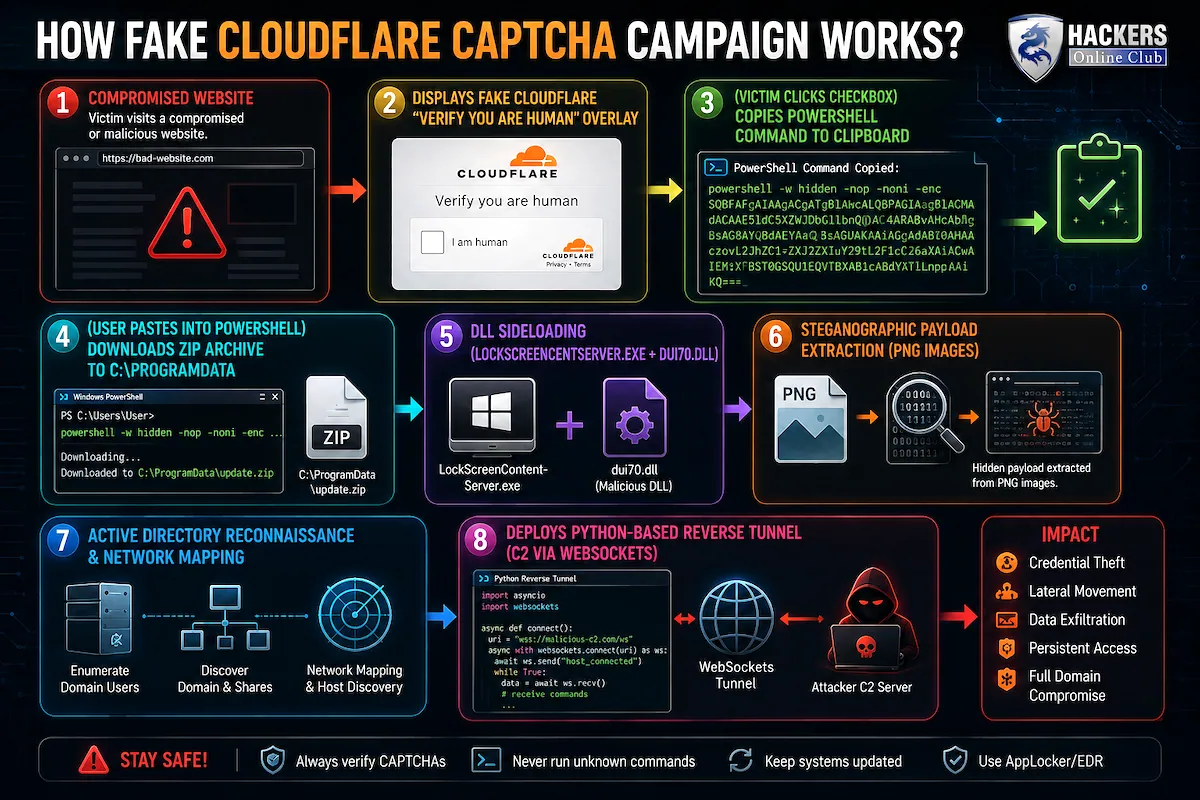
1. Social Engineering Lure: Visitors to compromised websites are presented with a near-pixel-perfect Cloudflare Turnstile overlay complete with a “Verify you are human” checkbox.
2. Clipboard Hijacking: Clicking the checkbox silently copies a PowerShell snippet to the user’s clipboard while displaying visual instructions to open Windows Terminal or PowerShell and press paste.
3. Payload Staging & DLL Sideloading: The pasted command downloads a ZIP archive containing a signed, legitimate Windows binary (`LockScreenContentServer.exe`) alongside a malicious library (`dui70.dll`). Executing the trusted application triggers a DLL sideloading attack that runs the malicious code in the background.
4. Steganography: The sideloaded DLL downloads seemingly innocent PNG images from attacker-controlled domains (`bestsocialmedianewspapper[.]com` and `offlineupdater[.]com`). It extracts hidden payload data embedded inside pixel channels to construct next-stage executables before deleting the image source files.
Post-Compromise & Active Directory Reconnaissance
Once established, TerminalFix executes deep reconnaissance routines across the internal network, searching for high-value targets:
- Domain Enumeration: Maps Active Directory users, domain administrators, computer lists, and trust relationships.
- Network Topology Mapping: Pings internal servers, domain controllers, databases, mail servers, and backup systems.
- Python Reverse-Tunnel Implant: Launches a embedded Python environment (`pythonw.exe`) running a custom `client.py` script. The implant connects to `gitnow[.]dev:443` over TLS, upgrades to WebSockets, and establishes a persistent reverse tunnel.
Why This Matters: The reverse tunnel provides attackers with direct, unmonitored TCP access into the victim’s internal network. This enables threat actors to bypass perimeter firewalls, pivot laterally across local subnets, exfiltrate sensitive data, or stage enterprise-wide ransomware attacks.
Indicators of Compromise (IoCs)
Enterprise security operations teams (SOCs) should monitor environments for the following signatures:
| Indicator Type | Details / Signature |
| Malicious Domains | bestsocialmedianewspapper[.]com, offlineupdater[.]com |
| Tunnel C2 Server | gitnow[.]dev:443 |
| Staging Directory | C:\ProgramData\f47f2a8c21c9df4e (Hidden/System attributes applied) |
| Sideloading Pair | LockScreenContentServer.exe running outside C:\Windows\SystemApps alongside dui70.dll |
| Persistence Keys | HKCU\Software\Microsoft\Windows\CurrentVersion\Run and scheduled task triggering LockScreenContentServer.exe every 60 minutes |
Mitigation Steps for Enterprise
1. Restrict Script Execution: Restrict PowerShell and terminal tool usage for non-administrative users using AppLocker or Application Control for Windows.
2. Enable Logging: Turn on PowerShell Script Block Logging (Event ID 4104) to catch obfuscated `Invoke-Expression` commands pasted via CLI lures.
3. Monitor DLL Sideloading: Alert on system binaries (like `LockScreenContentServer.exe`) executing from user-writable directories like `\ProgramData\` or `\AppData\`.
4. Security Awareness Training: Train employees to recognize ClickFix and fake CAPTCHA prompts that instruct users to copy-paste terminal commands.