

Security researchers have uncovered “ChatGPhish,” a novel prompt injection attack that exploits AI web summarization features. By hiding malicious instructions on websites, attackers can trick ChatGPT into displaying phishing links, fake security alerts, or tracking QR codes—directly inside the trusted AI interface.
What Is ChatGPhish?
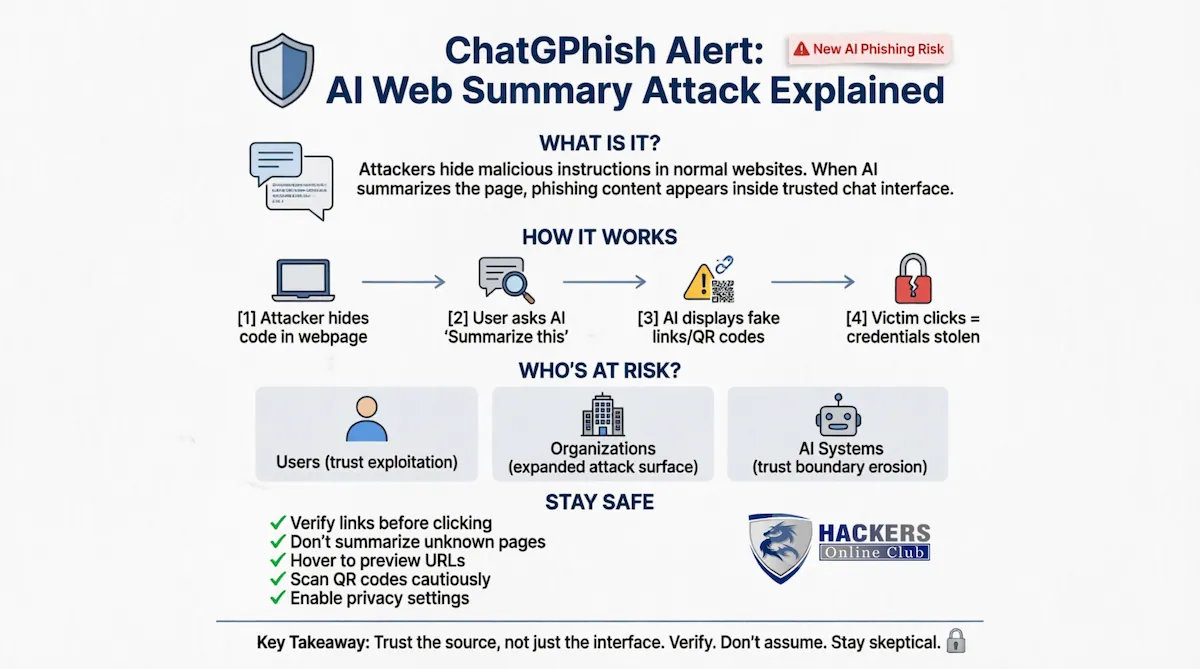
ChatGPhish is a newly disclosed security vulnerability that allows attackers to AI-powered web summarization tools like ChatGPT. When users ask an AI assistant to summarize a webpage containing hidden malicious code, the assistant may unknowingly render attacker-controlled content—including clickable phishing links, spoofed account alerts, or scannable QR codes—as if it were legitimate advice.
This attack falls under indirect prompt injection (also called cross-prompt injection or XPIA), where malicious instructions embedded in external content influence the AI’s output without the user’s knowledge.
How the Attack Works (Simple Breakdown)
|
Step
|
What Happens
|
Why It’s Dangerous
|
|---|---|---|
|
1️⃣ Attacker Prepares
|
Malicious instructions are hidden in a webpage’s code (e.g., GitHub README, blog post, documentation)
|
The page looks normal to human visitors
|
|
2️⃣ User Requests Summary
|
Victim asks ChatGPT to “summarize this page” via browser integration
|
AI processes both visible content AND hidden instructions
|
|
3️⃣ AI Renders Response
|
ChatGPT displays a summary that includes attacker-controlled links, alerts, or images
|
Content appears inside trusted ChatGPT interface with no warning labels
|
|
4️⃣ Victim Takes Action
|
User clicks a fake “Verify Account” link or scans a malicious
QR code
|
Credentials stolen, malware installed, or tracking data leaked
|
Real-World Impact: Who’s at Risk?
End Users
– Trust exploitation: People naturally trust content displayed inside familiar AI interfaces
– Cross-device attacks: QR codes in summaries can bypass desktop security by redirecting to mobile devices
– Silent tracking: Auto-loaded images can leak IP addresses, browser details, and activity timing to attackers
Organizations
– Expanded attack surface: Any public webpage (documentation, blogs, partner sites) can become a delivery vector
– Bypassed defenses: Traditional email security, URL filters, and password managers may not protect AI-rendered content
– Productivity tool risk: Teams using AI for research, support, or content review face new exposure
AI Ecosystem
– Trust boundary erosion: Blurs the line between user instructions, retrieved content, and AI-generated output
– Scalable threat: Low-skill attackers can deploy these attacks using publicly accessible web pages
Security Best Practices: What Users & Teams Should Do
For Individual Users
– Verify before clicking: Treat any link, alert, or QR code inside an AI summary as untrusted until you confirm the destination
– Avoid summarizing unknown pages: Don’t use AI tools to summarize user-generated content, forums, or unverified third-party sites
– Hover and inspect: On desktop, hover over links to preview URLs before interacting
– Use separate devices cautiously: Never scan QR codes from AI summaries on your phone without verifying the source first
For Security Teams & Enterprises
– Update acceptable use policies: Explicitly address AI summarization of external content in security guidelines
– Restrict AI browser permissions: Limit which users and workflows can use web-summarization features with sensitive data
– Monitor outbound requests: Watch for unexpected image fetches or redirects to shortened URLs from AI-integrated tools
– Train staff on AI-specific risks: Include prompt injection awareness in security training programs
What AI Companies Should Do: Responsible Mitigation Steps
Based on research from Permiso Security and industry best practices, AI developers should prioritize:
Technical
|
Recommendation
|
Why It Matters
|
|---|---|
|
Clear origin labeling
|
Visually distinguish content sourced from external pages vs. AI-generated text
|
|
Strict Markdown sanitization
|
Block or sandbox rendering of links/images from untrusted domains
|
|
User confirmation prompts
|
Require explicit approval before displaying clickable elements from summarized content
|
|
Request isolation
|
Prevent auto-fetching of remote images/links without user consent
|
Policy & Transparency
– Publish threat models: Clearly document known limitations like prompt injection risks in developer documentation.
– Enterprise controls: Offer admin settings to disable web summarization or restrict external content processing.
– Bug bounty prioritization: Treat indirect prompt injection as high-severity due to real-world phishing potential.
– User education: Build in-context warnings when AI processes content from unverified sources.
Key Insight from Researchers: “The problem is not only that the model can be influenced by untrusted content. The larger issue is that the resulting output is displayed in a way that inherits the trust of the assistant itself.” — Permiso Security
Frequently Asked Questions (FAQ)
Q: Does ChatGPhish mean my ChatGPT account is hacked?
A: No. The attack doesn’t compromise your account. It exploits how the AI processes and displays content from external webpages.
Q: Is this a browser bug (like in Firefox)?
A: No. Researchers used Firefox for testing, but the vulnerability exists in the AI rendering layer, not the browser itself.
Q: Can other AI tools be affected?
A: Yes. Any AI system that summarizes or processes untrusted web content could face similar risks if it doesn’t properly separate source data from generated output .
Q: Has OpenAI fixed this?
A: As of late May 2026, Permiso Security reported no confirmed fix. Users should follow mitigation practices above while monitoring official updates.
Q: How do I report suspicious AI behavior?
A: Use the platform’s official reporting channels (e.g., OpenAI’s Bugcrowd program) and avoid interacting with suspicious content.