




On 19 July 2024, a single faulty content update pushed by CrowdStrike Falcon — one of the world's most widely deployed EDR platforms — caused 8.5 million Windows systems to crash simultaneously. Airlines cancelled over 5,000 flights. Hospitals postponed surgeries. Banks went offline.
That single fact tells you more about what EDR is than any textbook definition. EDR operates at the deepest level of the operating system — kernel-level visibility into every process, every network connection, every file write, every registry change — on every protected endpoint, in real time. That depth is both its power and its risk. No other security control gives defenders the same visibility into what is actually happening on a device at the moment an attack occurs.
This guide covers what EDR is and how it works technically, how it differs from traditional antivirus and next-generation antivirus, the full capability set of modern EDR platforms, an honest comparison of the leading tools in 2026 — CrowdStrike, SentinelOne, Microsoft Defender for Endpoint, and others — how EDR fits into a zero trust architecture, and how to evaluate and deploy EDR in a corporate environment.
- What is EDR?
- EDR vs antivirus vs NGAV vs XDR
- How EDR works — the technical architecture
- Core EDR capabilities explained
- EDR in action — how it catches an attack in real time
- Top EDR tools in 2026 — honest comparison
- EDR and zero trust — the device health signal
- Deploying EDR in a corporate environment
- Frequently asked questions
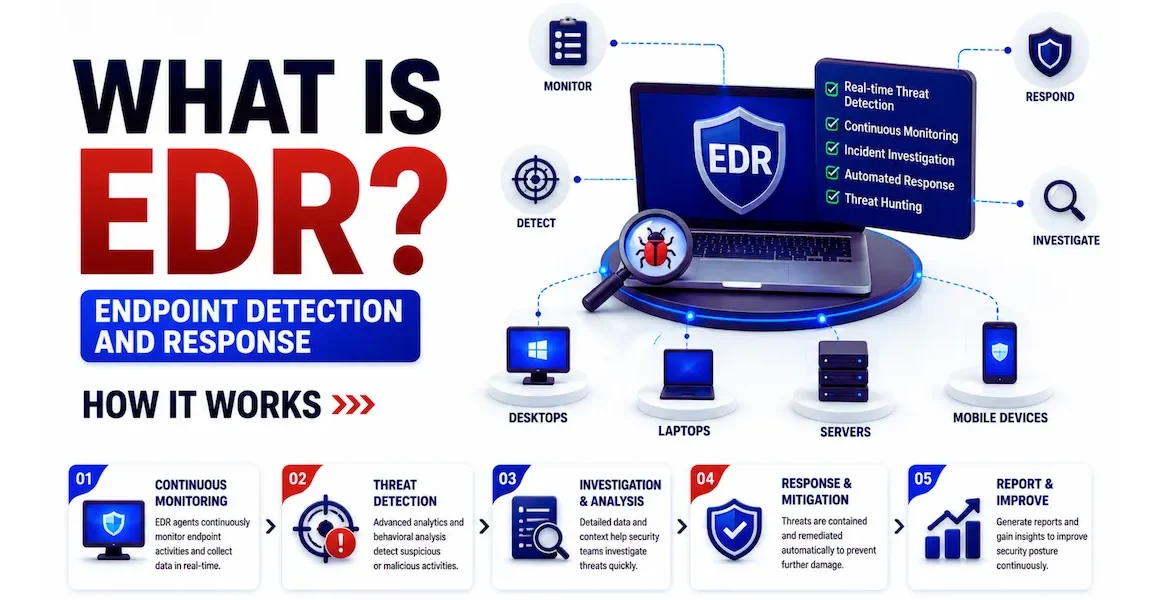
EDR — Endpoint Detection and Response — is a category of security software that continuously monitors endpoints (laptops, desktops, servers, virtual machines, and increasingly mobile devices) for signs of malicious activity, records detailed telemetry about everything that happens on those endpoints, detects threats using behavioural analysis and machine learning, and provides response capabilities to contain and remediate incidents.
The term was coined by Gartner analyst Anton Chuvakin in 2013. He defined it as tools that "record and store endpoint-system-level behaviours, use various data analytics techniques to detect suspicious system behaviour, provide contextual information, block malicious activity, and provide remediation suggestions." That definition remains accurate in 2026, though modern EDR platforms have expanded far beyond the original scope.
Traditional antivirus compares files against a database of known malicious signatures. If the file's hash matches a known bad hash, it is blocked. This works for known malware with known signatures. It is completely blind to:
- Fileless malware — attacks that execute entirely in memory, never writing a file to disk. No file to scan, no signature to match. Fileless techniques now account for over 70% of attacks.
- Zero-day malware — new malware that has never been seen before, for which no signature exists yet.
- Living-off-the-land (LOtL) attacks — attackers using legitimate built-in tools (PowerShell, WMI, certutil, mshta) to execute malicious activity. These tools are not malicious themselves — only their usage pattern is suspicious. AV has no way to detect this.
- Lateral movement — once inside a network, attackers move between machines using legitimate credentials. No malware involved — just authentication events that look normal in isolation.
EDR addresses all of these through behavioural analysis — watching what processes do, not just what files they are. A legitimate PowerShell process that spawns a child process that makes an outbound connection to an unusual IP and then writes to a startup folder is behaving suspiciously — EDR detects that pattern regardless of whether the malware has been seen before.
These four terms describe related but distinct technologies. Understanding the differences prevents the common mistake of treating them as interchangeable.
| Technology | Primary detection method | Telemetry recorded | Response capability | Visibility |
|---|---|---|---|---|
| Antivirus (AV) | Signature matching against known malware hashes. Simple heuristics. | None beyond scan results | Quarantine known malware files | Scan-time only. No continuous monitoring. |
| Next-Generation AV (NGAV) | Machine learning on file characteristics, limited behavioural analysis at execution time | Minimal — execution events only | Block malicious executables before they run | Better than AV but still file-centric. Limited post-execution visibility. |
| EDR | Continuous behavioural analysis of all process activity, memory, network connections, registry, file writes — at kernel level | Full telemetry: every process, connection, file event, registry change, user action — recorded continuously | Process kill, network isolation, file quarantine, rollback, remote shell for investigation | Deep and continuous. Full attack chain reconstruction. Threat hunting capability. |
| XDR (Extended DR) | Correlated detection across endpoint + network + email + cloud + identity — not just endpoint | EDR telemetry plus network, email, cloud, and identity telemetry from the vendor's ecosystem | Coordinated response across all integrated sources — isolate endpoint AND block email AND revoke identity session | Broadest — correlates signals across the full environment within one vendor ecosystem |
The EDR agent runs as a kernel-mode driver on Windows (or kernel extension on macOS, kernel module on Linux). This is the deepest level of the operating system — above hardware but below all user applications. Running at kernel level gives the agent visibility into everything the OS does: system calls, memory allocations, driver loads, network socket creation, and every interaction between user processes and the kernel. It is this depth that gives EDR its detection power — and what caused the CrowdStrike outage when a buggy kernel driver crashed the systems it ran on.
The agent hooks into OS APIs to intercept events before they complete. When a process creates a new child process, the EDR agent's hook fires before the new process even starts — allowing the agent to examine the parent-child relationship, the command line arguments, and the user context, and decide whether to allow or block the execution.
Every event the kernel sensors observe is recorded as a structured telemetry record and streamed to the cloud backend over an encrypted TLS connection. The telemetry volume is enormous — a single active endpoint generates hundreds of thousands of events per day. Events include: process creation (what process, what command line, what user, what parent process, what time), network connection (source IP and port, destination IP and port, which process initiated it), file write (what file, what directory, written by which process, file hash), registry write (key path, value, which process wrote it), and user authentication events.
This telemetry is the raw material for both automated detection and analyst-driven threat hunting. Even if the automated detection does not fire, the telemetry is retained in the cloud backend — typically for 12–24 months — and can be searched retrospectively when a new threat indicator is discovered.
Detection logic runs in two places. On-agent detection handles blocking decisions that must happen in milliseconds — signature-based blocking, and locally-trained ML models that can detect obvious malicious patterns without a cloud round-trip. Cloud-based detection handles the more sophisticated analysis that benefits from scale: cross-correlating telemetry from millions of endpoints to identify attack patterns that are invisible on any single device, running large neural network models too complex to run on endpoint hardware, and correlating threat intelligence (known IOCs, threat actor TTPs) against incoming telemetry in real time.
When a threat is detected, the analyst console provides one-click response options: network isolation (the endpoint continues communicating with the EDR cloud but all other network traffic is blocked — allowing investigation without giving the attacker continued access), process kill (terminate a specific malicious process), file quarantine (move a malicious file to a secure location), and rollback (on Windows, EDR can use Volume Shadow Copies to roll back file changes made by ransomware). The remote shell capability lets analysts open an interactive command prompt on a compromised endpoint without physically touching it — critical for incident response in distributed environments.
Here is a concrete walkthrough of a real attack scenario — a phishing email delivering a macro-enabled Office document that installs a remote access tool. This shows exactly what the EDR agent observes at each stage, what triggers detection, and what response actions are available.
WINWORD.EXE opens. EDR records the process creation, parent (Outlook), file path, command line, and user. Nothing suspicious yet — opening Word is normal.
AV: No detection — no malicious file yet EDR: Process tree started — watching WINWORD.EXEWINWORD.EXE spawns CMD.EXE, which spawns POWERSHELL.EXE with an encoded command line. EDR immediately flags: Office application spawning PowerShell is a known malicious pattern (T1566.001). Alert fires.
AV: No detection — PowerShell is a legitimate tool EDR: HIGH alert — Office spawned PowerShell · T1566.001 mappedEDR records: POWERSHELL.EXE initiates TCP connection to 185.x.x.x:443 (not a known Microsoft/CDN IP). Downloads a file to %TEMP%. File hash checked against threat intel — matches a known Cobalt Strike beacon. CRITICAL alert fires. On-agent blocking kicks in.
EDR: CRITICAL — Known malware hash · C2 connection blocked · Process killedThe analyst sees the full process tree: Outlook → WINWORD.EXE → CMD.EXE → POWERSHELL.EXE → blocked download attempt. All telemetry from the last 24 hours on this endpoint is available. The analyst confirms the scope and initiates network isolation.
EDR: Endpoint isolated — analyst investigating via remote shellAnalyst queries the EDR platform: "Did any other endpoint contact 185.x.x.x in the last 7 days?" Two other machines did — they were compromised before EDR blocked the payload on the first endpoint. Both are immediately isolated. The entire incident is contained within 12 minutes of the first user opening the attachment.
EDR: 3 total endpoints identified · All isolated · Incident closed in 12 minutesCrowdStrike Falcon is the market-leading enterprise EDR platform and one of the most recognised security brands globally. Its cloud-native architecture means the agent itself is lightweight — most detection logic runs in the cloud, with telemetry streaming to CrowdStrike's graph database (Threat Graph) which correlates data from over a trillion weekly events across its customer base.
The July 2024 outage (a faulty content configuration file update caused 8.5 million Windows BSODs) severely tested CrowdStrike's reputation, but enterprise market share recovery was largely complete by mid-2025. The incident drove significant changes to CrowdStrike's update validation and deployment practices, and highlighted the inherent risks of kernel-level security software. Despite the incident, Falcon remains the benchmark against which other EDR platforms are evaluated.
- Industry-leading threat intelligence — Adversary Intelligence is unmatched
- Lightweight agent with minimal performance impact
- Threat Graph correlation at massive scale
- Best-in-class threat hunting with Overwatch managed service
- Extensive MITRE ATT&CK coverage benchmarks
- July 2024 outage damaged trust in update process
- Premium pricing — one of the most expensive platforms
- Cloud dependency — reduced functionality during cloud outages
- FQL has a learning curve compared to natural language
SentinelOne's key architectural differentiator is its emphasis on on-agent AI — more detection logic runs locally on the endpoint rather than requiring a cloud round-trip. This means SentinelOne provides full protection even when endpoints are offline or the cloud connection is intermittent — a meaningful advantage for air-gapped environments, manufacturing floors, and remote sites with unreliable connectivity.
Its ransomware rollback capability — automatically reversing file encryption using Volume Shadow Copy snapshots tracked by the agent — is considered best-in-class. The Purple AI feature (launched 2024, enhanced 2025) allows analysts to write threat hunting queries in natural language rather than a proprietary query language, significantly lowering the skill barrier for threat hunting.
- Best ransomware rollback capability in the market
- On-agent AI — full protection offline
- Purple AI natural language threat hunting
- Strong MITRE ATT&CK evaluation results
- Competitive pricing vs CrowdStrike
- Threat intelligence less deep than CrowdStrike
- Managed detection service (Vigilance) less mature than CrowdStrike Overwatch
- Some customers report higher false positive rates
Microsoft Defender for Endpoint (MDE) is the most cost-effective EDR choice for organisations running Microsoft 365. It is included in Microsoft 365 E5 and Business Premium licences at no additional per-endpoint cost — an enormous pricing advantage compared to standalone EDR platforms. Its native integration with Microsoft Sentinel (SIEM), Microsoft Entra ID (identity), Microsoft Intune (MDM), and Microsoft 365 Defender (XDR) creates a deeply integrated security ecosystem that reduces both tool sprawl and integration complexity.
Detection quality has improved dramatically since 2022 and MDE now consistently performs well in MITRE ATT&CK evaluations. The Advanced Hunting feature uses KQL (the same query language as Sentinel), enabling analysts familiar with Sentinel to threat hunt across endpoint telemetry without learning a new query language. Security Copilot AI integration allows natural language investigation.
- Included in M365 E5 — zero additional EDR cost
- Native integration across the Microsoft stack
- KQL hunting consistent with Sentinel
- Security Copilot AI investigation
- Strong Windows telemetry (Microsoft owns the OS)
- Best when exclusively in Microsoft ecosystem
- macOS and Linux telemetry less rich than Windows
- Threat intelligence depth below CrowdStrike
- Configuration complexity — many features need tuning to shine
| Platform | Architecture | Best for | Offline protection | Rollback | Managed service |
|---|---|---|---|---|---|
| CrowdStrike Falcon | Cloud-native | Enterprise, highest threat intel | Limited | Basic | Overwatch — excellent |
| SentinelOne Singularity | On-agent AI | Ransomware protection, offline sites | Full | Best-in-class | Vigilance — good |
| Microsoft Defender for Endpoint | Hybrid (agent + cloud) | M365 organisations, cost-conscious | Partial | Basic | Microsoft Defender Experts |
| Palo Alto Cortex XDR | Cloud-native | Palo Alto NGFW customers | Limited | Basic | Unit 42 — excellent |
| Trellix (McAfee + FireEye) | On-prem / Cloud | Regulated industries, on-prem requirement | Full | Basic | Trellix Wise |
| Elastic Defend | Open core / Cloud | Tech companies, cost-sensitive, open-source preference | Partial | No | None built-in |
| Cybereason | Hybrid | Mid-market, operation-centric detection | Partial | Basic | MDR available |
EDR is the enforcement mechanism for the Devices pillar of zero trust architecture. Zero trust's "verify explicitly" principle requires that access decisions be based on identity AND device health — a valid user identity on a compromised device is still a security risk. EDR provides the device health signal that makes this possible.
All EDR platforms offer a detection-only or "passive" mode where threats are detected and alerted on but not automatically blocked. Deploy in this mode for the first 2–4 weeks across a pilot group of endpoints. This reveals false positives — legitimate applications that the EDR incorrectly flags as malicious — before enforcement mode is enabled. A false positive that kills a critical business application in production is a serious incident. Discovering it in detection-only mode is a tuning exercise.
Every environment has legitimate software that EDR will flag — backup agents, deployment tools, developer environments, custom internal applications. Build exclusion lists for these verified legitimate tools before enabling enforcement. Document every exclusion with a business justification and review the list quarterly — exclusion lists are a common attacker target (attackers try to add their malware to exclusion lists if they gain admin access).
Enable enforcement mode in stages: start with a non-critical department, monitor for one week, expand to the next department. This staged rollout catches environment-specific issues before they affect the whole organisation. When you do hit a false positive in enforcement mode, the EDR console shows exactly which detection rule fired and allows you to create a fine-grained exception without disabling the entire detection.
Configure your EDR to forward all alerts and high-severity telemetry to your SIEM. This is critical for compliance (many frameworks require centralised security log management) and enables correlation between EDR data and other sources — the network segmentation firewall log plus EDR process data together tell a more complete story than either alone. Connect the SOAR to automate first-response actions: isolate endpoint, disable user account, create ITSM ticket.
The most common EDR deployment failure is insufficient SOC training. The platform collects vast telemetry and generates complex alerts — analysts who have not been trained on the specific platform will miss detections, misinterpret process trees, and not know how to use threat hunting effectively. Every EDR vendor provides free training: CrowdStrike University, SentinelOne University, Microsoft Learn for MDE. Require all SOC analysts to complete the vendor's analyst certification before the platform goes live.
⚡ Getting started with EDR
- Get hands-on with Microsoft Defender for Endpoint free trial — the Microsoft 365 E5 trial includes MDE with Advanced Hunting (KQL-based threat hunting). Connect a few test endpoints, generate some suspicious activity (run PowerShell in unusual ways), and watch how MDE detects and surfaces it. This is the fastest free path to hands-on EDR experience.
- Study the MITRE ATT&CK framework — EDR alerts map directly to ATT&CK techniques. Understanding ATT&CK means you understand what every alert is telling you about attacker intent and stage. Start with the Initial Access, Execution, and Persistence tactics. Every SOC analyst needs this fluency.
- Understand how EDR fits into zero trust — the device health signal that EDR provides is what enables zero trust's "verify explicitly" principle at the device layer. Zero trust architecture guide →
- Learn how EDR integrates with SIEM — EDR generates endpoint telemetry; SIEM centralises and correlates it with other sources. The two together give you complete visibility that neither provides alone. SIEM guide →
- Pursue SOC analyst certification — EDR proficiency is one of the most in-demand skills for SOC analysts. CompTIA CySA+ includes EDR in its exam domains. Vendor-specific certifications (CrowdStrike CCFA, SentinelOne Certified Associate) demonstrate platform-specific expertise to employers. SOC analyst career guide →
EDR stands for Endpoint Detection and Response. It is a security platform that continuously monitors endpoints (laptops, desktops, servers) by collecting detailed telemetry about all process activity, network connections, file operations, and registry changes at the kernel level. It uses behavioural analysis and machine learning to detect threats — including fileless malware, living-off-the-land attacks, and zero-day exploits that signature-based antivirus cannot detect. When a threat is detected, it provides response capabilities including process termination, endpoint isolation, and forensic investigation tools.
Antivirus scans files against a database of known malicious signatures — it can only detect threats it has seen before, in file form. EDR continuously monitors everything that happens on the endpoint at the operating system level and detects threats based on behaviour — what processes do, not what files they are. EDR catches fileless malware (no file to scan), living-off-the-land attacks (using legitimate tools maliciously), and zero-day threats (never seen before). EDR also records detailed telemetry enabling retrospective investigation and proactive threat hunting — capabilities antivirus does not have.
EDR (Endpoint Detection and Response) monitors and responds to threats on endpoints — laptops, desktops, and servers. XDR (Extended Detection and Response) extends this to correlate telemetry across multiple sources within a vendor's ecosystem: endpoint, network, email, cloud, and identity. An XDR platform can correlate a phishing email (email security), a malicious file download (EDR), and an anomalous identity sign-in (identity security) into a single unified attack story. Most modern enterprise EDR platforms (CrowdStrike, SentinelOne, MDE) have evolved into XDR platforms, offering EDR as their foundational capability and XDR as the broader ecosystem integration.
On 19 July 2024, CrowdStrike pushed a faulty content configuration update (not a code update — a configuration file that the agent's kernel driver parsed) that contained an invalid memory access pattern. When the kernel driver read this configuration file, it triggered a memory access violation, causing Windows to crash with the Blue Screen of Death (BSOD). Because the kernel driver loaded very early in the Windows boot process, every affected system was unable to boot. 8.5 million Windows systems were simultaneously affected. The lesson for enterprise security teams: all EDR agents operate at kernel level, making them capable of causing system-wide crashes if their code or configuration contains bugs. Staged update deployment — testing updates on a pilot ring before fleet-wide rollout — is now considered a mandatory best practice.
Yes — small businesses are frequently targeted by ransomware and phishing attacks, and traditional antivirus provides inadequate protection against modern threats. For small businesses, Microsoft Defender for Endpoint is included in Microsoft 365 Business Premium ($22/user/month) — making it the most cost-effective entry point. SentinelOne and CrowdStrike both offer SMB-focused packages at lower price points than their enterprise tiers. The minimum viable approach: deploy an EDR platform on all endpoints, ensure alerts are reviewed (even if not by a dedicated SOC — the business owner or a managed security service provider), and have a basic incident response plan for what to do when an alert fires.
Threat hunting is the proactive, analyst-driven search for threats that automated detection may have missed — looking for subtle indicators of compromise or attack techniques that do not trigger automated rules. EDR enables threat hunting by storing detailed telemetry from all endpoints for 12–24 months, searchable through query interfaces (CrowdStrike FQL, SentinelOne Deep Visibility, Microsoft Advanced Hunting with KQL). A threat hunter might query: "Find all endpoints where PowerShell executed with the -EncodedCommand flag AND made an outbound network connection within 60 seconds" — a pattern consistent with malware delivery but not necessarily flagged by automated rules alone. This retrospective search capability is what transforms EDR from a reactive detection tool into a proactive security intelligence platform.
EDR addresses several compliance control areas directly. For PCI-DSS v4.0, Requirement 5.2 mandates anti-malware solutions that detect and protect against malware on all in-scope systems — EDR satisfies this with better coverage than traditional AV. For ISO 27001, Control A.8.7 (protection against malware) is satisfied by EDR deployment. For HIPAA, the technical safeguard for audit controls (164.312(b)) is addressed by EDR's comprehensive activity logging. For NIST CSF 2.0, EDR contributes to the Detect (DE.CM: monitoring) and Respond (RS.MA: incident management) functions. The telemetry logs EDR retains are also valuable for forensic investigation in the event of a reportable breach, helping meet breach notification timelines by accelerating investigation.