



In 2013, a contractor named Edward Snowden walked out of an NSA facility with a USB drive containing one of the most sensitive intelligence datasets in history. He had the access because the perimeter was trusted — once inside, he could move anywhere.
A decade later, the same failure mode caused the SolarWinds breach, the Microsoft Exchange attacks, and hundreds of ransomware incidents that cost enterprises billions. The lesson was always the same: trusting the network perimeter is the most dangerous assumption in enterprise security.
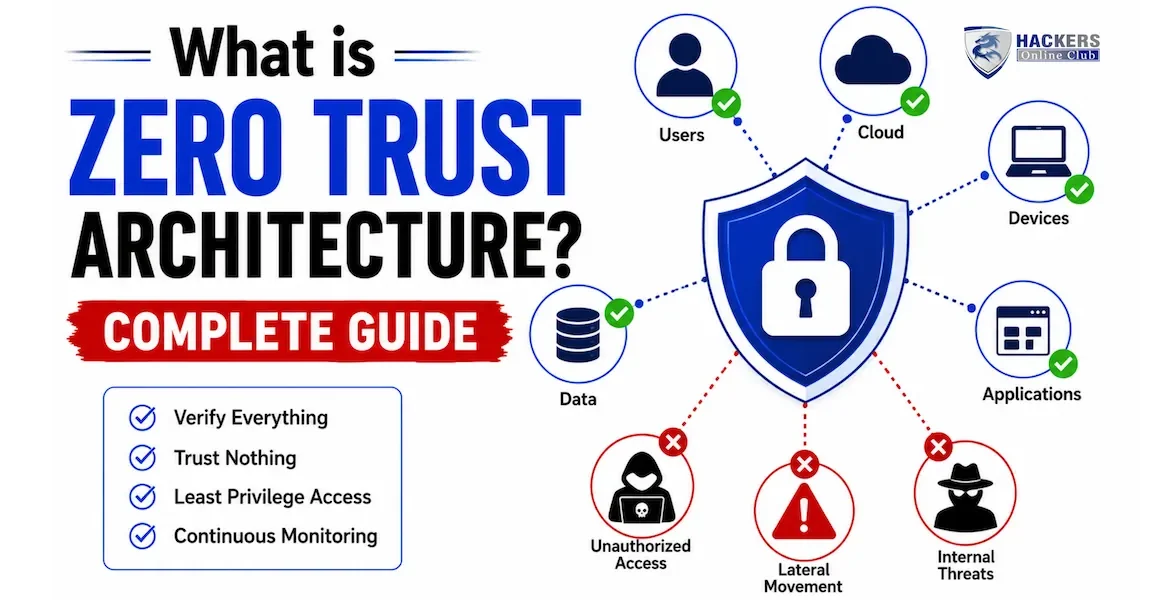
Zero trust architecture is the formal answer to that assumption. It replaces "trust but verify" with "never trust, always verify" — treating every access request as untrusted by default, regardless of where it originates. Not just external traffic. Not just remote workers. Every user, every device, every application, every API call — verified continuously, granted only the minimum access required, and monitored throughout the session.
This guide covers what zero trust architecture is, how it works technically, the seven pillars that define a mature zero trust implementation, how it compares to traditional perimeter security, a step-by-step implementation roadmap, the tools that enable it, and why Gartner projects 60% of enterprises will have adopted it by end of 2026.
- What is zero trust architecture?
- Why the traditional perimeter security model failed
- The three core principles of zero trust
- The seven pillars of zero trust architecture
- How zero trust works — the technical flow
- Zero trust vs VPN — what is the difference?
- How to implement zero trust — 6-stage roadmap
- Zero trust tools and vendors
- Zero trust frameworks — NIST, CISA and Microsoft
- Common zero trust challenges and how to overcome them
- Frequently asked questions
Zero trust architecture (ZTA) is a security model and framework built on the principle that no user, device, or network connection should be inherently trusted — even those that appear to originate from inside the corporate network. Access is granted only after explicit verification of identity, device health, and contextual signals, and is limited strictly to what the specific request requires.
The term was coined by John Kindervag at Forrester Research in 2010. The original concept was simple: eliminate the idea of a trusted internal network. Everything is treated as hostile until proven otherwise — internal traffic just as much as external traffic. Over the following decade, the model matured from a conceptual framework into a detailed implementation architecture with defined pillars, technology requirements, and government-endorsed standards.
Traditional security: build a strong wall around the network. Anyone inside the wall is trusted. Anyone outside is not.
Zero trust security: there is no wall. Every access request — regardless of where it comes from — must prove it is legitimate before access is granted, receives only the minimum access needed, and is monitored continuously throughout the session. The assumption is that the attacker is already inside.
The perimeter model was designed for a world that no longer exists. In the 1990s, all users sat inside a physical office, all servers lived in an on-premises data centre, and the network had a clear inside and outside. A strong firewall at the boundary was a reasonable defence.
That world is gone. Consider what the modern enterprise looks like in 2026:
- Remote and hybrid workers connect from home networks, coffee shops, and co-working spaces — outside any perimeter
- Applications run across AWS, Azure, GCP, and SaaS platforms like Salesforce, Microsoft 365, and Workday — also outside the perimeter
- Third-party contractors, suppliers, and partners need access to internal systems — external identities that the perimeter model has no good answer for
- IoT devices, OT equipment, and personal devices connect to corporate networks — endpoints that cannot run traditional security agents
- Attackers regularly obtain valid credentials through phishing, credential stuffing, and social engineering — meaning they enter through the front gate, not by breaching the wall
Once an attacker is inside a traditional network — through phishing, a compromised device, or a stolen VPN credential — they can often move freely between systems. The network trusts them because they are "inside." The SolarWinds attackers moved through Microsoft's internal network for months before detection because every system trusted other internal systems.
Cloud applications, remote access, and SaaS tools mean data and workloads now live outside the traditional perimeter by design. Routing all cloud traffic through a central firewall creates performance bottlenecks and is architecturally incompatible with how modern applications are built.
When a user connects via VPN, they typically receive broad access to the corporate network segment — far more than they need for any specific task. This violates the principle of least privilege and means a compromised VPN credential exposes far more than it should.
84% of data breaches in 2025 involved compromised credentials (IBM Cost of a Data Breach Report). If the attacker has valid credentials, the perimeter model has no defence — the firewall sees legitimate traffic. Zero trust's continuous verification catches anomalous behaviour even when credentials are valid: wrong device, wrong location, wrong time of day, unusual resource access patterns.
Every zero trust framework — NIST SP 800-207, CISA's Zero Trust Maturity Model, Microsoft's Zero Trust model — converges on three foundational principles. Everything else in zero trust architecture is an implementation detail built on these three ideas.
CISA's Zero Trust Maturity Model defines seven pillars — the functional areas that together make up a complete zero trust implementation. A mature zero trust architecture addresses all seven. Most organisations begin with identity and devices, which deliver the most immediate risk reduction, then expand across the remaining pillars over 18–36 months.
Identity is the new perimeter in zero trust. Every user, service account, and workload must have a verified, managed identity. This pillar covers: strong authentication (MFA everywhere, phishing-resistant where possible), Single Sign-On (SSO) so identity flows consistently across all applications, Privileged Access Management (PAM) for administrative accounts, Just-In-Time (JIT) access provisioning, and User and Entity Behaviour Analytics (UEBA) to detect compromised credentials through behavioural anomalies.
Tools in this pillar: Microsoft Entra ID (Azure AD), Okta, CyberArk, BeyondTrust, Ping Identity.
A valid identity on a compromised device is still a risk. Every device that requests access must prove it is managed, healthy, and compliant before access is granted. This pillar covers: Mobile Device Management (MDM) enrolment, Endpoint Detection and Response (EDR) for continuous monitoring, certificate-based authentication (devices prove identity with a cert, not just a password), compliance checks (OS version, patch level, encryption enabled, no jailbreak), and hardware attestation where available.
Tools in this pillar: Microsoft Intune, CrowdStrike Falcon, SentinelOne, Jamf (macOS/iOS), Tanium.
Zero trust replaces flat network access with micro-segmentation — dividing the network into small zones where each resource is individually controlled. Zero Trust Network Access (ZTNA) replaces VPN by brokering application-level access rather than network-level access. No user ever needs to see the full corporate network — they are granted access to specific applications only. This dramatically limits lateral movement.
Tools in this pillar: Zscaler Private Access, Palo Alto Prisma Access, Cisco Secure Access, Cloudflare Access, Akamai EAA.
Every application — SaaS, on-premises, cloud-native — requires its own access controls rather than relying on network-level trust. This pillar covers: application proxies (users authenticate to the proxy, never touch the application server directly), Cloud Access Security Brokers (CASB) for SaaS visibility and control, API security, OAuth 2.0 and OpenID Connect for application-to-application authentication, and Web Application Firewalls (WAF) in front of all web applications.
Ultimately, zero trust exists to protect data. This pillar covers: data classification (knowing where sensitive data is before you can protect it), Data Loss Prevention (DLP) to prevent exfiltration, encryption at rest and in transit including east-west traffic inside the network, Information Rights Management (IRM) so documents carry their own access policies, and access logging so every data access is auditable.
Zero trust generates vast amounts of telemetry — every access decision is logged. This pillar turns that data into actionable security intelligence. It covers: SIEM platforms (Splunk, Microsoft Sentinel) for centralised log analysis, UEBA for behavioural anomaly detection, extended detection and response (XDR) for correlated threat visibility across all pillars, and threat intelligence feeds to contextualise observed behaviours.
Zero trust at enterprise scale cannot be operated manually — the volume of access decisions, policy changes, and response actions requires automation. This pillar covers: SOAR platforms for automated incident response, dynamic access policies that adjust based on real-time risk signals (step up to MFA if anomaly detected), automated policy enforcement when a device falls out of compliance, and orchestration between tools so the identity platform, EDR, SIEM, and network controls operate as a coordinated system rather than isolated silos.
Every access request in a zero trust architecture flows through three logical components defined in NIST SP 800-207: the Policy Engine (PE), the Policy Administrator (PA), and the Policy Enforcement Point (PEP).
The most common question organisations ask when evaluating zero trust is whether it replaces their VPN. The answer is: yes, in most cases, ZTNA (Zero Trust Network Access) should replace the remote access VPN function — but the replacement is architectural, not just a product swap.
| Dimension | Traditional VPN | Zero Trust Network Access (ZTNA) |
|---|---|---|
| Access model | Network-level access — user is placed inside the network segment | Application-level access — user is connected only to specific apps |
| Trust assumption | Authenticated user = trusted user, granted broad network access | No implicit trust — every request verified against identity + device + context |
| Lateral movement risk | High — compromised VPN credential exposes the whole network segment | Very low — user can only reach the specific apps they are authorised for |
| Device health check | Typically no — VPN authenticates the user, not the device state | Yes — device must pass compliance check before access is granted |
| Cloud application access | Poor — traffic must hairpin through corporate DC, creating bottlenecks | Native — ZTNA connects users directly to apps wherever they are hosted |
| Visibility | Low — VPN logs show connections, not application-level behaviour | High — every access decision and session is logged and analysable |
| User experience | Often slow due to traffic backhauling, VPN client overhead | Typically faster — direct-to-app connection, no backhauling |
| Third-party access | Difficult — issuing VPN credentials to contractors is a governance problem | Clean — contractors get app-specific access without network credentials |
| MFA integration | Add-on, inconsistent | Native — MFA is a core component of every access decision |
Zero trust is a journey measured in years, not a product you install. Most enterprise implementations take 18–36 months to reach maturity across all seven pillars. The roadmap below follows the sequence recommended by CISA's Zero Trust Maturity Model — starting with identity and devices because they deliver the highest risk reduction fastest, then expanding across network, application, and data controls.
No single vendor provides a complete zero trust architecture — it requires integration across multiple categories of tools. The major enterprise platforms (Microsoft, Google, Palo Alto, Zscaler) provide broad coverage across multiple pillars, but most organisations build their zero trust architecture from best-of-breed tools across categories.
| Framework | Published by | Focus | Best used for | URL |
|---|---|---|---|---|
| NIST SP 800-207 | US National Institute of Standards | Technical architecture — defines PE, PA, PEP components and tenets. The foundational academic reference for zero trust. | Technical architects designing ZTA from first principles. Referenced by US government agencies. | csrc.nist.gov |
| CISA Zero Trust Maturity Model 2.0 | US Cybersecurity and Infrastructure Security Agency | Maturity-based implementation guide across 5 pillars with specific capability levels (Traditional, Initial, Advanced, Optimal) | Measuring current maturity and planning the implementation roadmap. Widely adopted by US federal agencies and enterprises. | cisa.gov/zero-trust-maturity-model |
| Microsoft Zero Trust Model | Microsoft | Implementation-focused guide across 6 pillars with Microsoft product mapping. Detailed deployment guides for each capability. | Organisations using Microsoft 365 and Azure — practical step-by-step guidance with tool specifics. | microsoft.com/zero-trust |
| DoD Zero Trust Strategy | US Department of Defense | Zero trust for high-security government environments. Very detailed capability targets across 152 specific activities. | Defence contractors and highly regulated industries. The most comprehensive specific capability list available. | dodcio.defense.gov |
Many enterprise environments contain legacy applications that cannot integrate with modern IdPs, do not support MFA, and cannot be fronted by an application proxy. These systems often run critical business processes and cannot be simply replaced.
Solution: Implement a jump server or application proxy that handles authentication externally — the user authenticates with full zero trust controls to a proxy, which then connects to the legacy system using service credentials. The legacy system is never directly exposed. This is imperfect but pragmatic. Document legacy exceptions formally and prioritise decommissioning in the roadmap.
Additional authentication steps and stricter access controls create friction for users. Executive resistance is common: "Why do I need MFA every time I open email?" The IT team knows why but struggles to communicate the risk clearly.
Solution: Use risk-based adaptive authentication — only require step-up authentication when signals are anomalous. A user accessing email from their managed corporate laptop in the office should have a seamless experience. The same user accessing from an unknown device in a foreign country should face step-up authentication. Communicate the "why" clearly during rollout with concrete examples: "This is what would have stopped the [well-known breach] that cost [company] $X million."
Mapping all legitimate application communication flows and translating them into microsegmentation policies is labour-intensive. Misconfigured policies break production applications, creating pressure to open rules broadly, defeating the purpose.
Solution: Use a traffic analysis tool (Illumio, Guardicore, or cloud-native flow logs) to map all existing communication flows before writing any policies. Start in observe mode — log violations without enforcing — for 2–4 weeks. Review the logs, work with application teams to understand legitimate flows, then enforce. Never microsegment without this observe phase first.
Zero trust takes 18–36 months to implement fully. Boards and executives often expect immediate results and become frustrated with a multi-year programme that requires significant investment before payoff is visible.
Solution: Frame zero trust in business terms: "We are reducing the blast radius of a breach from our entire network to a single application. This is what SolarWinds teaches us." Show quick wins — MFA deployment in month 1 reduces credential-based breach risk by 99%. Report maturity model progress quarterly. Map each implementation stage to specific risk reduction metrics the board can understand.
⚡ Implement zero trust in your organisation
- Assess your current maturity — complete the CISA Zero Trust Maturity Model self-assessment at cisa.gov. It is free and gives you a baseline score across all five pillars that you can track over time. This is the most important first step before spending anything.
- Start with MFA on email and remote access — this week, if you have not already. This single control prevents the majority of credential-based attacks. Every other zero trust initiative builds on identity security.
- Read the NIST SP 800-207 executive summary — free at csrc.nist.gov. The 4-page executive summary gives you the language to discuss zero trust at board level. The full document is the technical implementation reference.
- Understand the SOC's role in zero trust — zero trust generates telemetry that only has value if the SOC can analyse and act on it. SOC analyst guide →
- Learn about the cybersecurity career paths that implement zero trust — cloud security engineers, identity architects, and SOC analysts are the most in-demand professionals for zero trust programmes. Cybersecurity career roadmap →
Zero trust architecture is a security model where no user, device, or network connection is automatically trusted — even if it appears to come from inside the company network. Every access request is verified against identity, device health, and context before access is granted, and only the minimum necessary access is provided. The guiding principle is "never trust, always verify." It replaces the old model of building strong walls around the network perimeter and trusting everything inside.
A traditional firewall operates at the network perimeter — it blocks or allows traffic based on IP addresses and ports, and everything inside the perimeter is implicitly trusted. Zero trust removes the concept of a trusted perimeter entirely. Instead of protecting the network boundary, it protects every individual resource independently. A firewall asks "is this traffic coming from inside or outside?" Zero trust asks "is this specific identity, on this specific device, with these specific context signals, authorised to access this specific resource right now?" These are fundamentally different questions.
No. Firewalls and network controls remain part of a zero trust architecture — they are one layer in a defence-in-depth strategy. What changes is that the firewall is no longer the primary trust boundary. Firewalls still provide perimeter filtering, block known-bad traffic, and enforce network segmentation. But the critical security controls move to the identity and access layer — every access decision is based on verified identity and context, not just network location. The network becomes one signal among many, not the primary trust factor.
ZTNA (Zero Trust Network Access) is the specific technology that replaces remote access VPN in a zero trust architecture. It is one component of zero trust, not zero trust itself. ZTNA brokers application-level access — users connect to specific apps rather than the full network — using zero trust principles (verify identity, check device, grant minimum access). Zero trust architecture is the broader framework covering all seven pillars: identity, devices, networks, applications, data, visibility, and automation. ZTNA primarily addresses the network and application pillars.
A complete zero trust implementation across all pillars typically takes 18–36 months for an enterprise organisation. However, meaningful risk reduction starts within weeks: deploying MFA on all critical applications (month 1), enrolling devices in MDM and deploying EDR (months 2–3), and implementing Conditional Access policies (months 3–6) collectively address the majority of breach scenarios. The longer timeline applies to full microsegmentation, comprehensive data classification, and mature automation — the more architecturally complex aspects. Zero trust is not a project with an end date — it is an ongoing security operating model.
No — the principles apply at any scale, and many zero trust capabilities are available at low or no cost for smaller organisations. Microsoft 365 Business Premium includes Entra ID with Conditional Access, Intune for MDM, and Defender for Endpoint — this covers the identity and devices pillars for small businesses at around $22/user/month. Cloudflare Zero Trust has a generous free tier for teams under 50 users that provides ZTNA, secure web gateway, and email security. The principles of MFA everywhere, least privilege access, and device compliance checking are implementable without enterprise budgets.
SASE (Secure Access Service Edge) is a network architecture that combines WAN networking capabilities (SD-WAN) with cloud-delivered security services (ZTNA, CASB, SWG, FWaaS) into a single platform. Zero trust is a security model or philosophy. SASE is one way to implement the network and application security pillars of zero trust. They are complementary — SASE delivers the network architecture that enforces zero trust principles for distributed workforces and multi-cloud environments. The key vendors in the SASE space (Zscaler, Palo Alto Prisma, Cloudflare, Netskope) build their products on zero trust principles.