



On 14 December 2020, FireEye announced it had discovered a backdoor in SolarWinds Orion software — software used by 18,000 organisations including the US Treasury, Departments of Commerce, Homeland Security, and State. The attackers had been inside networks for up to nine months.
The reason this went undetected for so long: most victim organisations either lacked a SIEM, had one poorly configured, or had not written detection rules for the specific behavioural patterns the attackers used.
A well-configured SIEM would not have guaranteed detection — this was a nation-state level operation with sophisticated evasion — but it would have dramatically narrowed the window. The organisations that detected the intrusion earliest all had one thing in common: centralised log collection, correlation rules, and analysts watching anomalous behaviour patterns. That is exactly what a SIEM does.
This guide covers what a SIEM is, how it works at a technical level, the real-world use cases that make it the centrepiece of every enterprise SOC, an honest comparison of the top SIEM tools in 2026 — Splunk, Microsoft Sentinel, IBM QRadar, and others — and a practical guide to getting started.
- What is a SIEM?
- How a SIEM works — the technical pipeline
- SIEM vs SOAR vs XDR — what is the difference?
- Real-world SIEM use cases and detection rules
- What log sources does a SIEM collect?
- Top SIEM tools in 2026 — honest comparison
- Getting started with Splunk — your first SPL queries
- Implementing a SIEM — what to do and what to avoid
- Frequently asked questions
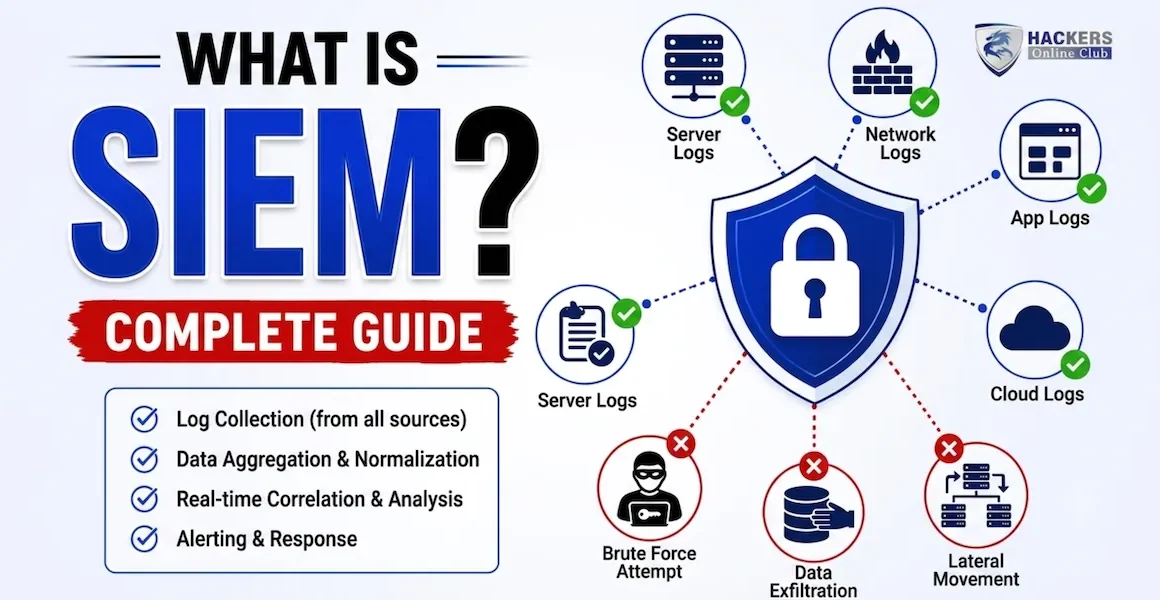
SIEM stands for Security Information and Event Management. It is a platform that collects, normalises, correlates, and analyses log and event data from across an organisation's entire IT environment — servers, endpoints, network devices, cloud services, applications, and security tools — in one centralised system, in real time.
The term combines two older technologies:
- SIM (Security Information Management) — long-term storage, analysis, and reporting of log data for compliance and forensics
- SEM (Security Event Management) — real-time monitoring and correlation of security events to detect threats as they happen
A modern SIEM does both simultaneously, plus much more. It is the technological core of a Security Operations Centre (SOC) — the single pane of glass through which analysts see what is happening across the entire environment and receive alerts when something looks wrong.
A medium-sized enterprise with 1,000 employees generates tens of millions of log events per day across hundreds of systems. A Windows domain controller alone logs thousands of events per hour. A firewall, a VPN gateway, five cloud applications, 200 servers, and 1,000 endpoints each produce their own logs in their own formats.
Without a SIEM: these logs sit in individual systems, analysable only by logging into each system separately, in incompatible formats, with no cross-system correlation. An attacker who compromises credentials on Monday, moves laterally on Tuesday, and exfiltrates data on Wednesday leaves traces in three separate systems. No single system shows the full picture.
With a SIEM: every event from every system flows into one platform. The SIEM normalises the formats, correlates the events across systems, and fires an alert: "User account X logged in from an unusual location (firewall log), immediately accessed the file server (server log), and downloaded 500MB of data to an external IP (DLP log) — investigate." That chain of events, spanning three systems, becomes one correlated alert.
Every SIEM processes security data through the same fundamental pipeline regardless of vendor. Understanding each stage is essential for SOC analysts configuring detection rules, tuning alert thresholds, and investigating incidents.
These three acronyms appear together constantly in SOC discussions and are frequently confused. They are complementary technologies, not alternatives.
| Platform | Primary function | What it does that the others don't | Relationship |
|---|---|---|---|
| SIEM | Collect, store, correlate, and alert on log data from across the environment | Long-term log retention, compliance reporting, ad-hoc search, broad source coverage, correlation across any data source | The data lake and detection brain. Feeds alerts to SOAR. Receives telemetry consumed by XDR. |
| SOAR | Automate the response to SIEM alerts — execute playbooks, enrich cases, perform remediation actions | Automated response: block an IP, disable a user account, isolate an endpoint, create a ticket — without analyst manual action | The arms of the SOC. Takes SIEM alerts as input, automates the first-response workflow. |
| XDR | Correlated detection and response across endpoint, network, email, cloud — tightly integrated within one vendor's ecosystem | Faster, deeper correlation within a vendor's own telemetry; built-in response capabilities; lower analyst workload within supported sources | Complements or partially overlaps SIEM. Some organisations run XDR for primary detection and SIEM for compliance/long-term retention. |
The SIEM is only as good as its detection rules. Here are the eight most impactful use cases every enterprise SOC should have configured, with the specific log sources and correlation logic each requires.
The breadth of log sources determines how much of your environment the SIEM can see. A SIEM that only collects firewall logs has enormous blind spots. Here are the log sources every enterprise SIEM should collect, ranked by detection value.
| Log source | Key events captured | Critical Windows Event IDs | Detection value |
|---|---|---|---|
| Active Directory / Domain Controller | Authentication, logon/logoff, account changes, group membership changes, password resets, GPO changes | 4624, 4625, 4648, 4720, 4728, 4732, 4768, 4769, 4776, 1102 | ⭐⭐⭐⭐⭐ Critical |
| Endpoint (EDR agent) | Process creation, network connections from process, file writes, registry changes, command line arguments | 4688 (process creation), 4663 (file access), Sysmon Event IDs 1, 3, 7, 11 | ⭐⭐⭐⭐⭐ Critical |
| Firewall / NGFW | Allowed/denied connections, bytes transferred, NAT translations, application identification | N/A (Syslog format — vendor specific) | ⭐⭐⭐⭐⭐ Critical |
| Cloud Identity (Entra ID / Okta) | MFA events, sign-in risk signals, Conditional Access policy results, application access, admin actions | N/A (API ingestion — vendor specific event schemas) | ⭐⭐⭐⭐⭐ Critical |
| Email (O365 / Google Workspace) | Phishing delivery, mail forwarding rules, attachment downloads, impersonation attempts, external sharing | N/A (API ingestion) | ⭐⭐⭐⭐ High |
| Web Proxy / DNS | URLs visited, domain lookups, blocked categories, connections to known-bad domains | N/A (Syslog) | ⭐⭐⭐⭐ High |
| AWS / Azure / GCP logs | API calls, IAM changes, storage access, network security group changes, instance creation/deletion | N/A (CloudTrail, Activity Log, Cloud Audit Logs) | ⭐⭐⭐⭐ High |
| VPN / Remote access | Connection/disconnection, source IP, bytes transferred, user, MFA result | N/A (Syslog / vendor API) | ⭐⭐⭐⭐ High |
| Web Application Firewall (WAF) | Blocked requests, SQLi/XSS attempt signatures, rate limiting triggers, geographic blocks | N/A (vendor specific) | ⭐⭐⭐ Medium |
| Database activity monitoring | SQL queries on sensitive tables, bulk data exports, schema changes, new accounts, off-hours access | N/A (database audit logs) | ⭐⭐⭐ Medium |
Splunk has been the dominant enterprise SIEM for over a decade. Its Search Processing Language (SPL) is the most flexible and powerful query language in any SIEM — it can express any query you can imagine and is a required skill for senior SOC analysts. Splunk's ecosystem of apps (pre-built detections, dashboards, and integrations from Splunkbase) covers virtually every log source and use case.
The Cisco acquisition in 2024 changed the commercial model — Splunk now emphasises workload-based pricing alongside the traditional ingest-based model. Enterprise Security (the premium SIEM layer on top of core Splunk) adds threat intelligence management, UEBA, risk-based alerting, and a full SOC workflow. Splunk SOAR (formerly Phantom) provides the automation layer.
- Most powerful and flexible query language
- Largest app ecosystem (2,000+ integrations)
- Dominant employer demand — SPL is a top job skill
- Risk-based alerting reduces alert fatigue significantly
- Excellent threat hunting capabilities
- Expensive — one of the priciest SIEMs at scale
- Significant learning curve for SPL
- Complex to maintain and tune
- Post-Cisco acquisition commercial uncertainty
Microsoft Sentinel is the fastest-growing SIEM in the enterprise market in 2026. For organisations already running Microsoft 365 and Azure, it is the natural choice — native integration with Entra ID, Defender for Endpoint, Defender for Office 365, and Azure services means these critical log sources connect in minutes with zero configuration. Microsoft 365 Defender data is ingested free, which alone covers identity, endpoint, email, and cloud app telemetry.
Sentinel's query language (KQL) is powerful and more approachable than Splunk's SPL. The built-in analytics rules library provides hundreds of pre-built detections mapped to MITRE ATT&CK. The built-in SOAR capability (Logic Apps-based playbooks) allows automated response without a separate SOAR product. AI Copilot integration in 2025 allows natural language investigation queries.
- Native Microsoft 365 integration — fastest setup for M365 orgs
- Pay-as-you-go pricing scales with usage
- Built-in SOAR (Logic Apps playbooks)
- Copilot AI integration for natural language investigation
- 200+ connectors in the content hub
- Azure-native — limited appeal for non-Azure organisations
- Costs can escalate quickly at high ingest volumes
- Less mature ecosystem than Splunk
- KQL is less established as a job-market skill than SPL
IBM QRadar is the veteran enterprise SIEM — widely deployed in financial services, government, and healthcare sectors where on-premises deployment, strict data residency requirements, and decades of compliance reporting are non-negotiable. QRadar's network flow analysis (QFlow) is particularly strong — it can correlate network traffic patterns with log events in ways that purely log-based SIEMs cannot.
IBM QRadar SIEM SaaS (the cloud-native version) was launched in 2023 and addresses the infrastructure burden of the traditional on-premises deployment. The IBM Security ecosystem integration (QRadar + Guardium for database security + Verify for IAM + Resilient for SOAR) provides a complete enterprise security operations platform for IBM-committed organisations.
- Strong network flow analysis (QFlow)
- Proven in regulated financial and government sectors
- EPS-based pricing predictable at scale
- Mature compliance reporting library
- On-prem version complex to manage
- UI less modern than Sentinel or Elastic
- Slower cloud transformation than competitors
- AQL less popular as a job-market skill
| SIEM | Deployment | Query lang | Best fit | Free tier | 2026 trend |
|---|---|---|---|---|---|
| Splunk ES | On-prem / Cloud | SPL | Large enterprise, complex hunting | 60-day trial | Stable – Cisco integration ongoing |
| Microsoft Sentinel | Cloud (Azure) | KQL | M365 orgs, cloud-first | Free 90-day trial + free M365 ingestion | Fastest growing – AI Copilot differentiator |
| IBM QRadar | On-prem / SaaS | AQL | Regulated industries, government | Community Edition (limited) | Stable – government and finance stronghold |
| Elastic SIEM | Cloud / On-prem | KQL / EQL | Tech companies, open-source preference | Yes – open-source core | Growing – cost-effective alternative |
| Exabeam Fusion | Cloud-native | Proprietary | UEBA-focused, mid-market | No | Growing – strong UEBA capabilities |
| LogRhythm SIEM | On-prem / Cloud | Proprietary | Mid-market, managed SIEM | No | Stable – mid-market focus |
| Google Chronicle | Cloud (GCP) | YARA-L / UDM | GCP orgs, high-volume environments | No | Growing – Google AI integration |
Splunk is the most in-demand SIEM skill in SOC analyst job postings in 2026. Splunk offers a free Developer licence (500MB/day ingest limit) and free training at Splunk Education. Here are the essential SPL queries every SOC analyst needs to know.
The most common SIEM failure is buying the tool before knowing what you want to detect. Before selecting a vendor, define your top 10 detection requirements — credential attacks, lateral movement, data exfiltration, C2 beaconing, and so on. Then evaluate which SIEM handles your specific log sources and detection logic most efficiently. The tool should serve the use cases, not the other way around.
Connect Active Directory, your primary firewall, and your EDR platform first. Get these sources working correctly, normalised, and producing quality detections before adding anything else. More sources means more noise. Noise kills SOC analyst trust in the system — if analysts are drowning in false positives, they stop investigating alerts.
Track your false positive rate per detection rule. Any rule producing more than 10 false positives per week needs tuning. A SIEM with a 90% false positive rate burns analyst time and causes alert fatigue — real threats get missed because analysts stop trusting the system. Treat false positive tuning as an ongoing operational responsibility, not a one-time setup task.
Every SIEM ships with hundreds of pre-built detection rules. Enabling all of them immediately creates an alert storm that overwhelms the SOC. Enable rules incrementally, starting with the highest-confidence, highest-severity detections (log clearing, impossible travel, admin group additions). Add more rules as you understand your environment's baseline and tune each rule before moving to the next.
A SIEM is a living system. Your environment changes — new applications deployed, new cloud services adopted, new threat techniques emerge. Detection rules that were effective six months ago may be blind to current attacker techniques. Schedule quarterly detection reviews: what new MITRE ATT&CK techniques have been used against organisations in your sector? Do we have coverage? This keeps the SIEM relevant as the threat landscape evolves.
| Maturity level | Characteristics | Detection capability |
|---|---|---|
| Level 1 — Basic | Log collection from 3–5 sources, minimal rules, mostly compliance reporting | Detects known, simple attacks. Misses sophisticated threats. |
| Level 2 — Developing | Broad log coverage, custom detection rules, basic analyst workflow | Detects common attack patterns. Some lateral movement and credential attack coverage. |
| Level 3 — Defined | Comprehensive coverage, UEBA, threat intel integration, SOAR automation | Detects sophisticated attacks. MITRE ATT&CK mapped coverage. Active threat hunting. |
| Level 4 — Managed | Risk-based alerting, continuous tuning programme, red team validation of detections | Near-real-time detection. Minimal dwell time. Automated containment for common incidents. |
⚡ Get started with SIEM this week
- Complete Splunk Fundamentals 1 for free — splunk.com/education. This free 6-hour course teaches SPL from scratch. Splunk is the most in-demand SIEM skill in 2026 job postings. If you are pursuing a SOC career, SPL proficiency is non-negotiable.
- Set up a free Splunk environment — download Splunk Free (500MB/day, no expiry) and import some sample Windows event logs. Practise the SPL queries in Section 7 against real data. Hands-on practice beats any amount of reading.
- Try Microsoft Sentinel free — the 90-day free trial includes $300 Azure credit. Connect your Microsoft 365 tenant if you have one and see Sentinel ingesting real identity and endpoint data immediately.
- Read the SOC analyst career guide — SIEM is the primary tool of a SOC analyst. Understanding how to use it opens the door to the most consistently available entry-level security role in 2026. SOC analyst guide →
- Understand how SIEM fits zero trust — the visibility and analytics pillar of zero trust architecture is powered by your SIEM. Zero trust architecture guide →
- Map your detections to MITRE ATT&CK — every detection rule should correspond to an ATT&CK technique. This gives you a visual representation of your coverage gaps and tells you where to invest in new detections next.
SIEM stands for Security Information and Event Management. It is a platform that collects log and event data from across an organisation's entire IT environment — servers, endpoints, network devices, cloud services, and applications — correlates that data in real time to detect security threats, generates alerts for SOC analysts to investigate, stores logs for compliance and forensic purposes, and produces reports for regulatory requirements. It is the technological centrepiece of a Security Operations Centre.
A SIEM collects, stores, and analyses security data — it detects threats and generates alerts. A SOAR (Security Orchestration, Automation and Response) automates the response to those alerts — it executes playbooks to block IPs, disable compromised accounts, isolate endpoints, and create tickets without manual analyst intervention. In practice, the SIEM detects the threat and the SOAR responds to it. Most enterprise SOCs use both, and many modern SIEMs (Splunk, Sentinel) include built-in SOAR capabilities.
Splunk is the best SIEM to learn for career purposes — it appears in approximately 60% of SOC analyst job postings, the free developer licence allows genuine hands-on practice, and Splunk Fundamentals 1 is a free course that teaches SPL systematically. For beginners at Microsoft-centric organisations, Microsoft Sentinel with KQL is an excellent alternative and has a 90-day free trial. The most important thing is hands-on practice with real log data — reading about SIEMs without querying one develops zero practical skill.
SIEM costs vary widely by vendor and deployment model. Splunk Enterprise is typically $100–$200 per GB of data ingested per day at enterprise scale — a large organisation ingesting 100GB/day could spend $3–7 million annually. Microsoft Sentinel uses consumption-based pricing starting around $2.46/GB ingested, with commitment discounts. IBM QRadar is licensed by events-per-second (EPS) capacity. Elastic SIEM has an open-source core with enterprise licensing for advanced features. For small organisations, Elastic (open-source) or Microsoft Sentinel (with M365 free ingestion) provide very low cost entry points.
Alert fatigue occurs when a SIEM generates so many alerts — most of them false positives — that analysts become desensitised and start dismissing alerts without proper investigation. This is the most common SIEM failure mode. It is caused by: enabling too many detection rules without tuning them for the specific environment, setting thresholds too low (any 3 failed logins triggers an alert in an environment with thousands of users), and not adjusting rules for known-legitimate behaviours. The fix is continuous tuning — tracking false positive rates per rule and adjusting until each rule has a high signal-to-noise ratio. Risk-based alerting (Splunk ES's approach) helps by aggregating related events into risk scores rather than individual alerts.
Small businesses benefit from SIEM capabilities but rarely need — or can afford — enterprise-grade platforms. Practical alternatives include: Microsoft Sentinel with M365 Business Premium (cost-effective for M365 users, native integration with identity and endpoint data), Elastic SIEM (open-source, requires technical setup), and managed SIEM services where a third-party SOC provider manages the SIEM on your behalf. The core SIEM functions — centralised log collection, authentication monitoring, and alerting on known-bad patterns — can be partially achieved for free using tools like Microsoft Defender for Business, which includes some built-in threat detection without a full SIEM deployment.
The most critical Windows Event IDs for threat detection are: 4624 (successful logon — track for unusual times, types, and locations), 4625 (failed logon — detect brute force), 4648 (logon with explicit credentials — detect pass-the-hash and lateral movement), 4688 (process creation — detect malicious execution, requires enhanced audit policy), 4720 (user account created), 4728 and 4732 (member added to security/admin group — detect privilege escalation), 4769 (Kerberos service ticket request — detect Kerberoasting), 1102 (audit log cleared — detect attacker covering tracks), and Sysmon Event 1 (process creation with full command line — requires Sysmon installation but provides far richer endpoint telemetry than native Windows logging).