




In May 2017, the WannaCry ransomware infected over 230,000 systems across 150 countries in a single day. The NHS alone had 80 hospitals and clinics knocked offline. The vulnerability it exploited — EternalBlue, an SMB flaw — was already patched. But the patch had not been applied widely because flat networks meant that applying it broke things. And when WannaCry entered through a single unpatched machine, the flat network gave it a highway to every other machine on the segment.
A properly segmented network would not have stopped WannaCry from infecting its initial target. But it would have contained the spread dramatically — infected machines in one segment cannot reach machines in another segment without crossing a firewall. The NHS's MRI scanners would not have been on the same network segment as its administrative PCs. The ransomware would have hit one room, not the entire hospital.
Network segmentation is the practice of dividing a network into smaller, isolated zones — each with its own security controls, access rules, and traffic policies. It is one of the most impactful security controls available, directly addresses lateral movement (the method attackers use to spread through a network after initial access), and is required by virtually every major compliance framework — PCI-DSS, HIPAA, ISO 27001, NIST. This tutorial covers everything from the fundamentals through to a complete implementation guide with VLAN configurations and firewall rule templates.
- What is network segmentation?
- Why segment your network — the security case
- Types of network segmentation — physical, VLAN, and microsegmentation
- Designing your network zones — the standard corporate model
- VLAN segmentation — configuration guide
- DMZ design — protecting public-facing services
- Firewall rules for segmented networks
- Microsegmentation — zero trust network controls
- Step-by-step implementation roadmap
- Segmentation and compliance — PCI-DSS, HIPAA, ISO 27001
- Frequently asked questions
Network segmentation is the process of dividing a computer network into multiple sub-networks — called segments or zones — where each segment is isolated from the others by access controls. Traffic between segments must pass through a firewall or other enforcement point, where it is inspected and either permitted or denied based on policy.
In a flat (unsegmented) network, every device can communicate with every other device. A laptop in the accounts department can freely reach a database server in the data centre. A visitor's device on the guest Wi-Fi can attempt connections to internal systems. An attacker who compromises any single machine has a clear path to every other machine.
In a segmented network, those connections are broken by design. The accounts laptop can reach the finance application server. It cannot reach the HR database, the OT/SCADA network, or the data centre management infrastructure — because those segments have firewall rules that deny connections from the user segment by default, permitting only specifically required flows.
The primary security value of network segmentation is blast radius reduction — limiting how far an attacker can move after initial compromise. Even with perfect perimeter defences, some attacks will succeed. Phishing delivers a malware payload to one endpoint. A web application vulnerability is exploited. Credentials are stolen and used to log in.
In a flat network, that initial foothold gives the attacker access to everything on the same broadcast domain. In a segmented network, the attacker is contained to the segment of their initial compromise. Reaching the data centre, the payment card systems, or the OT environment requires crossing firewall boundaries — each of which can detect, alert on, and block the lateral movement attempt.
This is the lateral movement sequence attackers follow in flat networks — documented in hundreds of incident response reports:
- Compliance — PCI-DSS requires cardholder data to be isolated in a separate network segment. HIPAA requires protected health information systems to be separated from general corporate networks. ISO 27001 Annex A.13 specifies network segregation controls. Segmentation is not optional for regulated organisations.
- Performance — broadcast traffic (ARP, DHCP, multicast) is contained within each VLAN rather than flooding the entire network. Smaller broadcast domains mean less unnecessary traffic and better performance for legitimate applications.
- Simplified troubleshooting — when a problem occurs, the segment boundary tells you exactly which devices are affected. A broadcast storm in one VLAN does not bring down the entire network.
- IoT and OT isolation — printers, IP cameras, HVAC controllers, building management systems, and industrial control systems are notoriously insecure. Segmenting them away from corporate systems means a compromised printer cannot reach the domain controller.
| Type | How it works | Security strength | Cost and complexity | Best used for |
|---|---|---|---|---|
| Physical segmentation | Separate physical switches, cables, and firewalls for each segment. No shared infrastructure between zones. | Strongest — no shared hardware means no risk of VLAN hopping or misconfiguration bridging segments | Highest — duplicate hardware for each zone | Air-gapped networks, OT/SCADA, highly classified environments, payment processing |
| VLAN segmentation | Virtual LANs on shared switch infrastructure. Traffic tagged with VLAN IDs, switches enforce segment boundaries. Inter-VLAN routing controlled by firewall/router. | Strong when properly configured — requires hardening against VLAN hopping attacks | Medium — uses existing switch infrastructure, requires managed switches | Standard corporate segmentation. Most cost-effective approach for most organisations. |
| Microsegmentation | Software-defined policies applied at the workload level — each virtual machine, container, or application has its own policy. Works independent of network topology. | Strongest for east-west traffic — granular per-workload control, policy follows the workload | Highest complexity — requires SDN or agent-based enforcement | Data centre east-west traffic, cloud environments, zero trust architectures |
| Firewall zones | Logical grouping of interfaces/subnets into zones on a firewall. Inter-zone traffic controlled by policy. | Strong — firewall enforces all inter-zone traffic at Layer 3/4/7 | Low to medium — uses existing firewall capability | Complement to VLAN segmentation. Defines traffic policy between VLANs. |
| Software-Defined Networking (SDN) | Centralised controller manages network policy across virtual and physical infrastructure. Enables dynamic policy enforcement. | Strong and flexible — policy enforced consistently across hybrid environments | High — requires SDN platform (VMware NSX, Cisco ACI, Arista CloudVision) | Large data centres, multi-cloud environments, enterprises with frequent topology changes |
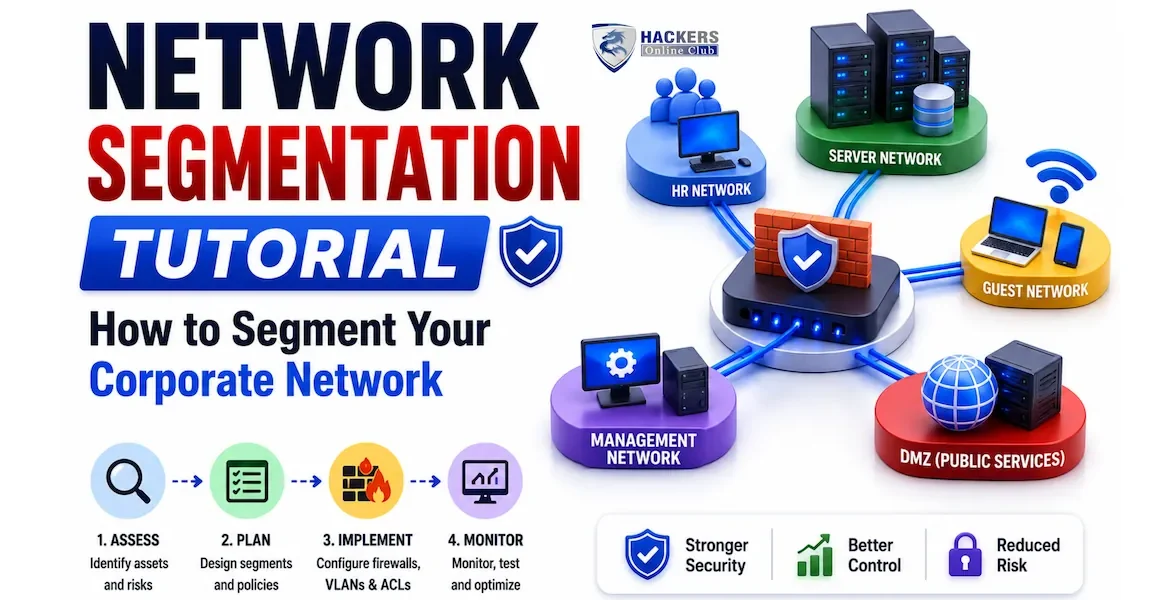
A well-designed corporate network segmentation model defines zones based on the sensitivity of the systems within them and the type of users or services that need access. The following zone model is the industry-standard starting point — adapt it to your organisation's specific applications and compliance requirements.
VLANs (Virtual Local Area Networks) are the primary mechanism for network segmentation in enterprise environments. They logically divide a physical switch into multiple isolated Layer 2 domains. Traffic between VLANs must pass through a Layer 3 device (a router or Layer 3 switch) where security policy can be enforced.
The DMZ (Demilitarised Zone) is the network segment that sits between the internet and your internal network, hosting services that must be publicly accessible — web servers, mail gateways, VPN endpoints, and API gateways. It is the most critical segmentation boundary in most organisations because it faces the internet directly.
The most secure DMZ design uses two separate firewall devices — a perimeter firewall between the internet and the DMZ, and an internal firewall between the DMZ and the internal network. Even if an attacker compromises the perimeter firewall (or a DMZ host), they face a second, separate firewall before reaching internal systems. Single-firewall DMZ designs (using three interfaces on one firewall) are acceptable for smaller organisations but provide less defence-in-depth.
- Internet → DMZ: Allow only the specific ports needed for each public service. Web server: TCP 80 and 443 only. Mail gateway: TCP 25 (SMTP), 587, 465. VPN: UDP 500, 4500. Deny everything else.
- DMZ → Internal: The most critical rule set. DMZ servers should only be able to initiate connections to specific internal resources they explicitly need — a web server connecting to an application server on specific ports. No DMZ host should ever initiate connections to the internal network broadly.
- Internal → DMZ: Administrative access only, from the management VLAN jump servers. Users do not connect from internal to DMZ directly.
- DMZ → Internet: Restrict outbound. Web servers should not need to initiate outbound connections to arbitrary internet IPs. If a web server starts making outbound connections to unusual IPs, that is a strong indicator of compromise. Whitelist known-required destinations only.
- No direct path from internet to internal: No rule should ever permit a connection from an internet IP directly to the internal network without passing through the DMZ.
| Rule | Source | Destination | Port/Protocol | Action | Log |
|---|---|---|---|---|---|
| 1 | ANY (internet) | 10.10.10.5 (Web server) | TCP 80, 443 | ALLOW | Yes |
| 2 | ANY (internet) | 10.10.10.10 (Mail GW) | TCP 25, 587 | ALLOW | Yes |
| 3 | ANY (internet) | 10.10.10.15 (VPN) | UDP 500, 4500 | ALLOW | Yes |
| 4 | ANY (internet) | DMZ (10.10.10.0/24) | ANY | DENY | Yes |
| 5 | ANY (internet) | Internal (10.0.0.0/8) | ANY | DENY | Yes — Alert |
| Rule | Source | Destination | Port | Action | Purpose |
|---|---|---|---|---|---|
| 1 | 10.10.10.5 (Web) | 10.10.30.20 (App server) | TCP 8080 | ALLOW | Web → App tier |
| 2 | 10.10.10.10 (Mail) | 10.10.30.25 (Exchange) | TCP 443 | ALLOW | Mail delivery |
| 3 | 10.10.10.0/24 (DMZ) | 10.10.40.0/24 (DB) | ANY | DENY | No DMZ-to-DB |
| 4 | 10.10.10.0/24 (DMZ) | 10.10.99.0/24 (Mgmt) | ANY | DENY | No DMZ-to-Mgmt |
| 5 | 10.10.10.0/24 (DMZ) | 10.10.0.0/16 (Internal) | ANY | DENY | Default deny all |
Firewall rules between segments follow the principle of least privilege — deny everything by default, then explicitly permit only what is required. The rule order matters: firewalls evaluate rules top-to-bottom and stop at the first match. Always put specific permit rules before general deny rules.
VLAN segmentation operates at the network layer and controls traffic between subnets. Microsegmentation goes deeper — it controls traffic between individual workloads (virtual machines, containers, application processes) within the same subnet. Even within the server VLAN, a compromised application server cannot reach another application server it has no business communicating with.
Microsegmentation is the network implementation of the zero trust "assume breach" principle. It answers the question: if an attacker compromises one application server, how far can they move among other application servers on the same VLAN?
Windows Firewall and Linux iptables/nftables provide workload-level traffic filtering. Each server only accepts connections on the specific ports from the specific IPs that need to reach it. This is the most accessible microsegmentation approach — no additional tools required, deployable via Group Policy (Windows) or Ansible/Puppet (Linux).
For data centre and cloud environments, SDN platforms provide centralised microsegmentation policy management across hundreds or thousands of workloads. The policy follows the workload — if a VM moves to a different host, its microsegmentation policy moves with it.
- VMware NSX — the market leader for data centre microsegmentation. Distributed firewall runs on each ESXi host, enforcing policy at the vNIC of each VM before traffic enters the network. Policy is defined centrally in NSX Manager and pushed to all hosts.
- Illumio Core — agent-based microsegmentation that maps all workload communications (its "Illumination" feature shows you exactly what talks to what before you write any policies), then enforces policies through the host firewall.
- Guardicore / Akamai Guardicore Segmentation — similar to Illumio. Strong in mixed environments with physical servers, VMs, and cloud workloads.
- AWS Security Groups, Azure NSGs — cloud-native microsegmentation. In AWS, Security Groups are instance-level firewalls that define exactly which sources can reach each instance on which ports. Properly configured, they provide effective microsegmentation in cloud environments without additional tools.
In Kubernetes environments, NetworkPolicy resources define which pods can communicate with which other pods and services. By default, all pods in a Kubernetes cluster can communicate with each other — enabling network policies is the equivalent of implementing segmentation for containerised workloads.
| Framework | Segmentation requirement | Specific controls | Benefit of compliance |
|---|---|---|---|
| PCI-DSS v4.0 | Required — cardholder data environment (CDE) must be isolated from non-CDE networks. Isolation must be verified annually by a QSA. | Req. 1.2: Network security controls between CDE and other networks. Req. 1.3: No direct routes between internet and CDE. Req. 4.1: Segmentation must be validated annually. | Organisations with segmented CDE have a dramatically smaller PCI scope — reducing audit cost and complexity significantly. |
| HIPAA | Required — ePHI (electronic Protected Health Information) systems must be isolated. Technical safeguards require access controls limiting ePHI access to authorised users. | Technical Safeguard 164.312(a): Access control. 164.312(e): Transmission security. Segmentation is the primary implementation mechanism. | In the event of a breach, segmentation that contained ePHI to a specific zone may qualify as a mitigating factor reducing breach notification requirements. |
| ISO 27001 | Strongly recommended — Annex A Control 8.20 (network security) and 8.22 (segregation of networks) specify network segmentation as a required control area. | A.8.20: Networks shall be managed and controlled to protect information. A.8.22: Groups of information services, users, and information systems shall be segregated in networks. | Auditors expect to see VLAN segmentation documentation, firewall rule reviews, and network diagrams showing zone isolation. |
| NIST CSF 2.0 | Recommended — Protect function, Network Security category. PR.AC-5: Network integrity is protected, incorporating network segregation where appropriate. | Aligns with NIST SP 800-53 SC-7 (boundary protection) which requires monitoring and control at external and internal boundaries. | Demonstrates mature PR (Protect) capability in CSF assessments. Required for US federal contractors and agencies under FedRAMP. |
⚡ Start segmenting your network
- Run a network discovery scan this week — use Nmap (nmap -sn 192.168.0.0/16) to discover every live host in your environment. Before you can segment, you need to know what you have. Our Nmap tutorial covers the full scanning methodology.
- Start with guest and IoT VLANs — these are the easiest to create (few legitimate flows to preserve), deliver immediate security improvement (printers and cameras off the main network), and give your team experience with VLAN configuration before tackling the more complex user-to-server segmentation.
- Understand zero trust and how segmentation fits in — network segmentation is the network pillar of zero trust architecture. VLAN segmentation controls north-south and east-west traffic between zones; microsegmentation controls traffic within zones. Zero trust architecture guide →
- Feed your segmentation logs into your SIEM — inter-VLAN firewall traffic is some of the most valuable security telemetry you can collect. Every denied connection is a potential lateral movement attempt worth investigating. SIEM guide →
- Validate with a penetration test — once segmentation is in place, verify it holds with an authorised penetration test specifically targeting lateral movement across segment boundaries. Test from the user VLAN: can you reach the database VLAN? Can you reach management interfaces? A pentester will find gaps your implementation missed. Penetration testing guide →
Network segmentation is the practice of dividing a network into isolated zones where traffic between zones is controlled by firewall policy. It is important because it limits lateral movement — an attacker who compromises one machine in a segmented network cannot freely reach all other machines. They are contained within the compromised segment and must cross firewall boundaries to progress, where their movement can be detected and blocked. It is also required by major compliance frameworks including PCI-DSS, HIPAA, and ISO 27001.
VLANs segment the network at Layer 2 — they create separate broadcast domains and control traffic between subnets. A VLAN is a zone containing multiple devices. Microsegmentation goes deeper, controlling traffic between individual workloads within the same subnet or zone. While VLANs prevent an attacker in the user segment from reaching the database segment, microsegmentation prevents a compromised application server from reaching another application server on the same VLAN. VLANs address north-south traffic between segments; microsegmentation addresses east-west traffic within segments.
A DMZ (Demilitarised Zone) is a network segment that sits between the internet and the internal corporate network, hosting services that must be publicly accessible — web servers, email gateways, VPN endpoints, and API gateways. The DMZ is exposed to internet traffic but protected from the internal network by a firewall. If an internet-facing server in the DMZ is compromised, the attacker is contained in the DMZ — strict firewall rules prevent them from freely reaching internal systems. The name comes from the military concept of a buffer zone between two opposing territories.
The number depends on your environment's complexity, but a practical minimum for most organisations is seven to ten VLANs: DMZ, users, servers, databases, management, guest Wi-Fi, IoT/OT, and voice/VoIP. PCI-DSS regulated organisations need an additional dedicated payment zone. Healthcare organisations need ePHI system isolation. The principle is functional separation — devices with similar trust levels and communication requirements belong in the same VLAN; devices with different trust levels or very different communication needs belong in separate VLANs. Avoid over-segmenting to the point where the administrative complexity exceeds your team's ability to maintain it accurately.
VLAN hopping is an attack where an attacker on one VLAN gains access to traffic on another VLAN by exploiting switch trunk configuration weaknesses. The two main techniques are switch spoofing (the attacker's device pretends to be a switch and negotiates a trunk connection) and double tagging (the attacker sends frames with two 802.1Q tags, and the outer tag is stripped by the first switch, leaving the inner tag to route the frame to a different VLAN). Prevention: disable DTP on all access ports with switchport nonegotiate, set access ports to access mode explicitly, change the native VLAN from VLAN 1 to an unused VLAN, and never use switchport trunk allowed vlan all.
No — network segmentation requires a firewall. VLANs create the segment boundaries, but a Layer 3 device (firewall or Layer 3 switch with ACLs) is what enforces the traffic policy between segments. Without a firewall controlling inter-VLAN routing, the segments are technically separate broadcast domains but traffic can still flow freely between them. Segmentation and firewalls are complementary: segmentation defines the zones, firewalls enforce the policy at the zone boundaries. A segmented network with no inter-VLAN firewall policy provides very little security improvement.
Network segmentation is the network implementation of zero trust's "assume breach" principle. In zero trust architecture, the network pillar specifies that network access should be controlled based on identity and context rather than network location — ZTNA replaces VPN for remote access, and microsegmentation controls east-west traffic within the network. Traditional VLAN segmentation addresses the macro-level (controlling traffic between large zones), while zero trust microsegmentation addresses the micro-level (controlling traffic between individual workloads). A mature zero trust implementation builds on strong VLAN segmentation and adds microsegmentation at the workload level on top of it.