



A mid-sized financial services firm ran a test in 2023. They asked their Tier 1 SOC analyst team to handle a simulated phishing wave: 200 alerts over four hours, each requiring the same sequence of eight manual steps — check the email headers, look up the sender domain, query the SIEM for other recipients, check VirusTotal for the attachment hash, disable the account if confirmed malicious, remove the email from all mailboxes, create the ITSM ticket, and send the user notification.
Analysts managed about 12 alerts per hour. By the end of the simulation, 152 alerts were unresolved, most analysts were exhausted, and critical alerts were buried under a backlog of medium-severity phishing cases.
They deployed a SOAR platform the following quarter. The same 200-alert scenario, automated: average resolution time dropped from 25 minutes per alert to 47 seconds. The eight manual steps executed automatically. Analysts were presented only with the 11 alerts the SOAR flagged as requiring human judgment. The team handled the entire wave in 19 minutes.
This is the core value proposition of SOAR. Not replacing analysts — reducing the manual, repetitive, deterministic work so analysts can focus their expertise on the decisions that actually require human judgment. This guide covers what SOAR is, how it works, how it differs from SIEM and XDR, the three pillars of security orchestration, real playbook examples with automation logic, an honest comparison of the top SOAR platforms in 2026, and a practical guide to getting started.
- What is SOAR?
- The three pillars — orchestration, automation, and response
- SOAR vs SIEM vs XDR — the definitive comparison
- How SOAR works — the technical architecture
- SOAR playbooks — real-world examples
- Playbook 1 — Phishing email triage and response
- Playbook 2 — Malware detection and containment
- Playbook 3 — Brute force and credential attack
- Top SOAR tools in 2026
- Implementing SOAR — what to automate first
- Frequently asked questions
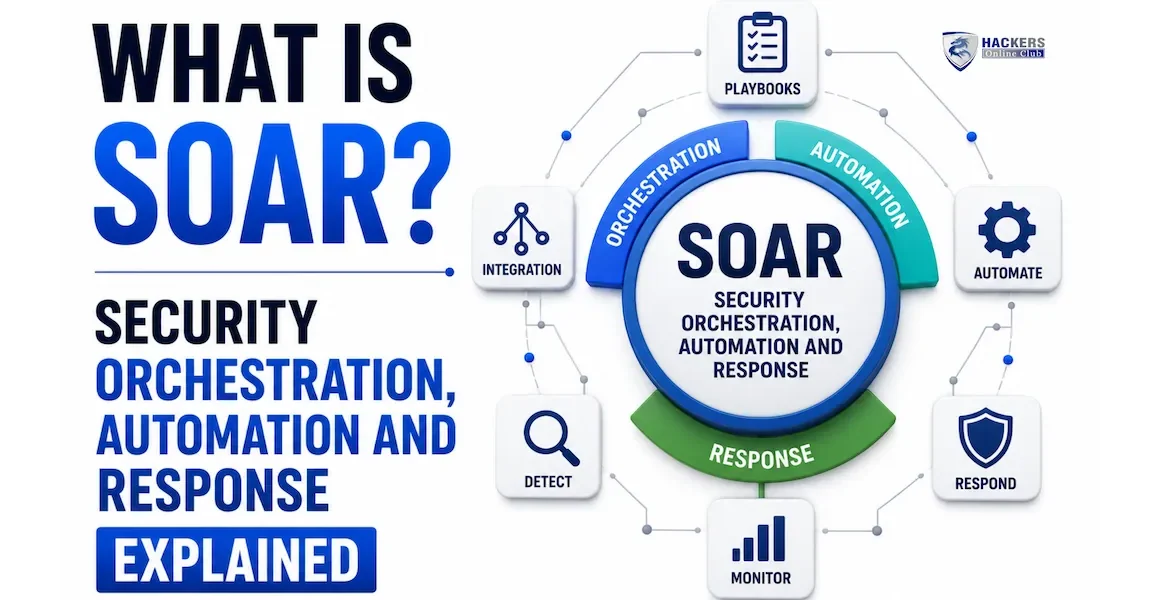
SOAR stands for Security Orchestration, Automation, and Response. It is a category of security platform that connects the tools in a security operations centre, automates repetitive response workflows through playbooks, and provides case management and reporting for the human analysts who handle escalations that require judgment.
The term was coined by Gartner in 2017 to describe a convergence of three previously separate product categories: Security Orchestration and Automation (SOA), Threat Intelligence Platforms (TIP), and Security Incident Response Platforms (SIRP).
Modern SOAR platforms encompass all three — they integrate with every tool in the security stack, run automated playbooks in response to alerts, manage the case lifecycle from detection through closure, and pull in threat intelligence to enrich every decision.
Your SIEM generates an alert: "User account jsmith logged in from an IP in Nigeria at 3 AM." Without SOAR, a Tier 1 analyst wakes up, logs into five different tools, manually looks up jsmith's normal login location, checks whether the Nigerian IP is on any threat lists, checks whether jsmith's account has done anything suspicious in the last 24 hours, decides whether to disable the account, then manually creates a ticket and sends a notification email.
With SOAR: the alert hits the SOAR platform. Within 30 seconds, a playbook has automatically queried Active Directory for jsmith's account details and recent activity, looked up the Nigerian IP across 15 threat intelligence feeds, checked the identity platform for jsmith's historical login locations, determined this is "impossible travel" by comparing timestamps against the previous known-good login, disabled the account in Entra ID, revoked all active sessions, created the ITSM ticket with all evidence attached, and sent jsmith a notification. The analyst is paged with a pre-populated case — not an alert requiring 15 minutes of manual work — and asked simply: "Confirmed compromise? Confirm to proceed with full investigation workflow."
Orchestration is the connectivity layer. It is the set of integrations that allow SOAR to send commands to and receive data from every tool in the security stack — SIEM, EDR, firewall, identity platform, ticketing system, threat intelligence feeds, email gateway, vulnerability scanner, and cloud platforms. Modern SOAR platforms ship with hundreds of pre-built integrations (Splunk SOAR has over 300; Palo Alto XSOAR has over 800) and support custom integration development via REST API and Python. Without orchestration, automation cannot act on anything — the playbook can make a decision but has nowhere to send the command.
The practical value of orchestration is that it creates a single interface through which an analyst can take action across every security tool without switching between platforms. Rather than logging into the EDR to isolate an endpoint, then logging into the firewall to block an IP, then logging into the identity platform to disable an account — one SOAR action triggers all three simultaneously, with every action logged in the case timeline.
Automation is the execution layer — the playbooks that run response workflows without human intervention. A SOAR playbook is a conditional logic workflow: if this condition is true, take this action; if that condition is true, take a different action; if the result of this action meets this criterion, escalate to a human. Playbooks are built visually (drag-and-drop flowchart) or as code (Python in Splunk SOAR, YAML in Cortex XSOAR) and execute in seconds to minutes per alert. The automation layer is what reduces mean time to respond from hours to minutes — the playbook does not need to sleep, take breaks, or context-switch between tasks.
Automation operates on a spectrum: fully automated (no human involvement — the playbook runs to completion and closes the case), semi-automated (the playbook runs enrichment and initial response, then pauses for analyst approval before taking high-impact actions), or decision-support only (the playbook enriches the alert and presents all relevant context to the analyst, who makes all decisions manually). Most mature SOAR deployments use different automation levels for different alert types — fully automated for low-confidence, low-impact actions; human approval required for high-impact actions like account disablement or system isolation.
Response is the case management and analyst workflow layer. Every alert that comes into SOAR creates a case — a structured record that accumulates the alert data, every enrichment result the playbook gathered, every automated action taken, the timeline of events, analyst notes and decisions, and the final disposition. Cases provide the audit trail that compliance requires ("show me every action taken in response to incident IR-2026-047"), the documentation for post-incident review, and the structured workflow that keeps analysts working systematically rather than ad-hoc. The response layer also captures metrics — mean time to detect, mean time to respond, automation rate, false positive rate — that management uses to measure SOC effectiveness.
These three acronyms are frequently confused and increasingly overlap in vendor marketing as platforms converge. Understanding where each one's primary value lies — and where the boundaries are blurring — is essential for making sound security tool decisions.
| Platform | Primary function | What it does uniquely | Inputs | Outputs | Relationship |
|---|---|---|---|---|---|
| SIEM | Collect, store, correlate, and alert on security data from across the environment | Long-term log retention, compliance reporting, broad multi-source correlation, ad-hoc threat hunting query capability | Logs from everything: servers, endpoints, network, cloud, identity, applications | Alerts, cases, dashboards, compliance reports, search results | SOAR's primary alert source. SIEM detects; SOAR responds. |
| SOAR | Automate the response to security alerts — execute playbooks, enrich cases, orchestrate actions across tools | Cross-platform action execution, playbook automation, human approval workflow, case management, response metrics | Alerts from SIEM, EDR, email gateway, vulnerability scanner, threat intel, and any other connected tool | Automated actions (block IP, isolate endpoint, disable account, create ticket), enriched cases, analyst tasks | Acts on what SIEM detects. Works alongside XDR for endpoint-specific response. |
| XDR | Correlated detection and response across endpoint, network, email, cloud within one vendor's ecosystem | Deep correlation within vendor ecosystem, faster detection for covered sources, built-in response capability without separate SOAR | Telemetry from the vendor's own tools (their EDR, email security, firewall, identity) | Correlated alerts, automated response within the ecosystem, investigation console | Competes partially with SOAR for detection and response within its ecosystem. SIEM still needed for broad log retention and compliance. |
SOAR ingests alerts from multiple sources simultaneously — SIEM correlation rules, EDR detections, email gateway phishing alerts, vulnerability scanner findings, cloud security alerts, and manual analyst input. Each source sends alerts in a different format, so the SOAR normalises them into a common schema: alert type, severity, source system, affected assets, relevant indicators (IP, hash, domain, user), and timestamp. This normalisation is what allows a single playbook to handle alerts from multiple different source systems — the playbook sees a consistent data structure regardless of whether the alert came from Splunk, CrowdStrike, or Microsoft Defender.
When an alert arrives, the SOAR evaluates routing rules: which playbook should run for this alert type? Routing is based on alert classification — a "phishing email" alert triggers the phishing playbook, a "malware detection" alert triggers the malware containment playbook, a "brute force success" alert triggers the credential compromise playbook. Alerts that do not match any routing rule go to a default queue for manual analyst triage. Good routing design is one of the most important implementation decisions — over-routing (everything triggers complex playbooks) creates false positive noise; under-routing (nothing is automated) provides no value.
The playbook execution engine runs the automated workflow. It executes actions against connected tools via their APIs, evaluates conditional logic to decide which branch to follow, handles failures gracefully (if an API call times out, the playbook can retry, take an alternative action, or escalate to a human), and tracks the complete execution log with every action taken, every API response received, and every decision made. Playbook execution is asynchronous — multiple playbooks run in parallel for concurrent alerts, each maintaining its own state and execution context.
Enrichment is one of SOAR's highest-value functions. Every alert automatically gains context from threat intelligence lookups before a human ever sees it. A malicious IP is looked up across VirusTotal, Shodan, AbuseIPDB, and your internal threat intel feed simultaneously. A suspicious domain is checked for WHOIS registration date, passive DNS history, and known malware associations. A file hash is checked across VirusTotal, MalwareBazaar, and your EDR's cloud lookup. A user account is queried against Active Directory for group memberships, last login time, and manager. This enrichment — which would take an analyst 10–15 minutes manually — happens automatically in under 30 seconds, and the results are attached to the case before the analyst is paged.
When the playbook completes its automated portion, it either closes the case automatically (if the alert was determined to be a false positive with high confidence), escalates to a human (for true positives or ambiguous cases), or creates a task requiring human approval before taking a high-impact action. The analyst receives a case that already contains: the original alert, all enrichment results, every automated action taken with its outcome, a recommended next step, and often a confidence score. The analyst's job shifts from "gather all this information" to "review this information and make a decision."
A SOAR playbook is a conditional workflow — a set of if-then logic and actions that execute automatically in response to a specific alert type. The best playbooks are built from existing manual analyst processes: document what your best analyst does when they handle a specific alert type, then automate the deterministic steps and leave only the judgment calls for humans.
- Trigger condition: What alert type or event starts this playbook? Be specific — "phishing email alert from email gateway with attachment" is better than "any phishing alert."
- Enrichment actions: What data does the playbook automatically gather before any response action? These are always safe to run — they are read-only and add context.
- Decision logic: Based on enrichment results, what branches does the playbook take? High-confidence malicious → auto-response. Low-confidence → human review. False positive indicators → auto-close.
- Response actions: What does the playbook do? Differentiate between low-impact actions (block an IP at the firewall — reversible, unlikely to affect business operations) and high-impact actions (disable a user account — potentially disruptive, may require human approval).
- Human approval gates: Which steps require a human to approve before execution? Typically: account disablement, endpoint isolation, data deletion, external communication.
- Notification logic: Who gets notified, when, and by what method? Different severity outcomes trigger different notification paths.
- Case closure logic: Under what conditions is the case auto-closed? What information must be documented before closure?
Phishing is the most common alert type in most SOCs and the best starting point for SOAR automation. It is high-volume, well-understood, and has clear decision criteria — making it ideal for playbook automation. This playbook handles 80–90% of phishing alerts automatically; only confirmed credential compromises require analyst escalation.
Splunk SOAR is the most widely deployed enterprise SOAR platform. Originally built as Phantom before Splunk's acquisition in 2018, it maintains the most mature playbook ecosystem in the market. Playbooks are written in Python (giving experienced developers full programming capability) and also buildable visually via a drag-and-drop editor. The Splunkbase community has hundreds of pre-built playbooks covering the most common use cases. Deep integration with Splunk Enterprise Security means SIEM alerts flow natively into SOAR cases without custom connector work.
- Most mature playbook library and community
- Python playbooks — maximum flexibility
- Deep Splunk ES integration
- Largest enterprise deployment base
- Strong case management and reporting
- Requires Python knowledge for advanced playbooks
- Premium pricing — significant licence cost
- Post-Cisco acquisition commercial uncertainty
- Steeper learning curve than newer platforms
Cortex XSOAR has the largest integration library in the SOAR market — over 800 content packs covering vendor products, threat intelligence feeds, and use-case-specific playbooks. The acquisition of Demisto in 2019 brought a strong visual playbook builder and one of the best war-room collaboration features: a real-time investigation space where multiple analysts can collaborate on a case, query tools, and execute playbooks simultaneously. The built-in Threat Intelligence Management (TIM) module handles IOC ingestion, deduplication, scoring, and distribution to connected tools without a separate TIP platform.
- Most content packs and integrations (800+)
- Built-in threat intelligence management
- War-room collaboration for team investigations
- Strong Palo Alto ecosystem integration
- XSOAR Marketplace — free pre-built content
- Complex to configure and maintain
- High cost at enterprise scale
- YAML playbooks less intuitive than Python
- Best value within Palo Alto ecosystem
Microsoft Sentinel includes a SOAR capability built on Azure Logic Apps — visually designed automation workflows that can be triggered by Sentinel incidents. For organisations already running Microsoft 365 E5 (which includes Sentinel), this represents zero additional SOAR licence cost. The deep native integration with Entra ID, Defender for Endpoint, Defender for Office 365, and Microsoft Teams means the most common response actions in Microsoft environments (disable account, isolate endpoint, remove email, post to Teams channel) are available out of the box without custom connector development. The Security Copilot integration (2025) allows natural-language playbook creation.
- Included in M365 E5 — zero additional SOAR cost
- Native Microsoft ecosystem integration
- No-code visual builder accessible to non-developers
- Copilot AI playbook assistance
- Scales automatically with Azure infrastructure
- Logic Apps less powerful than Python playbooks
- Azure-native — limited for non-Azure environments
- Case management less mature than Splunk/XSOAR
- Run-based pricing can be unpredictable at scale
| Platform | Playbook language | Integrations | Best for | Pricing model | Free tier |
|---|---|---|---|---|---|
| Splunk SOAR | Python + visual | 300+ | Splunk ES customers, mature enterprise SOC | Annual licence (capacity-based) | Free Community Edition (limited) |
| Palo Alto XSOAR | YAML + Python + visual | 800+ | Palo Alto NGFW customers, TIP needed | Annual licence | Community Edition (6 users) |
| Microsoft Sentinel | Logic Apps (visual/JSON) | 200+ | M365 E5 customers, Microsoft-first | Per playbook run + Logic Apps | 90-day trial, included in E5 |
| IBM Security QRadar SOAR | Python + visual | 200+ | QRadar SIEM customers, regulated industries | Annual licence | No |
| Tines | No-code JSON workflow | API-based (any REST) | Teams wanting no-code automation, dev-friendly SOCs | Per-action pricing | Free tier (limited actions) |
| Torq | No-code visual | 200+ | Mid-market, fast deployment, non-developer teams | Per-workflow pricing | Free trial |
| D3 SOAR | Visual + Python | 500+ | MSSPs, compliance-heavy, MITRE ATT&CK mapping | Annual licence | No |
Not everything should be automated. The following actions should always require human approval regardless of playbook confidence score:
- Permanent data deletion — irreversible actions affecting evidence or business data
- Customer-facing communications — breach notifications, service status updates
- Law enforcement engagement — requires legal counsel involvement
- Ransom payment decisions — always escalates to executives and legal
- Isolation of Tier 1 production systems — potential business disruption requires human risk assessment
- Disabling executive accounts — political and operational sensitivity
| Metric | Definition | Baseline (no SOAR) | Target (mature SOAR) |
|---|---|---|---|
| Automation rate | % of alerts fully handled by playbook without analyst action | 0% | 70–90% |
| Mean Time to Respond (MTTR) | Average time from alert to containment action | 2–4 hours | Under 5 minutes |
| Mean Time to Triage (MTTT) | Average time from alert to analyst first action | 30–60 minutes | Under 2 minutes (analyst only sees escalated cases) |
| Analyst alert capacity | Alerts handled per analyst per day | 30–50 | 200+ (analyst handles escalations, not raw alerts) |
| False positive rate | % of alerts that were false positives | Varies — track per source | Should decrease as playbooks improve |
| Playbook false action rate | % of automated actions that were incorrect | N/A | Under 1% — critical KPI for automated response trust |
⚡ Getting started with SOAR
- Start with the free community editions — Splunk SOAR Community Edition and Palo Alto XSOAR Community Edition (6 users) are both free and provide the full platform capability for evaluation. Deploy one in a test environment, connect it to a SIEM source, and build the phishing enrichment playbook from scratch. Hands-on building is the fastest way to understand what SOAR can and cannot do in your specific environment.
- Document your current manual process before touching the platform — sit with your best Tier 1 analyst and document every step they take when handling your highest-volume alert type. This documentation becomes the playbook design. If you cannot document the manual process clearly, you cannot automate it effectively.
- Ensure your SIEM is generating quality alerts first — SOAR amplifies whatever your SIEM produces. If your SIEM has a 90% false positive rate, SOAR will take automated actions on 90% false positives at high speed. Tune your SIEM alert quality before deploying SOAR. SIEM guide →
- Connect SOAR to your incident response plan — SOAR playbooks should map directly to your IR playbooks. When a SOAR playbook escalates a P1 incident, it should trigger the correct IR workflow automatically. Incident response plan →
- Understand the full SOC stack — SOAR works alongside SIEM (for detection), EDR (for endpoint response), and threat hunting (for proactive investigation). Understanding how all these pieces fit together is the foundation of a mature SOC operation. EDR guide → | Threat hunting guide →
SOAR stands for Security Orchestration, Automation, and Response. It is a platform category that connects security tools (orchestration), automates alert response workflows through playbooks (automation), and manages the case lifecycle and analyst workflow for incidents that require human judgment (response). The term was defined by Gartner in 2017 to describe a convergence of security orchestration, threat intelligence platforms, and incident response case management into a unified platform. SOAR sits on top of a SIEM — the SIEM detects threats and generates alerts; the SOAR automates the response to those alerts.
A SIEM (Security Information and Event Management) collects, stores, and analyses security log data from across the environment to detect threats and generate alerts. A SOAR (Security Orchestration, Automation, and Response) automates the response to those alerts — executing playbooks that enrich the alert with context, take containment actions across multiple security tools, manage the case lifecycle, and present only the alerts requiring human judgment to analysts. The SIEM detects and generates alerts; the SOAR responds to and resolves them. They are complementary, not alternatives — SOAR without SIEM has no reliable alert source; SIEM without SOAR requires analysts to manually respond to every alert.
A SOAR playbook is an automated, conditional workflow that executes response steps when triggered by a specific alert type. It contains: the trigger condition (what alert starts the playbook), enrichment actions (automatic lookups performed without human action — VirusTotal, GeoIP, Active Directory), decision logic (if conditions are met, take this action; if not, take a different action or escalate to a human), response actions (block IP, disable account, isolate endpoint, create ticket), human approval gates (high-impact actions requiring analyst confirmation), and closure logic (when and how the case is closed or escalated). Playbooks are built visually (drag-and-drop in most platforms) or as code (Python in Splunk SOAR, YAML in XSOAR).
No — SOAR eliminates the work that should never have required an analyst in the first place. Repetitive, deterministic tasks — looking up an IP on VirusTotal, checking a domain's registration date, creating a ticket, sending a notification email — consume a significant proportion of analyst time without requiring analyst judgment. SOAR handles these automatically, allowing analysts to focus their expertise on the decisions that actually require human intelligence: interpreting ambiguous findings, assessing business risk, communicating with stakeholders, and making judgment calls that playbook logic cannot handle. The practical result is that each analyst can effectively handle 4–10x more alerts, which is why SOAR is one of the primary tools for addressing SOC analyst burnout and staffing shortfalls.
Start with your highest-volume, most well-understood alert type — for most organisations this is phishing email triage. Phishing alerts are ideal first-automation targets because: they are high volume (meaningful time savings from day one), the decision criteria are well-understood (the same enrichment steps are taken for every alert), the response actions are relatively low-risk and reversible (blocking a domain, removing an email from mailboxes), and the playbook logic maps cleanly from the manual process. After phishing, add IOC enrichment (automatically enriching all alerts with threat intelligence), then malware detection and containment, then brute force response. Each playbook should be stable and trusted before adding the next.
SOAR is the automation and orchestration layer of the Automation and Orchestration pillar in the zero trust maturity model (CISA Zero Trust Maturity Model 2.0). Zero trust generates rich telemetry from identity, device, and network signals — SOAR's job is to act on that telemetry automatically. For example, when a zero trust policy engine detects that a device has become non-compliant (EDR detects malware), SOAR can automatically: revoke the device's access sessions in the ZTNA platform, disable the user account in the identity provider, isolate the endpoint via EDR, and create an IR ticket — all in under a minute, without analyst intervention. This integrated response is what distinguishes a mature zero trust implementation from one where each control operates independently.