


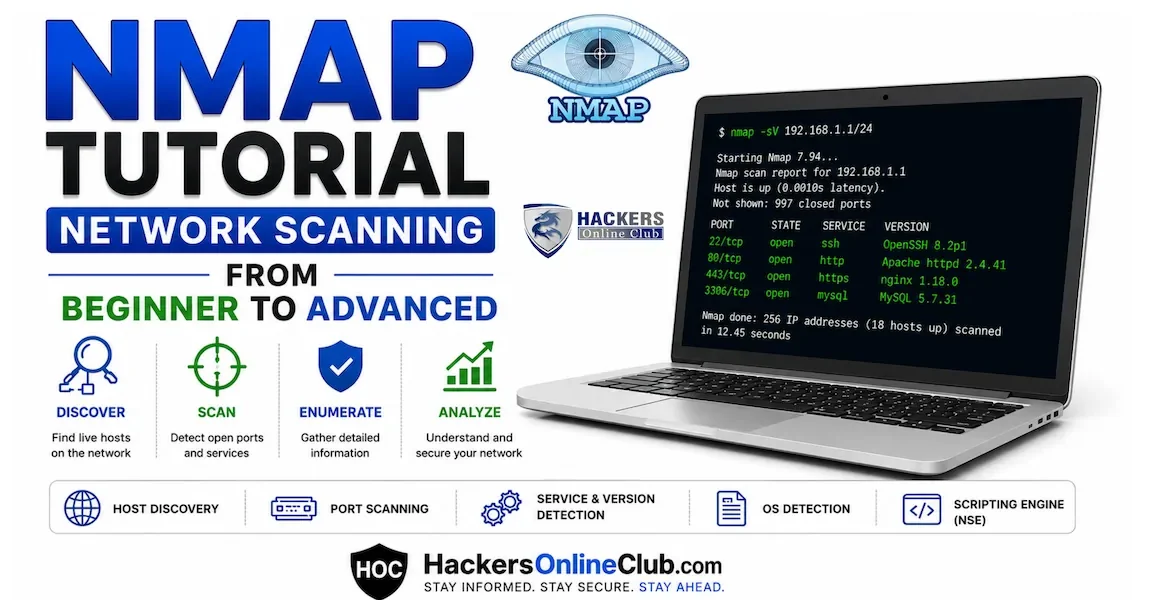
Nmap is the first tool every ethical hacker learns and the last tool they ever stop using. Whether you are running your first network scan or preparing for the OSCP exam, Nmap is the foundation everything else is built on. You cannot exploit what you cannot find — and Nmap finds everything.
This tutorial takes you from absolute zero to advanced Nmap usage. You will learn every major scan type, the essential flags that separate beginners from professionals, how to use the Nmap Scripting Engine (NSE) to automate vulnerability detection, and how to save results for your penetration test report. A complete cheatsheet is at the end. Jump to cheatsheet →
- What is Nmap and why do pentesters use it?
- How to install Nmap
- Your first Nmap scan — the basics
- Nmap scan types explained
- Essential Nmap flags every hacker must know
- OS detection and version scanning
- Nmap Scripting Engine (NSE) — automate vulnerability detection
- Saving Nmap output for reports
- Firewall evasion and stealth scanning techniques
- Complete Nmap cheatsheet
- Legal practice targets
- Frequently asked questions
Nmap (Network Mapper) is a free, open-source network discovery and security auditing tool created by Gordon Lyon (Fyodor) in 1997. It is the industry-standard tool for network scanning — used by penetration testers, sysadmins, and security researchers worldwide.
In a penetration test, Nmap answers the four most critical Phase 1 questions:
- Which hosts are alive? — discovers every live machine on a network or subnet
- What ports are open? — identifies which TCP and UDP ports are accepting connections
- What services are running? — detects the software and version behind each open port
- What OS is the target running? — fingerprints the operating system with high accuracy
Nmap comes pre-installed on Kali Linux. On other systems:
Nmap's syntax is straightforward. You give it a target and optional flags that control what it does. Let's run your first scans.
Nmap has multiple scan types, each working differently at the TCP/IP level. Understanding which to use — and why — is what separates a beginner from a professional.
The SYN scan (half-open scan) sends a SYN packet and waits for a response. If it receives SYN-ACK, the port is open — but Nmap immediately sends RST instead of completing the handshake. Because the connection is never fully established, it is harder for applications to log and faster than a full connect scan.
The TCP connect scan completes the full three-way handshake. More reliably detected by firewalls and IDS because the connection is fully established. However, it does not require root privileges — making it the default when Nmap runs as a regular user.
Most beginners only scan TCP — leaving UDP services completely undiscovered. DNS (53), SNMP (161), DHCP (67/68), and TFTP (69) all run on UDP. Some of the most critical vulnerabilities in history exploited UDP services overlooked during scanning.
These scan types exploit an edge case in the TCP RFC — closed ports must send RST in response to packets without SYN, while open ports simply drop them. This lets you probe ports without ever sending a SYN, potentially bypassing firewalls that only filter SYN packets.
Discovers which hosts are alive on a network without scanning any ports. The fastest way to map a live network before doing deeper scans.
Flags are what make Nmap powerful. Here are the ones you will use on every engagement.
Finding open ports is just the beginning. Knowing what software and OS version is running behind those ports is what enables you to find and use the right exploits.
The -sV flag probes open ports and determines the exact service name and version number. This is the most important flag for finding exploitable software versions.
Nmap analyses how the target responds to crafted packets and compares behaviour against a database of 2,600+ OS fingerprints to identify the operating system and version.
The -A flag enables OS detection, version scanning, script scanning, and traceroute all in one command. It is the most commonly used Nmap command in CTFs and professional penetration tests.
The NSE transforms Nmap from a port scanner into a vulnerability scanner. Scripts are written in Lua and perform tasks from banner grabbing to full vulnerability checks. Kali Linux ships with 600+ NSE scripts at /usr/share/nmap/scripts/.
Professional pentesters always save their Nmap output. Never re-run a scan to recover results you forgot to save. Nmap supports multiple output formats suited to different purposes.
In real penetration tests you will often encounter firewalls and IDS that block standard Nmap scans. These techniques help you gather information while minimising detection.
Step 1: sudo nmap -p- --min-rate 5000 -T4 <target> -oN allports.txt
Step 2: Extract open ports, then: sudo nmap -sV -sC -A -p 22,80,8080 <target> -oN targeted.txt
This two-phase approach is faster than any single combined scan.
Every essential Nmap command, flag, and use case. Bookmark this page or save as PDF for offline reference.
| Category | Command / Flag | What it does |
|---|---|---|
| Basic | nmap <target> | Default scan — top 1000 TCP ports |
| Basic | nmap 192.168.1.0/24 | Scan entire /24 subnet |
| Basic | nmap -iL targets.txt | Scan from a target list file |
| Host discovery | nmap -sn 192.168.1.0/24 | Ping sweep — find live hosts only |
| Host discovery | nmap -Pn <target> | Skip ping — force scan even "offline" hosts |
| Scan types | sudo nmap -sS <target> | SYN scan — stealthy, fastest TCP scan |
| Scan types | nmap -sT <target> | TCP connect scan — no root required |
| Scan types | sudo nmap -sU <target> | UDP scan — find DNS, SNMP, DHCP |
| Scan types | sudo nmap -sN <target> | NULL scan — no flags (bypass some firewalls) |
| Scan types | sudo nmap -sX <target> | Xmas scan — FIN+PSH+URG flags |
| Ports | nmap -p 80,443 <target> | Scan specific ports |
| Ports | nmap -p- <target> | Scan ALL 65535 ports |
| Ports | nmap --top-ports 100 <target> | Scan top 100 most common ports |
| Detection | nmap -sV <target> | Service and version detection |
| Detection | sudo nmap -O <target> | OS fingerprinting |
| Detection | sudo nmap -A <target> | Aggressive — OS + version + scripts + traceroute |
| Scripts | nmap -sC <target> | Run default NSE scripts |
| Scripts | nmap --script vuln <target> | Run ALL vulnerability detection scripts |
| Scripts | nmap --script smb-vuln-ms17-010 | Check for EternalBlue / MS17-010 |
| Scripts | nmap --script ftp-anon | Check for anonymous FTP login |
| Scripts | nmap --script ssl-heartbleed | Check for Heartbleed (OpenSSL) |
| Scripts | nmap --script smb-enum-shares | Enumerate SMB shares |
| Timing | nmap -T4 <target> | Fast — use in local labs and CTFs |
| Timing | nmap -T1 <target> | Slow — evades IDS rate-based detection |
| Timing | nmap --min-rate 5000 | Force minimum send rate — faster scans |
| Output | nmap -oN scan.txt | Save normal human-readable output |
| Output | nmap -oX scan.xml | Save XML output (import to Metasploit) |
| Output | nmap -oA results | Save all three formats simultaneously |
| Evasion | sudo nmap -f | Fragment packets — bypass basic firewalls |
| Evasion | sudo nmap -D RND:5 | Decoy scan — hide real IP in noise |
| Evasion | nmap --source-port 53 | Spoof source port to bypass port rules |
| Evasion | nmap --scan-delay 1s | Add delay — evades rate-based IDS |
| Verbose | nmap -v <target> | Show results live as they arrive |
| Verbose | nmap -vv <target> | Maximum verbosity |
Quick discovery: sudo nmap -sV -sC -T4 <target>
Full deep scan: sudo nmap -A -p- --min-rate 5000 -oA full-scan <target>
The best way to learn Nmap is to run it. Here are completely legal targets you can practice on right now:
- scanme.nmap.org — officially sanctioned by the Nmap project. Run any scan you like against this host. It is one of the only internet-facing machines you can scan without written permission.
- Metasploitable 2 — deliberately vulnerable Linux VM. Download free, run in VirtualBox, and practice every scan type from this tutorial. Every service on it is intentionally vulnerable — perfect for chaining Nmap output into Metasploit exploits.
- TryHackMe — free tier rooms with pre-configured vulnerable machines. The "Network Services" and "Nmap" rooms are specifically designed to practise this tutorial's content.
- HackTheBox — free "Starting Point" machines designed for beginners learning Nmap and Metasploit together.
- VulnHub — downloadable offline VM images. Run any machine in VirtualBox and practice scanning completely offline.
2. Run every scan type from Section 4 against it
3. Run sudo nmap -sV -sC --script vuln <target>
4. Note the vsftpd 2.3.4 finding in the output
5. Open Metasploit → use exploit/unix/ftp/vsftpd_234_backdoor → run
This single exercise connects Nmap directly to your first real shell — the most important skill chain in ethical hacking.
⚡ What to learn next — continue your path
- Metasploit — exploit what Nmap finds — take your scan output and turn open service versions into working shells. Full Metasploit tutorial →
- Burp Suite — web application scanning — once Nmap reveals web services, Burp Suite is the tool to attack them. Burp Suite tutorial for beginners →
- Top 20 Kali Linux commands — Nmap is command #1. See the complete toolkit. Top 20 Kali Linux commands →
- Bug bounty hunting — use Nmap for recon on in-scope targets. Bug bounty beginners guide →
Nmap is used for network discovery and security auditing. It identifies live hosts, discovers open ports, detects running services and their versions, fingerprints operating systems, and runs vulnerability-detection scripts. It is used by penetration testers, system administrators, and security researchers worldwide on every major platform.
Nmap itself is completely legal software. Running it against your own systems or systems you have explicit written permission to test is legal. Scanning unauthorised systems is illegal in most countries and can result in criminal charges. Always get written permission before scanning any network you do not own.
The best starting scan is nmap -sV -sC <target>. The -sV flag detects service versions and -sC runs default scripts that reveal common misconfigurations. This single command gives you port states, service names, versions, and script output — everything you need to begin a penetration test.
Use nmap -p- <target>. By default Nmap only scans the 1000 most common ports. The -p- flag scans all 65535 ports. This is slower but essential for finding services running on non-standard ports. Speed it up with --min-rate 5000 -T4.
A SYN scan (-sS) sends a SYN packet and never completes the TCP handshake — making it faster and stealthier. A TCP connect scan (-sT) completes the full three-way handshake, is more detectable, but does not require root privileges. Use SYN scan in labs, TCP connect when running without root.
Use sudo nmap -O <target> for OS detection. Nmap compares TCP/IP stack responses against a database of 2,600+ OS fingerprints. For more complete results, use sudo nmap -A <target> which combines OS detection, version scanning, script scanning, and traceroute all in one command.
Three ways: use -T4 on local networks, add --min-rate 5000 to force a fast send rate, and use the two-phase method — first -p- to find all open ports quickly, then a targeted -sV -sC only on the open ports. This combination is faster than any single combined scan.