


HOC Shorts |
1Password disclosed a security incident after an attacker compromised an employee’s corporate GitHub account, which 1Password began investigating.
- What Was Accessed: The attacker accessed internal CI/CD systems, copied private source code, and downloaded account records for a subset of users—including names, email addresses, account/user identifiers, timestamps, public keys, and some emailed invitation, provisioning, or recovery link tokens.
- What Stayed Safe: Stored passwords, vault items, Secret Keys, account passwords, account recovery keys, and 1Password apps and browser extensions were not accessed or compromised.
- Pro Tip: Even though your vault data is untouched, attackers now have names and email addresses for a subset of users—so watch out for convincing phishing emails, texts, or calls pretending to be 1Password.
1Password Discloses Corporate GitHub Breach: Why Your Vaults Remain Safe
Password manager 1Password has disclosed a security incident after an attacker gained access to an employee’s corporate GitHub account—a breach that opened doors to internal build pipelines and source code, while leaving customer password vaults untouched.
1Password began investigating suspicious activity tied to the account on November 19, 2026, and shared an update on November 25, 2026. While headlines about a breach at a password manager naturally raise eyebrows, the details show a clear line between internal developer systems and zero-knowledge vault encryption.
How the Breach Unfolded
From a single compromised employee GitHub account, the attacker moved into developer infrastructure rather than vault storage:
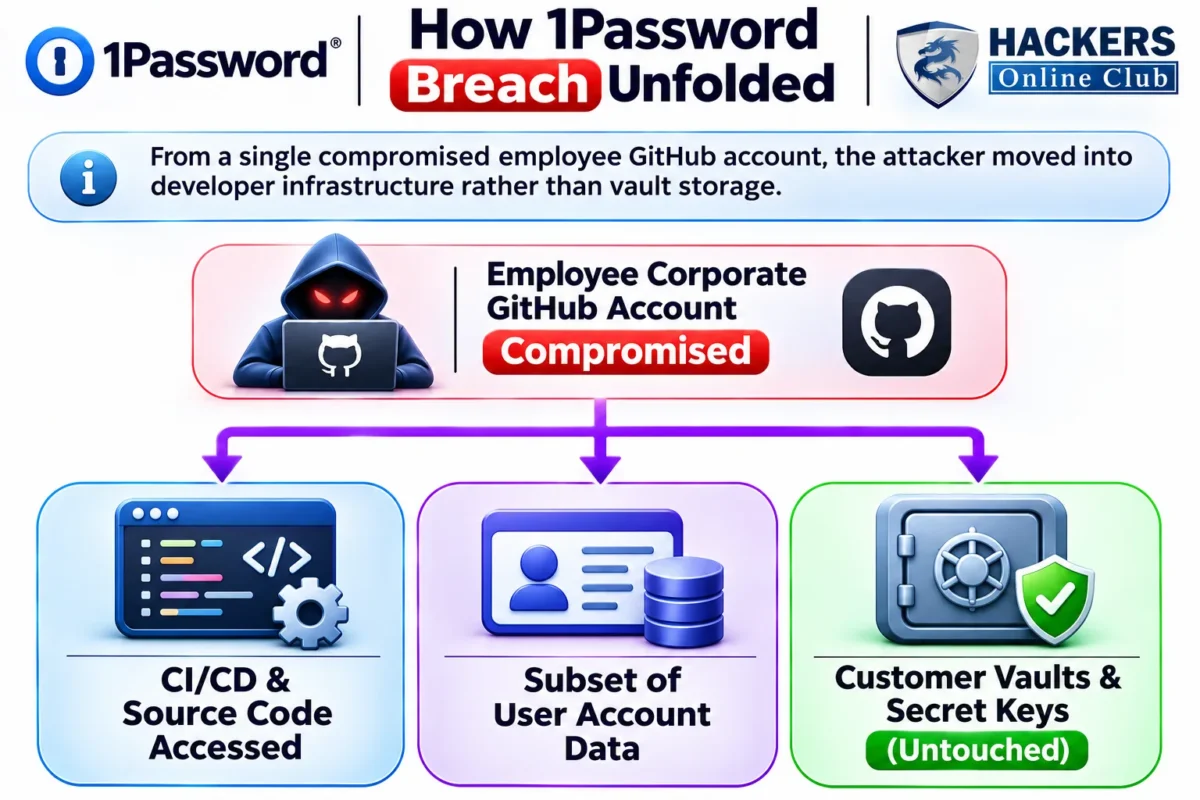
- Developer & Build Access: The attacker accessed 1Password’s continuous integration and continuous delivery (CI/CD) environment, planted malicious code on backend systems, and copied source code from private repositories.
- Account Metadata Taken: The intruder downloaded account records for a subset of users, including names, email addresses, account and user identifiers, creation and last sign-in timestamps, public keys, Secure Remote Password (SRP) parameters, internal non-secret metadata, and tokens embedded in certain emailed invitation, provisioning, or account recovery links.
- Containment & Hardening: 1Password disabled the affected GitHub account, revoked the stolen token and potentially exposed internal credentials, restored clean versions of affected services, tightened GitHub, CI/CD, and endpoint controls, and brought in independent security experts to validate remediation.
What Was Affected vs. What Stayed Safe
| Category | Status | What It Means for Users |
| Vault Passwords & Items | Safe / Not Accessed | Encrypted with keys only you hold; neither 1Password nor the attacker can read vault contents. |
| Secret Key & Account Password | Safe / Not Accessed | Not stored by 1Password and unaffected by the breach. |
| Apps & Browser Extensions | Safe / Unaffected | Official apps and extensions were not compromised. |
| Subset of User Account Records | Accessed | Includes names, email addresses, timestamps, public keys, and some emailed flow tokens. |
| Private Source Code & CI/CD | Accessed | Prompted credential rotations, service restoration, and tighter pipeline controls. |
1Password noted that emailed invitation, provisioning, or recovery tokens cannot unlock an account on their own because completing those flows requires single sign-on (SSO) or a verification code sent to the user’s registered email.
The company also reported finding no internal evidence of account takeovers using exposed tokens, notified the small group of users whose tokens were accessed, and expanded email verification codes from six numeric digits to ten alphanumeric characters to make guessing far harder.
Pro Tips for Users & Security Teams
- Pro Tip 1 — Treat Unexpected 1Password Messages as Phishing: Because names and email addresses for a subset of users were downloaded, attackers may send fake invitations, account recovery alerts, or urgent security texts/calls. Don’t click unexpected links in unsolicited messages.
- Pro Tip 2 — Never Share Your Secret Key or Master Password Outside Official Flows: 1Password will not ask you for your account password or Secret Key via email, chat, or support calls. Only enter them when you open the official app or type the official domain yourself.
- Pro Tip 3 — Audit Your Own GitHub & CI/CD Accounts: Incidents like this show how valuable a single employee developer account can be to intruders. Enforce phishing-resistant multi-factor authentication, short-lived tokens, and strict access reviews across your own repos and CI/CD runners.
- Pro Tip 4 — No Vault Reset Needed Because of This Incident: 1Password says users do not need to change their account settings solely due to this event—though keeping your recovery kit stored safely offline is always good hygiene.