
DevSecOps Tutorial: Embedding Security into CI/CD Pipelines (2026)

Devsecops Tutorial
Devsecops Tutorial
By HOC Team  |  Last updated: August 2026  |  Read time: ~25 min

In December 2020, security researchers discovered that the SolarWinds Orion build system had been compromised nine months earlier. Attackers injected malicious code into the legitimate Orion software build process — not into the source code repository, not through a vulnerability in the deployed product, but directly into the CI/CD pipeline that compiled, signed, and distributed the software.

The result: a cryptographically signed, legitimate-looking update was shipped to 18,000 customers including the US Treasury, State Department, and Pentagon. The build pipeline — trusted by everyone — was weaponised against everyone who trusted it.

The SolarWinds attack made supply chain security and CI/CD pipeline security unavoidable topics for every organisation that ships software. But the attack surface is broader than just the build system.

Every stage of the software delivery pipeline introduces security risk: source code with insecure patterns (SAST), open-source dependencies with known CVEs (SCA), deployed applications with exploitable endpoints (DAST), hardcoded credentials committed to repositories (secrets scanning), infrastructure defined as misconfigured Terraform (IaC scanning), and container images with unpatched base image vulnerabilities.

A mature DevSecOps programme addresses all of these gates, automates the checks, and integrates them into the developer workflow so security feedback arrives in seconds — not in a quarterly penetration test report.

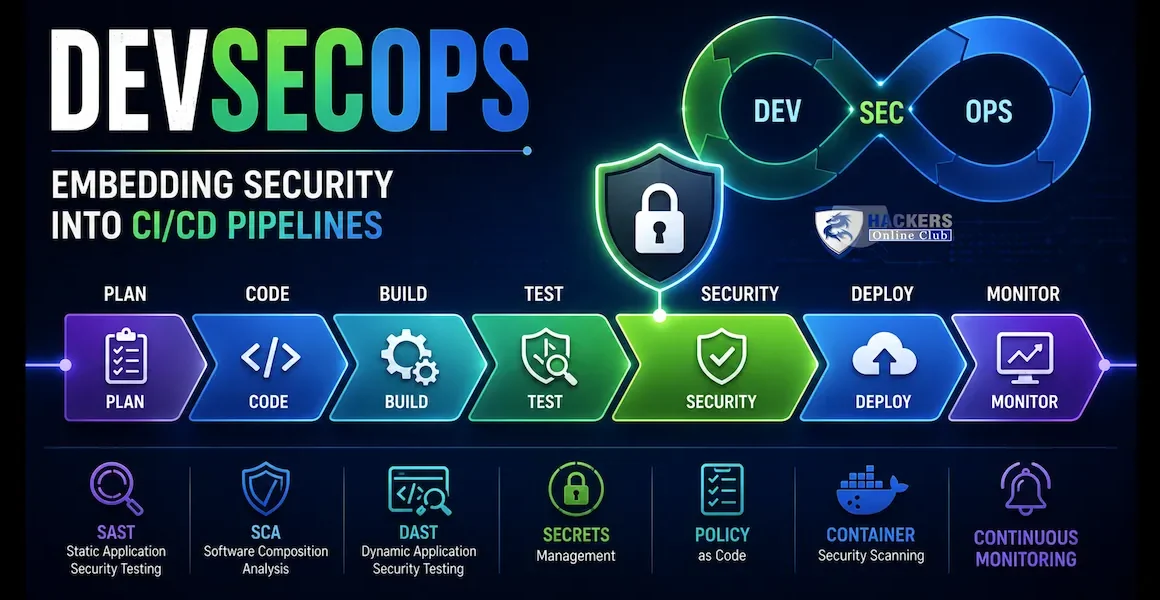
This tutorial covers the complete DevSecOps pipeline from pre-commit hooks through production monitoring: every security gate, the tools that implement it, complete pipeline configurations for GitHub Actions and GitLab CI, metrics for measuring DevSecOps maturity, and a phased implementation roadmap that lets any team start generating value on day one.

📊 DevSecOps in 2026 Cost of fixing a security bug in production: 30× more than fixing it at the design stage (IBM SSDL report) · 77% of production applications have at least one open-source vulnerability (Snyk) · Median time from vulnerability disclosure to exploitation in the wild: 12 days (Rapid7) · Organisations with mature DevSecOps reduce mean time to remediate (MTTR) by 72% vs manual security testing · 89% of developers say security slows them down — the #1 reason DevSecOps adoption fails · Only 23% of CI/CD pipelines include secrets scanning as a blocking gate
1. What is DevSecOps — shift-left security explained

DevSecOps extends the DevOps philosophy — breaking down silos between development and operations — to include security as a first-class concern at every stage of software delivery. The core principle is "shift left": move security checks as early as possible in the development lifecycle, where defects are cheapest to find and fix.

📐
The cost of finding security bugs at different stages
IBM SSDL data — fix it earlier, spend less
Stage foundRelative cost to fixWho finds itTime to fix
Design / threat model1× (baseline)Security architect + developerHours — fix the design
Pre-commit (IDE / hook)DeveloperMinutes — fix before commit
CI pipeline (SAST/SCA/secrets)10×Automated gateHours — fix to unblock the PR
QA / staging (DAST)15×Security team + DAST toolDays — triage and fix
Pre-production pentest60×Penetration testerWeeks — fix + retest + release delay
Production (breach / bug bounty)100–300×Attacker or researcherIncident response + remediation + breach costs

DevSecOps does not eliminate penetration testing or security architecture reviews — it adds automated gates that catch the vast majority of common vulnerabilities at the earliest possible stage, so that human security review focuses on logic flaws and business context that automation cannot assess.

DevSecOps pipeline — security gates at each stage from developer IDE through production monitoring
DevSecOps Pipeline — Security Gates at Every Stage IDE Pre-commit hooks 🔒 secrets COMMIT Git hook 🔒 secrets 🔒 SAST diff PR BUILD 🔒 SAST 🔒 SCA 🔒 IaC scan TEST Unit + integration 🔒 DAST (light) 🔒 API security IMAGE 🔒 Trivy scan 🔒 Cosign sign 🔒 SBOM attach STAGING Full DAST 🔒 Signature verify Admission policy DEPLOY IaC plan review 🔒 Drift detect Approval gate PRODUCTION Runtime security (Falco/WAF) Continuous vuln monitoring Alert on new CVEs in SBOM 🔒 = Blocking security gate (pipeline fails if check fails) Shift-left principle: the earlier a security issue is caught, the cheaper and faster it is to fix. Gates at IDE and Commit cost developers seconds; gates at Production cost weeks of incident response. Tools: Semgrep (SAST) · Trivy / Grype (SCA + image) · gitleaks (secrets) · OWASP ZAP (DAST) · Checkov (IaC) · Cosign (signing) · Syft (SBOM)
2. The secure CI/CD pipeline — all seven security gates
1
Pre-commit — developer IDE and git hooks
Fastest feedback — seconds, catches issues before they enter the repo
secrets detection basic SAST formatting

Pre-commit hooks run on the developer's machine before each commit is accepted. They catch the lowest-effort, highest-value issues: hardcoded credentials, obvious insecure patterns, and syntax errors. Feedback is immediate — the developer fixes the issue in their IDE without opening a browser or leaving their workflow.

Tools: pre-commit framework + detect-secrets + gitleaks + Semgrep (custom rules). Lightweight checks only — hook runtime should be under 10 seconds or developers disable them.

2
SAST — Static Application Security Testing
Analyses source code for insecure patterns without executing it
SQL injection XSS hardcoded creds insecure crypto

SAST scans source code for patterns that indicate security vulnerabilities — SQL injection via string concatenation, XSS via unsanitised output, hardcoded credentials, use of deprecated cryptographic functions, insecure deserialization, path traversal, and hundreds of other vulnerability classes. It does not run the code; it reasons about its structure.

Tools: Semgrep (fast, rule-based, language-agnostic), Bandit (Python), ESLint security plugins (JavaScript/TypeScript), SpotBugs + FindSecBugs (Java), CodeQL (GitHub native, deep semantic analysis). Block on HIGH/CRITICAL; warn on MEDIUM.

3
SCA — Software Composition Analysis
Audits open-source dependencies for known CVEs and licence issues
CVE detection licence audit transitive deps

Modern applications are 80–90% open-source code. SCA checks every direct and transitive dependency against vulnerability databases (NVD, GitHub Advisory, OSV) and flags packages with known CVEs. It also checks for licence compliance — GPL dependencies in a commercial product can create legal exposure. Unlike SAST, SCA does not read your code; it reads your dependency manifest (package.json, requirements.txt, pom.xml, go.sum).

Tools: Trivy (also does containers and IaC), Snyk (commercial, excellent developer UX with fix PRs), OWASP Dependency-Check, Grype, npm audit / pip-audit / Bundler-Audit (language-native, fast in CI). Block on CRITICAL CVEs with a fix available.

4
Secrets Scanning — blocking hardcoded credentials
Prevents API keys, tokens, and passwords from entering version control
AWS keys GitHub tokens private keys DB passwords

Hardcoded secrets in source code are one of the most consistently exploited misconfigurations — automated scanners crawl public GitHub for patterns like AWS access key prefixes (AKIA) and have bots that can compromise an account within four minutes of a key being pushed. Secrets scanning must run at both pre-commit (to catch before the commit) and in CI (to catch what pre-commit misses, and to scan git history for historical commits).

Tools: gitleaks (open-source, fast, comprehensive rule set), detect-secrets (Yelp, widely used), truffleHog (verifies if found credentials are active), GitHub Secret Scanning (native, free for public repos, push protection for private repos on Advanced Security). Block on any verified secret; warn on probable secrets.

5
IaC Security Scanning — Terraform, Helm, CloudFormation
Finds misconfigurations in infrastructure definitions before they are deployed
Terraform Helm charts CloudFormation Kubernetes YAML

Infrastructure as Code defines cloud resources, network configuration, and security controls in version-controlled files. IaC scanning finds misconfigurations before they are deployed — a public S3 bucket defined in Terraform, a security group with 0.0.0.0/0 ingress on port 22, or a Kubernetes deployment without resource limits. Finding and fixing these in a PR takes minutes; finding them after deployment via a cloud pentest takes weeks.

Tools: Checkov (Bridgecrew, 1000+ checks, supports Terraform/CF/Helm/K8s/ARM), tfsec (Terraform-focused, fast), KICS (multi-platform, Checkmarx), Terrascan, Trivy (config mode). Block on HIGH/CRITICAL; warn on MEDIUM.

6
Container Image Scanning + Signing
Scans the built image for CVEs and signs it for supply chain integrity
OS CVEs language deps Cosign sign SBOM

After the container image is built, scan it for vulnerabilities in the OS packages and language dependencies installed in the image — separate from the SCA scan of the application's manifest, this catches vulnerabilities introduced by the base image itself. Then sign the image with Cosign so admission controllers can verify the image came from a trusted pipeline before allowing it into the cluster.

Tools: Trivy (image scan), Grype (Anchore), Docker Scout, Cosign (signing, Sigstore). Block deployment if CRITICAL CVEs exist with no active exception. Attach SBOM to the image signature for provenance tracking.

7
DAST — Dynamic Application Security Testing
Tests the running application by sending actual attack payloads
OWASP Top 10 API security auth testing

DAST deploys the application into a test environment and actively probes it — sending SQL injection payloads, XSS vectors, authentication bypass attempts, and OWASP Top 10 attack patterns. Unlike SAST (which reads code), DAST can find vulnerabilities that only manifest at runtime: authentication issues, business logic flaws, CORS misconfigurations, and insecure API endpoints. Typically runs in staging; a lightweight "baseline" scan can run per-PR.

Tools: OWASP ZAP (free, scriptable, Docker-friendly CI integration), Nuclei (template-based, very fast), Burp Suite Enterprise (commercial), StackHawk (API-focused DAST, CI-native). Block on confirmed HIGH/CRITICAL findings; triage MEDIUM manually.

3. SAST — Static Application Security Testing
🔍
Semgrep — fast, rule-based SAST for any language
Open-source · runs in 10 seconds on a typical PR diff
# Install Semgrep pip install semgrep brew install semgrep # Scan with OWASP Top 10 rules — covers SQLi, XSS, SSRF, XXE, insecure deserialization semgrep --config=p/owasp-top-ten . # Scan with multiple rulesets semgrep \ --config=p/owasp-top-ten \ --config=p/secrets \ --config=p/python \ --config=p/javascript \ --output=semgrep-results.json \ --json \ . # CI-friendly output — exit 1 on any HIGH or CRITICAL finding semgrep --config=p/owasp-top-ten \ --severity=ERROR \ --error \ --json --output=results.json \ . # Write a custom Semgrep rule — example: detect SQL injection via f-string (Python) rules: - id: python-sqli-fstring patterns: - pattern: cursor.execute(f"... {$VAR} ...") - pattern-not: cursor.execute(f"... {$VAR} ...", ...) # Parameterised is OK message: > Potential SQL injection via f-string interpolation in cursor.execute(). Use parameterised queries: cursor.execute("SELECT * FROM t WHERE id = %s", (user_id,)) languages: [python] severity: ERROR metadata: cwe: CWE-89 owasp: A03:2021 - Injection # Semgrep rule — detect hardcoded AWS access key pattern rules: - id: aws-access-key-hardcoded pattern: $VAR = "AKIA..." message: Hardcoded AWS access key detected — use environment variables or AWS IAM roles languages: [python, javascript, go, java, ruby] severity: ERROR # Run only on changed files in a PR (faster CI feedback) git diff --name-only origin/main | xargs semgrep --config=p/owasp-top-ten
Language-specific SAST tools
LanguagePrimary toolSecondaryKey findings
PythonBanditSemgrep p/pythonUse of exec/eval, subprocess shell=True, use of MD5/SHA1, pickle deserialization, hardcoded passwords
JavaScript / TypeScriptESLint + eslint-plugin-securitySemgrep p/javascripteval(), innerHTML assignment, prototype pollution, RegExp DoS, dangerous crypto
JavaSpotBugs + FindSecBugsSemgrep p/javaSQL injection, XXE, SSRF, insecure deserialization (ObjectInputStream), weak crypto
GogosecSemgrep p/goHardcoded credentials, SQL injection, file path traversal, unsafe use of math/rand
RubyBrakemanSemgrep p/rubyRails-specific: mass assignment, unsafe redirects, XSS, SQL injection, command injection
C / C++FlawfinderCodeQLBuffer overflows, use of dangerous functions (gets, strcpy, sprintf), format string vulns
Any (deep)CodeQL (GitHub)Deep semantic analysis — tracks data flow across functions, finds complex multi-step vulns
SAST produces false positives — build a triage workflow from day one. A raw Semgrep scan of a large codebase may produce hundreds of findings, most of which are false positives or accepted risk. Implement a suppression mechanism (inline annotations like # nosemgrep: rule-id for intentional suppressions with a comment explaining why), a findings backlog tracked in your security ticketing system, and a severity threshold for the blocking gate (block on ERROR/CRITICAL, warn on WARNING). Start with a small high-fidelity ruleset and expand it as the team develops a feel for the tool's signal-to-noise ratio in your codebase.
4. SCA — Software Composition Analysis
📦
SCA — auditing every open-source dependency for known CVEs
77% of production apps have at least one open-source vulnerability
# Trivy — SCA for multiple ecosystems (fastest CI option) trivy fs . --scanners vuln,secret \ --severity HIGH,CRITICAL \ --exit-code 1 \ --format table # Scans: package.json, requirements.txt, go.sum, pom.xml, Gemfile.lock, Cargo.lock, etc. # --exit-code 1 = pipeline fails if HIGH or CRITICAL CVE found with a fix available # Trivy with SARIF output (uploads to GitHub Security tab) trivy fs . --scanners vuln \ --format sarif \ --output trivy-results.sarif # Grype — Anchore's standalone SCA scanner brew install anchore/grype/grype grype dir:. --fail-on high # Language-native tools (faster, narrower scope) npm audit --audit-level=high # JavaScript / Node.js pip-audit --requirement requirements.txt # Python bundle audit check --update # Ruby / Bundler mvn org.owasp:dependency-check-maven:check # Java / Maven go list -m all | nancy sleuth # Go cargo audit # Rust # OWASP Dependency-Check — comprehensive Java/Python/JS/Ruby/Go scanner docker run --rm \ -v $(pwd):/src \ owasp/dependency-check:latest \ --scan /src \ --format HTML \ --out /src/reports \ --failOnCVSS 7 # Handling false positives — suppress known accepted risks # Trivy .trivyignore file: # CVE-2023-XXXXX # False positive — we don't use the affected code path, tracked in SEC-1234 CVE-2023-44487 # HTTP/2 Rapid Reset — mitigated at load balancer level, not in app code # Snyk — commercial SCA with automated fix PRs (excellent for developer experience) npm install -g snyk snyk auth snyk test --severity-threshold=high snyk monitor # Continuous monitoring — alerts when new CVEs affect your deps
Dependency update automation — Dependabot and Renovate

SCA scanning tells you what is vulnerable. Dependency update automation fixes it automatically. Both GitHub Dependabot and Renovate Bot open pull requests to update vulnerable or outdated dependencies — the PR includes the changelog, the CVE details, and passes your CI pipeline before it reaches a reviewer. This is the most effective way to keep open-source dependencies current: the update arrives as a PR with all context, approved and merged in minutes rather than tracked in a backlog for months.

# GitHub Dependabot configuration — .github/dependabot.yml version: 2 updates: - package-ecosystem: npm directory: "/" schedule: interval: weekly day: monday time: "09:00" open-pull-requests-limit: 10 groups: dev-dependencies: patterns: ["eslint*", "jest*", "typescript*"] update-types: ["minor", "patch"] ignore: - dependency-name: "lodash" versions: ["4.x"] # Known breaking change — tracked in backlog - package-ecosystem: docker directory: "/" schedule: interval: weekly labels: ["security", "dependencies"]
5. Secrets scanning — blocking hardcoded credentials
🔑
gitleaks + truffleHog — secrets detection in code and git history
Automated bots scan public GitHub — keys are exploited within 4 minutes of commit
# gitleaks — scan the entire git history and current working tree brew install gitleaks # Scan entire repo history gitleaks detect --source . \ --report-format json \ --report-path gitleaks-report.json \ --exit-code 1 # Scan only the most recent commits (faster in CI — for PR checks) gitleaks detect --source . \ --log-opts="$(git merge-base HEAD origin/main)..HEAD" \ --exit-code 1 # Pre-commit hook setup (protects developer machine) cat > .pre-commit-config.yaml << 'EOF' repos: - repo: https://github.com/gitleaks/gitleaks rev: v8.18.4 hooks: - id: gitleaks EOF pre-commit install # truffleHog — scans AND verifies if credentials are still active pip install trufflehog trufflehog git file://. --only-verified --json # --only-verified: only reports credentials that it has confirmed are active against the API # This dramatically reduces false positives — only real, working credentials are reported # GitHub Native Secret Scanning — Push Protection (blocks the push if a secret is detected) # Enabled per-repo: Settings → Code security → Secret scanning → Enable push protection # Supports 200+ secret types: AWS, GitHub PATs, Stripe, Twilio, Slack, Azure, GCP, etc. # gitleaks custom rule — detect internal API key format [[rules]] id = "internal-api-key" description = "Acme internal API key" regex = '''acme_[a-zA-Z0-9]{32}''' tags = ["key", "acme"] severity = "CRITICAL" [[rules.allowlist]] description = "Test keys in test files" regexes = ['''acme_test[a-zA-Z0-9]{28}'''] paths = ['''.*_test\.go$''', '''.*\.test\.js$'''] # EMERGENCY: If a secret is found in git history — it must be rotated, not just deleted # git filter-repo removes the commit from history but the key is already compromised # if it was ever pushed to a shared or public repository pip install git-filter-repo git filter-repo --path secrets.env --invert-paths # Then: rotate the exposed credential IMMEDIATELY — assume it was already stolen
6. Container image scanning and signing
🐳
Trivy image scan + Cosign signing in CI/CD
Scan after build, sign before push, verify at admission
# Complete container security workflow in CI # Step 1: Build the image docker build -t myregistry.io/myapp:$COMMIT_SHA . # Step 2: Scan the built image before pushing trivy image \ --exit-code 1 \ --severity HIGH,CRITICAL \ --ignore-unfixed \ --format sarif \ --output trivy-image.sarif \ myregistry.io/myapp:$COMMIT_SHA # --ignore-unfixed: skip CVEs with no fix available (no action possible) # --exit-code 1: fail the pipeline if CRITICAL or HIGH CVEs with fixes are found # Step 3: Generate SBOM (Software Bill of Materials) for the image syft myregistry.io/myapp:$COMMIT_SHA -o spdx-json > sbom.json # Step 4: Push the image to the registry docker push myregistry.io/myapp:$COMMIT_SHA # Step 5: Sign the image with Cosign (keyless via OIDC) cosign sign --yes myregistry.io/myapp:$COMMIT_SHA # Cosign keyless: uses the GitHub Actions OIDC token to sign # Signature recorded in Rekor public transparency log # No private keys to manage or rotate # Step 6: Attach SBOM to the signed image cosign attach sbom --sbom sbom.json myregistry.io/myapp:$COMMIT_SHA cosign sign --yes --attachment sbom myregistry.io/myapp:$COMMIT_SHA # Step 7: Tag with immutable digest (not just the mutable tag) DIGEST=$(docker inspect --format='{{index .RepoDigests 0}}' myregistry.io/myapp:$COMMIT_SHA) echo "Deploy using digest: $DIGEST" # Kubernetes manifests should reference this digest, not the mutable :$COMMIT_SHA tag # Verify the signature (run in cluster admission / CD pipeline before deployment) cosign verify \ --certificate-identity-regexp="https://github.com/myorg/myapp" \ --certificate-oidc-issuer="https://token.actions.githubusercontent.com" \ myregistry.io/myapp:$COMMIT_SHA # Distroless base images — dramatically reduce attack surface # Before (debian-based): 300+ packages, 50+ CVEs in base image FROM python:3.12-slim # After (distroless): no shell, no package manager, minimal OS, ~5 packages total FROM gcr.io/distroless/python3-debian12 # Distroless images: no bash, no sh, no apt, no curl # An attacker with RCE cannot spawn a shell — no shell exists
Dockerfile best practices — reducing the attack surface
# Dockerfile security best practices FROM python:3.12-slim AS builder WORKDIR /app # Install deps as a separate layer — enables layer caching and minimal final image COPY requirements.txt . RUN pip install --no-cache-dir --user -r requirements.txt # --- Final stage: minimal runtime image --- FROM gcr.io/distroless/python3-debian12 # Run as non-root user USER nonroot:nonroot # Copy only what's needed from the builder WORKDIR /app COPY --from=builder /root/.local /root/.local COPY --chown=nonroot:nonroot src/ ./src/ # Explicitly declare entrypoint — avoids CMD injection ENTRYPOINT ["/usr/bin/python3", "src/app.py"] # No EXPOSE — let the orchestrator define network access # No ENV with secrets — use mounted secret files or runtime injection # No ADD with URLs — use COPY from verified local source only # No RUN apt-get in final stage — build deps stay in builder stage
7. Infrastructure as Code (IaC) security scanning
🏗
Checkov + tfsec — scanning Terraform, Helm, and Kubernetes manifests
Find S3 public buckets, open SGs, missing encryption before terraform apply
# Checkov — 1000+ checks across Terraform, CloudFormation, Helm, K8s, ARM, Dockerfile pip install checkov # Scan Terraform directory checkov -d ./terraform \ --framework terraform \ --output cli \ --output sarif \ --output-file-path ./checkov-report \ --soft-fail-on MEDIUM \ # Warn on MEDIUM — don't block --hard-fail-on HIGH # Block on HIGH and CRITICAL # Checkov finding examples it catches automatically: # CKV_AWS_18: S3 bucket access logging disabled # CKV_AWS_20: S3 bucket public read ACL — CRITICAL # CKV_AWS_57: S3 bucket public write ACL — CRITICAL # CKV_AWS_23: S3 bucket versioning disabled # CKV_AWS_24: RDS storage not encrypted # CKV_AWS_25: Security group with unrestricted ingress # CKV2_AWS_5: Security group not attached to any resource # CKV_K8S_30: Pod running as root # CKV_K8S_37: Container not running with AllowPrivilegeEscalation=false # Scan Helm chart checkov -d ./helm-chart \ --framework helm \ --var-file values.yaml # Scan Kubernetes manifests checkov -d ./k8s \ --framework kubernetes # tfsec — Terraform-focused, fast, opinionated brew install tfsec tfsec ./terraform \ --minimum-severity HIGH \ --format sarif \ --out tfsec-results.sarif # KICS — Keeping Infrastructure as Code Secure (Checkmarx) docker run -t -v $(pwd):/path checkmarx/kics:latest scan \ -p /path/terraform \ --report-formats sarif \ -o /path/kics-report # Suppress a specific check with a comment (when the finding is intentional) resource "aws_s3_bucket" "public_assets" { # checkov:skip=CKV_AWS_20:Public read is intentional for CDN assets — reviewed SEC-456 bucket = "acme-public-cdn" } # Terraform plan scanning — scan the plan output, not just the source # Catches more issues than source scanning (resolves variables, modules) terraform plan -out=tfplan.binary terraform show -json tfplan.binary > tfplan.json checkov -f tfplan.json --framework terraform_plan
8. DAST — Dynamic Application Security Testing
🌐
OWASP ZAP + Nuclei — active security testing against a running application
Finds what SAST cannot: runtime auth issues, CORS, API misconfigurations
# OWASP ZAP — full-featured DAST, free, Docker-friendly # Baseline scan: passive scan + basic active scan (~5 minutes, suitable for per-PR) docker run --rm \ -v $(pwd):/zap/wrk/:rw \ ghcr.io/zaproxy/zaproxy:stable \ zap-baseline.py \ -t https://staging.myapp.com \ -r zap-report.html \ -x zap-report.xml \ -I \ # Continue even if alerts are found (don't block yet) --auto # ZAP full scan — more thorough active scan for staging gates docker run --rm \ -v $(pwd):/zap/wrk/:rw \ ghcr.io/zaproxy/zaproxy:stable \ zap-full-scan.py \ -t https://staging.myapp.com \ -r zap-full-report.html \ -l HIGH \ # Alert on HIGH and above --auto # ZAP API scan — test REST APIs using OpenAPI/Swagger spec docker run --rm \ -v $(pwd):/zap/wrk/:rw \ ghcr.io/zaproxy/zaproxy:stable \ zap-api-scan.py \ -t https://staging.myapp.com/api/v1/openapi.json \ -f openapi \ -r zap-api-report.html # Nuclei — template-based DAST, extremely fast (runs 3000+ templates in seconds) brew install nuclei nuclei -u https://staging.myapp.com \ -t cves/ \ -t exposures/ \ -t misconfiguration/ \ -severity high,critical \ -o nuclei-results.txt \ -json-export nuclei-results.json # StackHawk — CI-native DAST for APIs (commercial, good GitHub Actions integration) # stackhawk.yml configuration app: applicationId: ${APP_ID} env: Staging host: https://staging.myapp.com openApiConf: filePath: ./openapi.yaml # Point to your API spec for intelligent fuzzing hawk: spider: ajaxSpider: true # Enable for SPAs / JavaScript-heavy apps failureThreshold: HIGH # Fail the pipeline if HIGH or above found # Authentication — DAST must be able to authenticate to test protected endpoints # ZAP authentication via script or Selenium session zap-baseline.py \ -t https://staging.myapp.com \ -z "-config replacer.full_list(0).description=auth \ -config replacer.full_list(0).enabled=true \ -config replacer.full_list(0).matchtype=REQ_HEADER \ -config replacer.full_list(0).matchstr=Authorization \ -config replacer.full_list(0).replacement=Bearer\ $DAST_TOKEN"
9. Complete GitHub Actions security pipeline
Full DevSecOps pipeline — GitHub Actions workflow
Copy, adapt, and deploy — all tools are free and open-source
# .github/workflows/devsecops.yml # Complete security pipeline: SAST + SCA + Secrets + IaC + Container scan + Sign name: DevSecOps Security Pipeline on: push: branches: [main, develop] pull_request: branches: [main] permissions: contents: read security-events: write # Required for uploading SARIF to GitHub Security tab id-token: write # Required for Cosign keyless signing via OIDC packages: write # Required for pushing to GHCR jobs: # ─── JOB 1: SAST + Secrets ──────────────────────────────────────────────── sast-and-secrets: name: SAST + Secrets Scanning runs-on: ubuntu-latest steps: - uses: actions/checkout@v4 with: fetch-depth: 0 # Full history for gitleaks history scan - name: Semgrep SAST uses: semgrep/semgrep-action@v1 with: config: >- p/owasp-top-ten p/secrets p/python p/javascript generateSarif: "1" env: SEMGREP_APP_TOKEN: ${{ secrets.SEMGREP_APP_TOKEN }} - name: Upload Semgrep SARIF to GitHub Security uses: github/codeql-action/upload-sarif@v3 with: sarif_file: semgrep.sarif - name: gitleaks — secrets detection uses: gitleaks/gitleaks-action@v2 env: GITHUB_TOKEN: ${{ secrets.GITHUB_TOKEN }} GITLEAKS_ENABLE_COMMENTS: true # Post PR comment with findings # ─── JOB 2: SCA (open-source dependency audit) ─────────────────────────── sca: name: Software Composition Analysis runs-on: ubuntu-latest steps: - uses: actions/checkout@v4 - name: Trivy SCA — filesystem scan uses: aquasecurity/trivy-action@master with: scan-type: fs scan-ref: . scanners: vuln,secret severity: HIGH,CRITICAL exit-code: '1' ignore-unfixed: true format: sarif output: trivy-fs.sarif - name: Upload Trivy SARIF to GitHub Security uses: github/codeql-action/upload-sarif@v3 with: sarif_file: trivy-fs.sarif # ─── JOB 3: IaC Scanning ───────────────────────────────────────────────── iac-scan: name: IaC Security Scan runs-on: ubuntu-latest steps: - uses: actions/checkout@v4 - name: Checkov IaC scan uses: bridgecrewio/checkov-action@master with: directory: . framework: terraform,kubernetes,helm,dockerfile output_format: sarif output_file_path: checkov.sarif soft_fail: true # Set to false to block on findings skip_check: CKV_AWS_18,CKV_GIT_1 # Skip accepted findings - name: Upload Checkov SARIF uses: github/codeql-action/upload-sarif@v3 with: sarif_file: checkov.sarif # ─── JOB 4: Container scan + sign ──────────────────────────────────────── container-security: name: Container Security runs-on: ubuntu-latest needs: [sast-and-secrets, sca] # Only build image if code is clean if: github.ref == 'refs/heads/main' outputs: image-digest: ${{ steps.build.outputs.digest }} steps: - uses: actions/checkout@v4 - name: Set up Docker Buildx uses: docker/setup-buildx-action@v3 - name: Login to GHCR uses: docker/login-action@v3 with: registry: ghcr.io username: ${{ github.actor }} password: ${{ secrets.GITHUB_TOKEN }} - name: Build and push image id: build uses: docker/build-push-action@v5 with: context: . push: true tags: ghcr.io/${{ github.repository }}:${{ github.sha }} cache-from: type=gha cache-to: type=gha,mode=max - name: Trivy image scan uses: aquasecurity/trivy-action@master with: image-ref: ghcr.io/${{ github.repository }}:${{ github.sha }} severity: HIGH,CRITICAL exit-code: '1' ignore-unfixed: true format: sarif output: trivy-image.sarif - name: Upload image scan SARIF uses: github/codeql-action/upload-sarif@v3 with: sarif_file: trivy-image.sarif - name: Generate SBOM with Syft uses: anchore/sbom-action@v0 with: image: ghcr.io/${{ github.repository }}:${{ github.sha }} format: spdx-json output-file: sbom.spdx.json - name: Install Cosign uses: sigstore/cosign-installer@v3 - name: Sign image (keyless OIDC) run: | cosign sign --yes \ ghcr.io/${{ github.repository }}@${{ steps.build.outputs.digest }} - name: Attach SBOM to signed image run: | cosign attach sbom \ --sbom sbom.spdx.json \ ghcr.io/${{ github.repository }}@${{ steps.build.outputs.digest }} cosign sign --yes --attachment sbom \ ghcr.io/${{ github.repository }}@${{ steps.build.outputs.digest }} # ─── JOB 5: DAST (staging) ─────────────────────────────────────────────── dast: name: DAST — Dynamic Testing runs-on: ubuntu-latest needs: [container-security] if: github.ref == 'refs/heads/main' steps: - uses: actions/checkout@v4 - name: Deploy to staging run: | # Deploy the signed image to staging environment kubectl set image deployment/myapp \ app=ghcr.io/${{ github.repository }}@${{ needs.container-security.outputs.image-digest }} \ -n staging - name: Wait for staging to be ready run: kubectl rollout status deployment/myapp -n staging --timeout=120s - name: OWASP ZAP baseline scan uses: zaproxy/action-baseline@v0.12.0 with: target: https://staging.myapp.com rules_file_name: .zap/rules.tsv issue_title: ZAP Scan Report fail_action: false # Set to true to block on HIGH findings - name: Upload ZAP report uses: actions/upload-artifact@v4 with: name: zap-report path: report_html.html
GitLab CI equivalent — .gitlab-ci.yml
# .gitlab-ci.yml — GitLab CI DevSecOps pipeline (uses GitLab native security templates) include: - template: Security/SAST.gitlab-ci.yml # GitLab-native SAST (Semgrep-based) - template: Security/Secret-Detection.gitlab-ci.yml - template: Security/Dependency-Scanning.gitlab-ci.yml - template: Security/Container-Scanning.gitlab-ci.yml - template: Security/DAST.gitlab-ci.yml stages: [test, build, scan, dast, deploy] variables: SAST_EXCLUDED_PATHS: "spec, test, tests, tmp" CONTAINER_SCANNING_IMAGE: $CI_REGISTRY_IMAGE:$CI_COMMIT_SHA DAST_WEBSITE: https://staging.myapp.com DS_PYTHON_VERSION: "3" # Custom IaC scan job — GitLab template doesn't include Checkov iac-checkov: stage: scan image: bridgecrew/checkov:latest script: - checkov -d . --framework terraform,kubernetes --output cli --output sarif --output-file-path ./checkov-report --soft-fail-on MEDIUM artifacts: reports: sast: checkov-report/results_sarif.sarif paths: [checkov-report/] # Enforce approval for any security findings before merge # Project → Settings → Merge Requests → Security Approvals: # Require 1 security team approval if vulnerability report finds HIGH+
10. SBOM — Software Bill of Materials

A Software Bill of Materials (SBOM) is a complete inventory of every component in a software product — every library, package, and dependency, with its version and licence. SBOMs became mandatory for US federal software vendors under the 2021 Executive Order on Cybersecurity and are increasingly required by enterprise procurement contracts. In DevSecOps, SBOMs enable continuous vulnerability monitoring: when a new CVE is published, you can immediately query your SBOM inventory to determine which deployed applications are affected — rather than manually checking each application's dependencies.

# Syft — generate SBOM for containers, filesystems, directories brew install syft # Generate SBOM in SPDX format (Linux Foundation standard) syft myregistry.io/myapp:1.0.0 -o spdx-json > sbom-spdx.json # Generate in CycloneDX format (OWASP standard) syft myregistry.io/myapp:1.0.0 -o cyclonedx-json > sbom-cyclonedx.json # Generate SBOM for a directory (application source) syft dir:./src -o spdx-json > sbom-src.json # Use Grype to scan an existing SBOM for vulnerabilities (faster than re-scanning image) grype sbom:./sbom-spdx.json --fail-on high # Key use case: new CVE published → scan all stored SBOMs to find affected services # CI generates SBOM → store in artefact store → query when new CVEs are published # Trivy generate and scan SBOM in one step trivy image --format cyclonedx --output sbom.json myregistry.io/myapp:1.0.0 trivy sbom sbom.json --severity HIGH,CRITICAL # Dependency-Track — open-source SBOM management platform # Ingests SBOMs, tracks vulnerabilities, sends alerts when new CVEs affect your inventory docker run -d --name dependency-track \ -p 8080:8080 \ dependencytrack/bundled # Upload SBOMs via REST API from CI/CD: curl -X POST http://localhost:8080/api/v1/bom \ -H "X-Api-Key: YOUR_API_KEY" \ -F "project=myapp-production" \ -F "bom=@sbom-cyclonedx.json" # Dependency-Track alerts you via webhook/email when a new CVE matches any known component
💡 SBOM as a continuous monitoring foundation Generate an SBOM for every released artifact and store it alongside the artifact in your registry. When a critical vulnerability like Log4Shell is published, query your SBOM inventory with a single Grype command across all stored SBOMs to find every affected service, version, and deployment environment in under a minute — rather than spending days manually checking each application's dependencies. This transforms vulnerability response from a manual investigation into an automated query.
11. DevSecOps maturity model and metrics
LEVEL 0
Ad-hoc
  • Security tested only at year-end pentest
  • No automated security gates
  • Secrets committed to git regularly
  • CVEs discovered by attackers
  • No SBOM or dependency tracking
LEVEL 1
Initial
  • Secrets scanning in CI (non-blocking)
  • npm audit / pip-audit on merge
  • Basic SAST on main branch
  • Manual CVE triage monthly
  • Quarterly pentest
LEVEL 2
Defined
  • Blocking SAST + SCA + secrets on every PR
  • Container image scanning before push
  • IaC scanning in pipeline
  • Dependabot for auto-update PRs
  • DAST on staging pre-release
LEVEL 3
Managed
  • All gates blocking on HIGH+
  • Image signing + admission policy
  • SBOM generated and stored per release
  • Falco runtime detection in prod
  • Security metrics tracked (MTTR, escape rate)
LEVEL 4
Optimising
  • SBOM-driven CVE alerting across all services
  • Custom SAST rules per business logic
  • Automated MTTR SLA enforcement
  • Threat modelling integrated in design
  • Security champions in every team
📊
DevSecOps metrics — what to measure
Metrics drive behaviour — choose carefully
MetricDefinitionTargetAnti-pattern to avoid
Mean Time to Remediate (MTTR)Average time from vulnerability discovery to fix deployed to productionCRITICAL: <24h · HIGH: <7d · MEDIUM: <30dClosing tickets without fixing — "won't fix" abuse
Security debt ratioOpen HIGH/CRITICAL findings / total codebase size (findings per KLOC)Trending toward zero; reduce 10% per quarterMeasuring absolute count (growing codebase inflates)
Pipeline gate escape rate% of security findings discovered in production that were not caught by CI gates<5% — most findings should be caught before prodMeasuring only CI gate findings (misses prod escapes)
Time to detect (TTD)Time from vulnerability introduction to detection in CI<1h for committed code (next pipeline run)Using pentest as the detection mechanism (months)
SAST false positive rate% of SAST findings that are confirmed false positives<30% — high FP rates cause developers to ignore findingsMeasuring suppressed findings (teams suppress to meet quota)
Dependency freshness% of dependencies within N versions of current release>85% within 2 major versionsIgnoring transitive (indirect) dependencies
30×
more expensive to fix a security bug in production vs design stage
72%
reduction in MTTR for organisations with mature DevSecOps vs manual testing
12 days
median time from CVE disclosure to active exploitation in the wild (2025)
23%
of CI/CD pipelines include secrets scanning as a blocking gate — 77% do not

⚡ Start your DevSecOps pipeline — in priority order

  1. Add secrets scanning today — it takes 15 minutes and stops the most embarrassing breach type. Add gitleaks to your CI pipeline with three lines of GitHub Actions YAML (see Job 1 in Section 9). Enable GitHub Secret Scanning push protection on all repositories (Settings → Code security → Secret scanning → Push protection). Run a one-time historical scan with gitleaks detect --source . --log-opts=--all on all repositories — you may find previously committed credentials that need immediate rotation.
  2. Add Trivy SCA to every PR build — blocks CVEs with 4 lines of YAML. The GitHub Actions snippet in Section 4 adds Trivy filesystem scanning with SARIF upload to your GitHub Security tab. Start with --exit-code 0 (warn only) for the first two weeks while you triage existing findings and add .trivyignore suppressions for accepted risks, then flip to --exit-code 1 to make it blocking.
  3. Enable Semgrep SAST on pull requests — free for open-source, $0 for up to 1 developer. The Semgrep GitHub Action in Section 9 runs p/owasp-top-ten rules on every PR diff and posts findings directly in the PR as review comments. Start with warning mode, baseline the existing findings, then enable blocking on new findings only. This does not slow the developer — it runs in parallel with the build, and most PRs will have zero findings.
  4. Add Checkov IaC scanning to your Terraform PRs. If your team writes Terraform or Helm charts, Checkov catches public S3 buckets, open security groups, missing encryption, and 1000+ other misconfigurations before they reach a terraform apply. The GitHub Action in Section 7 uploads findings to GitHub Security. A typical Terraform directory passes its first Checkov scan with 5–20 findings that take an afternoon to review and suppress or fix.
  5. Extend to the full pipeline over 90 days. Secrets + SCA + SAST + IaC scanning is Level 2 maturity — covering the most common, most impactful findings automatically. From there, add container image scanning and Cosign signing (Section 6), DAST for your staging environment (Section 8), SBOM generation for every release (Section 10), and Falco runtime detection in your Kubernetes cluster. Kubernetes security → | Supply chain attacks → | Vulnerability management →
Frequently asked questions
What is DevSecOps and how does it differ from traditional security?

DevSecOps integrates security controls directly into the software development and delivery pipeline — at the IDE, commit, pull request, build, test, and deployment stages — rather than treating security as a separate gate at the end of the release cycle. Traditional security typically involves a penetration test or security review shortly before production release. DevSecOps catches the same vulnerabilities (and more) at the earliest possible stage, where fixes take minutes instead of weeks, and remediation does not require a release delay. The principle is "shift left" — move security checks earlier in the lifecycle. IBM research shows bugs fixed at the design stage cost 1× to remediate; the same bug found in production costs 30–300×. DevSecOps does not replace penetration testing — it complements it by ensuring automated tools handle the high-volume common vulnerabilities, leaving human security review to focus on logic flaws and business context that automation cannot assess.

What is the difference between SAST and DAST?

SAST (Static Application Security Testing) analyses source code without executing it, looking for insecure patterns — SQL injection via string concatenation, hardcoded credentials, use of deprecated crypto libraries, path traversal. It runs at the PR stage, takes seconds to minutes, and catches issues before the code is built or deployed. It cannot find runtime issues. DAST (Dynamic Application Security Testing) runs against a deployed, running application — sending actual attack payloads and observing responses. It finds runtime vulnerabilities that SAST cannot: authentication bypass, CORS misconfigurations, insecure API endpoints, business logic flaws, and issues that only manifest when the full application stack is running. DAST runs in staging and is slower (minutes to hours for a full scan). A complete DevSecOps pipeline uses both: SAST gates at the PR level for fast feedback, DAST gates in staging before production deployment.

What is Software Composition Analysis (SCA) and why does it matter?

SCA audits every open-source dependency — direct and transitive — against known vulnerability databases to find packages with published CVEs. Modern applications are 80–90% open-source code, and 77% of production applications have at least one open-source vulnerability. SCA does not read your application code; it reads the dependency manifest (package.json, requirements.txt, pom.xml, go.sum) and checks each package against NVD, GitHub Advisory Database, and OSV. Tools like Trivy, Snyk, and Grype produce a list of vulnerable packages with CVE IDs, CVSS scores, affected version ranges, and fixed versions. SCA findings are generally easier to fix than SAST findings — update the dependency version — making automated fix PRs via Dependabot or Renovate highly effective. Block on CRITICAL CVEs that have a fix available; track the rest in a security backlog with SLA-based remediation deadlines.

How do I handle SAST false positives without slowing down developers?

False positives in SAST are inevitable — even the best tools produce 20–40% false positive rates on first deployment. The key is building a suppression workflow from day one rather than trying to achieve zero false positives. First, use inline suppression annotations (Semgrep: # nosemgrep: rule-id) with a mandatory comment explaining why the suppression is legitimate — this creates an auditable record and discourages blanket suppression. Second, establish a triage process where security team reviews suppression PRs, not developers self-approving. Third, set the blocking threshold high (ERROR/CRITICAL only) and put WARNING findings in a non-blocking advisory report — developers see them but are not blocked by them. Fourth, regularly review the suppressed findings list for drift — a suppression that was valid six months ago may no longer apply after a code refactor. Finally, choose a SAST tool that allows team-level configuration files (.semgrepignore, .bandit) so suppressions are version-controlled and auditable.

What is an SBOM and who needs one?

An SBOM (Software Bill of Materials) is a complete inventory of every software component in a product — every library, package, dependency, and operating system package — with version numbers, licences, and provenance information. It is the software equivalent of an ingredient list. SBOMs are required for US federal government software vendors (Executive Order 14028, 2021) and increasingly mandated by enterprise security procurement requirements (PCI DSS, NIST SP 800-218). In DevSecOps, SBOMs enable continuous vulnerability monitoring: when a new CVE is published (like Log4Shell), teams with SBOMs can query their entire inventory in seconds to identify every affected service and version — rather than spending days manually checking application dependencies. Tools: Syft (generates SBOMs for containers and filesystems), Cosign (attaches SBOMs to container image signatures), Dependency-Track (open-source SBOM management platform with CVE alerting). Generate SBOMs in SPDX or CycloneDX format — both are open standards with broad tooling support.

How do I get buy-in from developers for DevSecOps?

Developer resistance to DevSecOps is almost always driven by one of three things: slow pipelines, high false positive rates, or lack of actionable context in findings. Address each directly. For speed: run security scans in parallel with the build (not sequentially), use incremental scanning on PR diffs rather than full-repo scans, and set a target of under 3 minutes for all security gates combined. For false positives: start all new tools in warning (non-blocking) mode for 2–4 weeks, triage aggressively, configure suppressions, then enable blocking only when the signal-to-noise ratio is acceptable. For actionable context: configure tools to post PR review comments with the finding, the CWE, and a concrete remediation example — a developer who receives "SQL injection in user.py line 42: use parameterised queries, example: cursor.execute('%s', (user_input,))" fixes it immediately; a developer who receives "SEMGREP: python.lang.security.audit.sqli" files a ticket and moves on. Security champions — senior developers in each team who own security culture — are the most effective long-term solution to adoption resistance.

About the author Written by the HOC Team at Hackers Online Club — a cybersecurity community trusted by DevSecOps engineers, platform engineers, application security teams, and security professionals since 2010. 15+ years of practical cybersecurity guides, CI/CD security tutorials, and secure development resources. Learn more about HOC →