


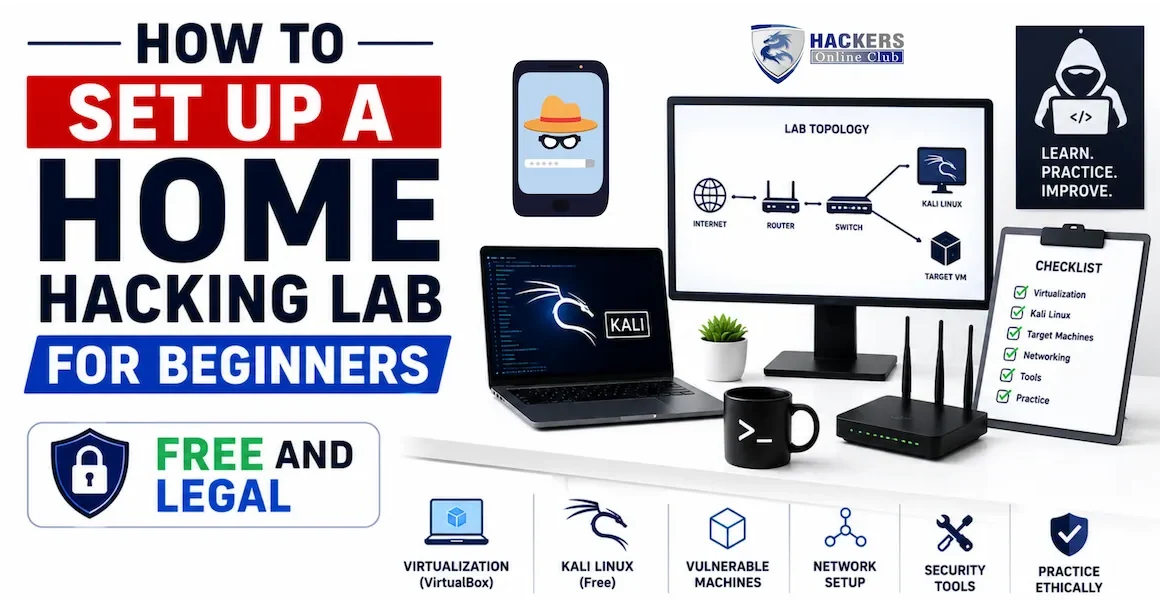
Every ethical hacker, penetration tester, and security researcher needs a place to practise — a controlled environment where they can run attacks, break things, and learn from the results without touching systems they do not own. That environment is a home hacking lab. Building one is free, takes an afternoon, and is one of the most important things you can do to accelerate your security skills.
This guide walks through building a complete home lab from scratch: selecting hardware, installing VirtualBox, setting up Kali Linux as your attacking machine, configuring deliberately vulnerable VMs as targets (Metasploitable 2, DVWA, VulnHub machines), creating an isolated network so nothing spills onto the internet, and a set of first exercises to run the moment your lab is ready. Everything here is free and completely legal — you are attacking machines you own, in a network you control.
- What you need — hardware requirements and free software
- Lab architecture — how the pieces fit together
- Step 1 — Install VirtualBox
- Step 2 — Set up Kali Linux (attacker machine)
- Step 3 — Configure an isolated host-only network
- Step 4 — Add Metasploitable 2 (first target)
- Step 5 — Add DVWA (web application target)
- Step 6 — Add VulnHub machines (unlimited targets)
- Step 7 — Cloud labs (no hardware required)
- Step 8 — Your first attacks — what to try first
- Troubleshooting common lab setup issues
- Frequently asked questions
| Component | Minimum (works) | Recommended (comfortable) | Why it matters |
|---|---|---|---|
| RAM | 8 GB | 16 GB | Running 2–3 VMs simultaneously needs headroom. Kali needs 2GB, each target VM needs 512MB–1GB. |
| CPU | 4-core, any modern processor | 6–8 core with virtualisation support | Virtualisation extensions (Intel VT-x / AMD-V) must be enabled in BIOS. Check: most CPUs since 2012 support this. |
| Storage | 50 GB free | 100–200 GB free (SSD preferred) | Kali VM ≈ 20GB, each target VM ≈ 5–8GB, snapshots add more. SSD makes VM boot and tool execution much faster. |
| OS (host) | Windows 10/11, macOS, Linux | Any of the above | VirtualBox runs on all three. If your host is Linux, performance is slightly better. Windows is most common. |
| Internet | Any broadband | Any broadband | Only needed to download the initial VMs. The lab itself runs offline. |
- VirtualBox — the hypervisor that runs all your VMs. Free, open-source, runs on Windows/macOS/Linux. virtualbox.org
- VirtualBox Extension Pack — adds USB 3.0, RDP, and disk encryption support. Free for personal use. Download from the same page.
- Kali Linux — pre-built VirtualBox image (~3 GB). Download from kali.org/get-kali — choose "VirtualBox" under Virtual Machines.
- Metasploitable 2 — intentionally vulnerable Linux VM (~900 MB). Download from sourceforge.net/projects/metasploitable
- DVWA (Damn Vulnerable Web Application) — can be run inside Metasploitable 2 (already included) or as a standalone Docker container on Kali.
- VulnHub machines — hundreds of free downloadable VMs of varying difficulty. vulnhub.com
Download the pre-built VirtualBox image from kali.org — this is the fastest way to get a working Kali VM. The image imports directly into VirtualBox in minutes and comes with all 600+ tools pre-installed and configured.
Metasploitable 2 is a Linux server deliberately configured with 20+ known vulnerabilities across every major service category. It is the closest thing to a real production server with real vulnerabilities you can practice on legally. It ships with vsftpd 2.3.4 (backdoor), Samba usermap script vulnerability, UnrealIRCd backdoor, PHP CGI argument injection, and many more — all exploitable with Metasploit Framework modules.
DVWA is a PHP/MySQL web application deliberately built with every major OWASP vulnerability class. It is already installed on Metasploitable 2 — access it from Kali's browser at http://192.168.56.102/dvwa. It has four difficulty levels: Low (no defences — learn the attack), Medium (basic defences — learn to bypass), High (stronger defences — more advanced bypasses), and Impossible (the correct secure implementation — learn what good looks like).
- Brute Force — use Burp Suite Intruder to brute-force the login with a wordlist. Start here — teaches you Burp workflow.
- Command Injection — inject OS commands into the ping tool. Classic beginner vulnerability.
- SQL Injection — manual SQLi, then automated with sqlmap. The most important web vulnerability class to understand.
- SQL Injection (Blind) — same as above but without visible error output. Teaches inference-based exploitation.
- XSS (Reflected) — inject JavaScript into a reflected input field.
- XSS (Stored) — inject JavaScript that persists in the database and fires for every visitor.
- File Upload — upload a PHP webshell disguised as an image. Classic way to get code execution on web servers.
- CSRF — craft a malicious link that changes the victim's password when clicked.
VulnHub is a community repository of downloadable vulnerable VMs — each designed as a CTF-style challenge where your goal is to find a foothold, escalate privileges, and capture a root flag. With 800+ machines ranging from absolute beginner to expert level, it provides essentially unlimited practice material for every skill level.
| Machine | Difficulty | What you practise | Download |
|---|---|---|---|
| Mr. Robot: 1 | ⭐⭐ Easy–Medium | Web enumeration, WordPress exploitation, privilege escalation via SUID | vulnhub.com/entry/mr-robot-1,151/ |
| Kioptrix: Level 1 | ⭐ Easy | Nmap scanning, Samba exploitation with Metasploit, first root shell | vulnhub.com/entry/kioptrix-level-1-1,22/ |
| Basic Pentesting: 1 | ⭐ Easy | Enumeration, FTP exploitation, SSH brute force, privilege escalation | vulnhub.com/entry/basic-pentesting-1,216/ |
| DC: 1 | ⭐⭐ Easy–Medium | Drupal exploitation, Python reverse shell, Linux privilege escalation | vulnhub.com/entry/dc-1,292/ |
| SkyTower: 1 | ⭐⭐ Medium | SQL injection for login bypass, SSH tunnelling, privilege escalation | vulnhub.com/entry/skytower-1,96/ |
If your hardware does not meet the requirements for running VMs locally, or you want additional practice environments, these cloud-based labs provide browser-accessible hacking environments with zero setup:
| Platform | Free tier | Best for | URL |
|---|---|---|---|
| TryHackMe | ✅ Many free rooms | Structured learning paths, guided challenges, perfect for complete beginners. "Pre-Security", "Jr Penetration Tester", and "SOC Level 1" paths are excellent free starting points. | tryhackme.com |
| HackTheBox | ✅ 2 free active machines | Realistic CTF-style machines at every difficulty. More challenging than TryHackMe — work through TryHackMe basics first. HTB Academy has free modules. | hackthebox.com |
| PortSwigger Web Security Academy | ✅ Completely free | The gold standard for web application security labs. Every OWASP vulnerability class has interactive labs that can be solved directly in the browser. Essential for bug bounty preparation. | portswigger.net/web-security |
| PentesterLab | ✅ Free exercises | Web vulnerability exercises from beginner to advanced. SQLi, XSS, file inclusion, deserialization — all hands-on with real applications. | pentesterlab.com |
| OWASP WebGoat | ✅ Free (Docker) | Runs locally in Docker — a deliberately insecure Java application with lessons and interactive challenges for each vulnerability. docker pull webgoat/webgoat | owasp.org/WebGoat |
| Hack The Box Sherlocks | ✅ Some free | Blue team / DFIR challenges — PCAP analysis, log forensics, malware triage. Good for SOC analyst skill building alongside offensive work. | hackthebox.com/sherlocks |
Your lab is up and running. Here is an ordered sequence of first exercises that progressively build from reconnaissance to exploitation — all on Metasploitable 2.
| Problem | Cause | Fix |
|---|---|---|
| VM fails to start: "VT-x is disabled in BIOS" | Hardware virtualisation not enabled | Restart PC → BIOS → find "Intel VT-x" or "AMD-V" → Enable → Save |
| Kali has no internet on eth0 | NAT adapter not configured | VM Settings → Network → Adapter 1 → Attached to: NAT → OK → restart VM |
| Can't ping Metasploitable from Kali | Host-only network not created, or target VM using wrong adapter | Check both VMs are on the same vboxnet0 adapter; run nmap -sn 192.168.56.0/24 from Kali to discover the target's actual IP |
| DVWA shows "Could not connect to the database" | Database not initialised | Navigate to http://[IP]/dvwa/setup.php and click "Create / Reset Database" |
| Metasploitable IP not known | DHCP assigned a different address | Log into Metasploitable console → run ifconfig; or from Kali run nmap -sn 192.168.56.0/24 |
| Kali resolution stuck at 640x480 | Guest Additions not installed | sudo apt install virtualbox-guest-x11 -y && sudo reboot |
| VulnHub VM gets no IP | DHCP server not running or wrong adapter | Confirm the VM is on vboxnet0 host-only network; check DHCP is enabled in VirtualBox Network Manager |
| Metasploit exploit fails / "Exploit completed, but no session" | Wrong RHOSTS or target patched | Verify target IP is correct; run nmap -sV [IP] -p [port] to confirm the vulnerable service version is present |
| Apple Silicon: VMs very slow | x86 emulation on ARM | Use UTM with ARM-based Kali, or switch to TryHackMe / HackTheBox cloud labs which have no hardware requirements |
⚡ Your lab is ready — here's what to do next
- Work through all DVWA modules at Low, then Medium difficulty — command injection, SQLi, XSS, file upload, CSRF. Each one teaches a real vulnerability class you will find in bug bounty programmes. Start today — your lab is ready.
- Learn Nmap properly — everything in your lab starts with a scan. Understanding every Nmap flag, scan type, and output format makes every subsequent step more effective. Complete Nmap tutorial →
- Master Burp Suite for web testing — the Proxy, Repeater, and Intruder tabs are essential for DVWA and every web vulnerability you will find. Burp Suite tutorial →
- Download and root your first VulnHub machine — start with Kioptrix Level 1. It is designed for absolute beginners and teaches the complete attack chain: scan → identify vulnerability → exploit with Metasploit → root shell. vulnhub.com/entry/kioptrix-level-1-1,22/
- Move to bug bounty hunting when ready — your home lab builds the skills; bug bounty programmes let you apply them legally on real targets for real money. Bug bounty guide for beginners →
- Understand what real vulnerabilities look like — the CVEs you exploit in your lab are based on real-world vulnerabilities. 10 real-world CVEs explained →
Completely legal. Everything in your home lab — Kali Linux, Metasploitable 2, DVWA, and VulnHub machines — are systems you own and control. You have full permission to attack them. The isolated host-only network means your attack traffic never leaves your machine. Setting up and using a home lab is not only legal but actively encouraged by the security community as the correct way to build hands-on skills.
Yes, with some care. Allocate 2 GB to Kali Linux and 512 MB to your target VM, leaving the rest for your host operating system. Run only one target VM at a time. Close your browser and other applications while the lab is running. On 8 GB you cannot run multiple VMs simultaneously, but for most exercises you only need one target running at once. If 8 GB is too tight, the cloud lab options (TryHackMe, HackTheBox, PortSwigger Academy) work on any hardware through a browser.
VirtualBox is completely free for all use cases including commercial, while VMware Workstation Pro requires a paid licence on Windows and Linux (VMware Fusion is free on macOS). Kali Linux provides pre-built VirtualBox images that import with one click. For a beginner home lab, VirtualBox is the recommended choice. If your organisation uses VMware, the concepts are identical — just the UI differs slightly. On Apple Silicon, VMware Fusion is actually the better choice for native ARM performance.
Metasploitable 2 is a full Linux server with vulnerabilities across every service layer — FTP, SSH, Telnet, Samba, MySQL, web applications, and more. It teaches network-level exploitation and service-based attacks. DVWA (Damn Vulnerable Web Application) is a PHP web application with web-specific vulnerabilities — SQL injection, XSS, CSRF, file upload, command injection. Both are essential: Metasploitable for learning network pentesting and Metasploit Framework, DVWA for learning web application security and Burp Suite. DVWA actually comes pre-installed on Metasploitable 2.
No — and for most people, you should not. Running Kali as a VM inside your existing operating system is the recommended approach. It is safer (an isolated environment where mistakes do not affect your main system), easier to manage (VirtualBox snapshots let you restore to a clean state instantly), and more convenient (you keep your regular OS for everyday work). Only install Kali as a primary OS if you have a dedicated machine specifically for security work.
In this order: (1) Run an Nmap scan against Metasploitable 2 and understand every open port and service. (2) Exploit the vsftpd backdoor with Metasploit — your first remote shell. (3) Open DVWA and complete the Command Injection module at Low difficulty. (4) Complete the SQL Injection module manually, then with sqlmap. (5) Complete the File Upload module and get a PHP webshell working. These five exercises teach the core skills underlying most penetration testing and bug bounty work.
Set the network adapter for Metasploitable 2, DVWA, and all VulnHub machines to Host-only only in VirtualBox settings. Do not add a NAT adapter to these VMs. The Host-only network creates a private network between your VMs and your host computer that has no route to the internet. Kali Linux should have two adapters: NAT (for internet access to download tools and updates) and Host-only (to communicate with the targets). This configuration is shown in the network diagram in Section 2.