
Penetration Testing Report Writing: How to Document Findings Professionally
You spent three weeks meticulously testing a client's infrastructure. You found a critical SQL injection that gave you database admin access, chained a misconfigured S3 bucket to exfiltrate customer PII, and pivoted through an unpatched Jenkins server to compromise the domain controller.
Technically, it was brilliant work.
Then you wrote a 12-page report with vague descriptions, missing screenshots, no business impact analysis, and remediation advice that said "fix the vulnerability." The client's CISO read it, couldn't understand the risk, and forwarded it to their development team who ignored it because they couldn't reproduce your steps.
Your technical skills got you the shell. Your report writing skills get you the contract renewal.
This is the uncomfortable truth that most penetration testers learn too late: the report is the product. The client does not pay you to hack their systems. They pay you to produce a professional document that enables their organization to understand and fix security weaknesses. A technically perfect engagement with a poor report is a failed engagement.
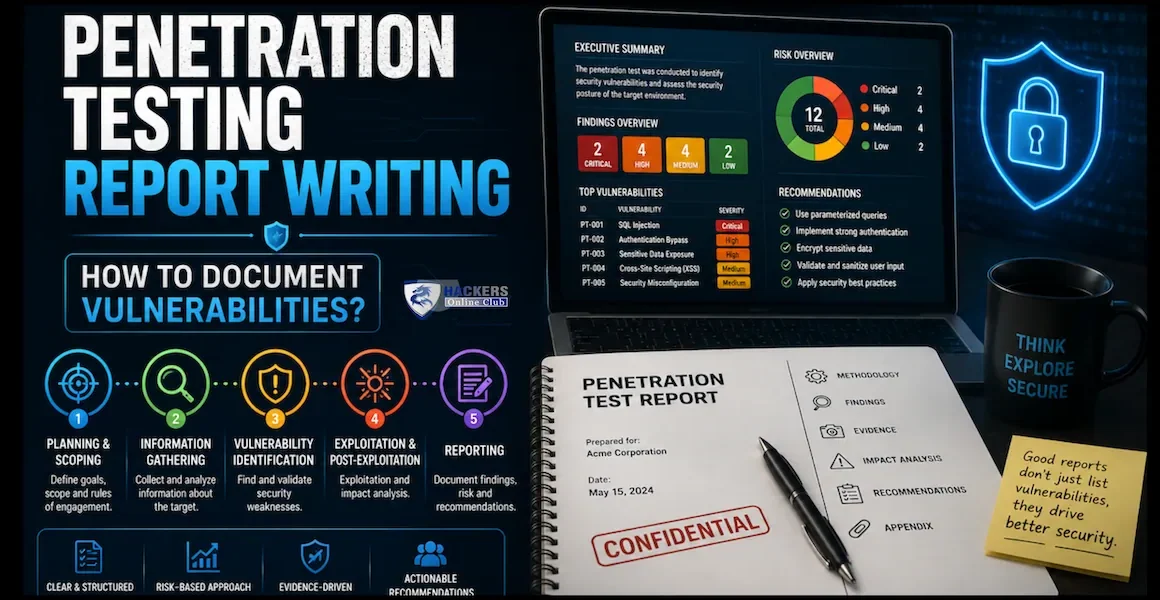
This guide covers everything you need to write penetration testing reports that clients actually read, developers can act on, and auditors accept. It includes the complete report structure, finding documentation templates, risk scoring methodology, evidence standards, executive summary writing, and the common mistakes that destroy credibility.
- Average report length: 30-80 pages (depending on scope and findings)
- Time spent on reporting: 30-40% of total engagement time
- #1 client complaint: "Findings were not actionable or reproducible"
- Report rejection rate: 15-20% of reports require major revision before client acceptance
- Most common failure: Missing evidence, vague remediation, no business impact context
- Industry standard frameworks: OWASP, PTES, NIST SP 800-115, OSSTMM
- Report delivery timeline: 5-10 business days after testing concludes
- Why the report is the product
- Complete report structure — section by section
- Writing the executive summary
- How to document a finding — the professional template
- Evidence standards — what to capture and how
- Risk rating methodology — CVSS and beyond
- Writing remediation recommendations that get implemented
- Full finding example — SQL injection documented professionally
- Common report writing mistakes that destroy credibility
- Report writing tools and automation
- OSCP and certification report requirements
- First actions — improve your reports today
- Frequently asked questions
1. Why the report is the product
Before we discuss structure and templates, you need to internalize one concept: the report is the only deliverable that matters to the client.
Consider who reads your report and what they need:
| Reader | What They Need | What They Skip |
|---|---|---|
| CISO / CTO | Overall risk posture, business impact, budget justification for fixes | Technical details, exploit code, tool output |
| Board / Executives | 1-page summary: Are we at risk? What do we need to spend? | Everything except the executive summary |
| Development Team | Exact reproduction steps, affected code/files, specific fix instructions | Executive summary, methodology, scope |
| IT Operations | Affected systems, configuration changes needed, patch references | Web application findings, code-level details |
| Compliance / Audit | Evidence of testing, scope coverage, finding-to-control mapping | Exploit narratives, attack chain stories |
| Legal / Risk | Regulatory exposure (GDPR, PCI, HIPAA), liability assessment | Technical exploitation details |
2. Complete report structure — section by section
A professional penetration testing report follows a standardized structure. Deviating from this structure confuses readers and signals inexperience.
| Section | Purpose | Audience | Length |
|---|---|---|---|
| 1. Title Page | Client name, engagement title, date, classification, version | All | 1 page |
| 2. Document Control | Version history, distribution list, classification level | Compliance | 1 page |
| 3. Executive Summary | High-level findings, overall risk rating, business impact, key recommendations | CISO, Board, Executives | 1-2 pages |
| 4. Scope & Methodology | What was tested, what was excluded, testing approach, tools used, timeline | All | 2-3 pages |
| 5. Summary of Findings | Table of all findings with severity, status, and affected assets | CISO, IT Management | 1-2 pages |
| 6. Detailed Findings | Each finding fully documented with evidence, impact, and remediation | Developers, IT Ops | 20-60 pages |
| 7. Attack Narrative | Story of chained exploits showing real-world attack paths (optional but powerful) | CISO, Security Team | 3-5 pages |
| 8. Recommendations Summary | Prioritized remediation roadmap (immediate, short-term, long-term) | CISO, IT Management | 1-2 pages |
| 9. Appendices | Raw tool output, additional evidence, glossary, references | Technical teams, Auditors | Variable |
3. Writing the executive summary
The executive summary is the most important section of your report. For 80% of stakeholders, it is the only section they will read. It must translate technical findings into business risk.
✅ Executive Summary Structure
- Opening statement: One sentence describing the engagement (what was tested, when, by whom)
- Overall risk posture: A clear, honest assessment (e.g., "The organization's external attack surface presents a HIGH risk of compromise")
- Key findings summary: The 3-5 most critical findings described in business terms, not technical jargon
- Business impact: What could happen if these vulnerabilities are exploited (data breach, financial loss, regulatory fine, reputational damage)
- Positive observations: What the client is doing well (this builds trust and shows balance)
- Strategic recommendations: 3-5 prioritized actions in business language
🔴 Executive Summary — What NOT to Write
// ✅ GOOD - Business risk language "Critical vulnerabilities were identified in the customer-facing web application that could allow an attacker to access the entire customer database, including names, email addresses, and payment information.
Additionally, an internal build server was found to be accessible without authentication, which could allow an attacker to take full control of the software deployment pipeline and compromise all internal systems."
4. How to document a finding — the professional template
Every finding in your report must follow a consistent, structured format. This is not optional — it is what separates professional reports from amateur ones.
📋 Finding Documentation Template
🔑 Rules for Writing Finding Titles
- Good: "SQL Injection in Login Form Allows Database Extraction" — specific, describes the vulnerability and impact
- Bad: "SQL Injection" — too vague, doesn't specify where or what impact
- Good: "Unauthenticated Remote Code Execution via Jenkins Script Console" — includes auth context, attack type, and affected component
- Bad: "Jenkins Vulnerability" — meaningless without context
5. Evidence standards — what to capture and how
Evidence is what makes your findings reproducible and defensible. Without proper evidence, a finding is just an opinion.
📸 Screenshot Standards
- Always show the target identifier: The URL bar, IP address, or hostname must be visible in every screenshot
- Show the full context: Don't crop so tightly that the reader cannot see what application or system is being shown
- Include timestamps: Tool output should show when the command was executed
- Highlight key elements: Use red boxes or arrows to draw attention to the specific vulnerability indicator
- One finding, one narrative: Screenshots should tell a sequential story — don't jump around
📝 Types of Evidence by Finding Type
| Finding Type | Required Evidence |
|---|---|
| Web Application Vulnerability | HTTP request/response (Burp Suite), screenshot of the vulnerable page, payload used, result of exploitation |
| Network Vulnerability | Nmap output showing open port/service, version information, exploit command and output |
| Configuration Weakness | Screenshot of the misconfigured setting, expected vs actual configuration, command output proving exploitation |
| Privilege Escalation | Before (low-privilege shell) and after (root/SYSTEM shell) screenshots, commands used, whoami output |
| Active Directory Attack | BloodHound path screenshot, Impacket command and output, hash/credential evidence, domain admin proof |
| Data Exposure | Screenshot of exposed data (redact PII in the report!), URL or path, access method |
6. Risk rating methodology — CVSS and beyond
CVSS (Common Vulnerability Scoring System) provides a standardized technical severity score, but it does not account for business context. A CVSS 9.8 vulnerability on an isolated test server is less risky than a CVSS 7.5 on your payment processing system.
📊 Risk Rating Matrix
| Severity | CVSS Range | Business Impact | Remediation Timeline |
|---|---|---|---|
| CRITICAL | 9.0 - 10.0 | Immediate risk of data breach, financial loss, or regulatory violation. Active exploitation likely. | 24-48 hours |
| HIGH | 7.0 - 8.9 | Significant risk of unauthorized access to sensitive data or systems. Exploit code likely available. | 7-14 days |
| MEDIUM | 4.0 - 6.9 | Moderate risk. Exploitation requires specific conditions or authentication. Limited data exposure. | 30 days |
| LOW | 0.1 - 3.9 | Minimal direct risk. May aid reconnaissance or be chained with other vulnerabilities. | 90 days |
| INFO | N/A | No direct security risk. Best practice improvement or informational finding. | Next review cycle |
7. Writing remediation recommendations that get implemented
The remediation section is where most reports fail. Vague advice like "implement secure coding practices" is useless to a developer who needs to fix a specific line of code by Friday.
✅ Remediation Writing Framework
- Specific: "Change line 47 of
login.phpto use parameterized queries" not "fix the SQL injection" - Actionable: Provide the exact code change, configuration value, or patch version
- Referenced: Link to vendor documentation, CVE advisories, or OWASP cheat sheets
- Prioritized: Distinguish between immediate fix (compensating control) and long-term fix (architectural change)
- Verified: Describe how to verify the fix works (e.g., "Re-run the test case from Steps to Reproduce and confirm the payload returns a 400 error")
🔴 Remediation — Bad vs Good
// ✅ GOOD - Specific, actionable, referenced "Immediate Fix: Replace the dynamic SQL query on line 47 of /api/users/search.php with a parameterized query using PDO:
$stmt = $pdo->prepare('SELECT * FROM users WHERE email = :email'); $stmt->execute(['email' => $userInput]); Long-term Fix: Implement an ORM (e.g., Eloquent, Doctrine) across the application to eliminate raw SQL queries entirely.
Verification: Submit the payload ' OR 1=1-- to the search field. The application should return 'No results found' instead of dumping the user table.
Reference: OWASP SQL Injection Prevention Cheat Sheet (https://cheatsheetseries.owasp.org/cheatsheets/SQL_Injection_ Prevention_Cheat_Sheet.html)"
8. Full finding example — SQL injection documented professionally
Here is a complete, publication-quality finding that demonstrates every principle in this guide.
VULN-003: SQL Injection in User Search API Allows Full Database Extraction
Description:
The user search API endpoint accepts a query parameter that is directly concatenated into a SQL query without sanitization or parameterization. An unauthenticated attacker can inject arbitrary SQL commands to extract, modify, or delete any data in the backend PostgreSQL database, including the users table containing customer PII and the payments table containing transaction records.
Steps to Reproduce:
- Navigate to
https://app.example.com/api/v2/users/search?query=test - Observe that the API returns user records matching "test"
- Inject a boolean-based test:
?query=test' AND 1=1--— the API returns results - Inject a false condition:
?query=test' AND 1=2--— the API returns no results - Confirm injection is viable. Use UNION-based extraction to enumerate database tables:
?query=' UNION SELECT table_name,NULL,NULL FROM information_schema.tables-- - Extract data from the
userstable:?query=' UNION SELECT email,password_hash,NULL FROM users--
Evidence:
[Screenshot 1: Burp Suite request showing the injected payload in the query parameter]
[Screenshot 2: API response showing extracted database table names]
[Screenshot 3: API response showing extracted user emails and password hashes (values redacted)]
Impact:
An unauthenticated attacker can extract the entire customer database, including 47,000 user records containing email addresses, full names, and bcrypt password hashes. This constitutes a reportable data breach under GDPR (Article 33) and could result in regulatory fines of up to 4% of annual global turnover. Additionally, the attacker could modify or delete payment records, leading to direct financial loss and loss of customer trust.
Remediation:
Immediate: Replace the dynamic SQL query in src/api/users/search.js (line 34) with a parameterized query using the pg library:
Long-term: Implement an ORM (e.g., Sequelize, Prisma) across all API endpoints to eliminate raw SQL construction. Deploy a WAF rule to block common SQL injection patterns as a compensating control.
Verification: Re-submit the payloads from Steps 3-6. The API should return a 400 Bad Request or "No results found" for all injected payloads.
References:
- OWASP SQL Injection Prevention: https://cheatsheetseries.owasp.org/cheatsheets/SQL_Injection_Prevention_Cheat_Sheet.html
- CWE-89: https://cwe.mitre.org/data/definitions/89.html
9. Common report writing mistakes that destroy credibility
| Mistake | Why It Destroys Credibility | The Fix |
|---|---|---|
| Vague finding titles | "Cross-Site Scripting" — which page? What type? What impact? | "Stored XSS in Comment Field Allows Session Hijacking of Admin Users" |
| Missing reproduction steps | Developers cannot reproduce the finding, so they close the ticket as "cannot reproduce" | Write numbered, exact steps that a junior developer can follow without asking you questions |
| No business impact | Management cannot prioritize the fix because they don't understand the risk | Always answer: "What happens to the business if this is exploited?" |
| Generic remediation | "Implement best practices" tells the developer nothing | Provide exact code changes, configuration values, and patch versions |
| Real PII in screenshots | The report itself becomes a data breach | Redact all real data. Use "[REDACTED]" or placeholder values |
| Copy-pasted scanner output | Looks lazy, includes false positives, no human analysis | Validate every finding manually. Write your own description and impact analysis |
| Inconsistent formatting | Signals carelessness and lack of quality control | Use a template. Review formatting consistency before delivery |
| Spelling and grammar errors | Undermines trust in your technical accuracy | Run spell-check. Have a second person proofread. Use Grammarly |
10. Report writing tools and automation
| Tool | Type | Best For | Cost |
|---|---|---|---|
| Dradis / PlexTrac | Dedicated pentest reporting platform | Professional consultancies, team collaboration, finding libraries | Commercial |
| SysReptor | Open-source pentest reporting | Independent pentesters, budget-conscious teams | Free / Pro |
| Microsoft Word + Templates | Manual document creation | Small engagements, OSCP reports, one-off tests | Free (with Office) |
| Markdown + Pandoc | Developer-friendly report generation | Technical teams who prefer code-based workflows | Free |
| Ghostwriter (SpecterOps) | Open-source reporting platform | Red team and pentest reporting with finding databases | Free |
| CherryTree / Obsidian | Note-taking during engagement | Organizing findings, screenshots, and commands during testing | Free |
11. OSCP and certification report requirements
If you are preparing for the OSCP (PEN-200) exam, your report has specific requirements that differ from commercial pentest reports:
- Use the official Offensive Security template — do not create your own format
- Every screenshot must show your Kali IP and the target IP — this proves you did the work from your exam machine
- Show the complete command AND the complete output — no partial screenshots
- Include the contents of proof files (
proof.txt,local.txt) visible in the terminal withcat - Document every step — if you ran 15 commands to get root, show all 15
- Submit within 24 hours of the exam ending — late submissions are rejected
script command at the start of every machine to log your entire terminal session. This gives you a safety net if you forget to take a manual screenshot.
⚡ Improve your reports today — first five actions
- Download a professional report template. Use the Offensive Security OSCP template, the SANS pentest report template, or create one based on the structure in Section 2. Having a template eliminates 50% of the formatting work and ensures consistency across every engagement.
- Rewrite your last 3 findings using the template in Section 4. Force yourself to fill in every field: CVSS, CWE, OWASP, steps to reproduce, business impact, specific remediation. If you cannot fill in a field, that is a gap in your documentation process that you need to fix during the next engagement.
- Practice writing an executive summary for a non-technical audience. Take your most recent engagement and write a 1-page summary that your parents could understand. If you use the words "SQL injection," "RCE," or "CVSS" in the executive summary, rewrite it.
- Set up a screenshot workflow. Use Flameshot (Linux) or ShareX (Windows) with auto-save to a dated folder. Configure your terminal to use the script command automatically. Every screenshot should include the target URL or IP visible in the frame.
- Build a personal finding library. Every time you document a finding, save it to a searchable database (Ghostwriter, SysReptor, or even a Notion database). Over time, you will build a library of 100+ pre-written findings that you can adapt for future reports, cutting your report writing time in half.
12. Frequently asked questions
How long should a penetration testing report be?
A professional penetration testing report typically ranges from 30 to 80 pages depending on the scope and number of findings. The executive summary should be 1-2 pages, while each finding requires 1-3 pages of detailed technical documentation including evidence, impact analysis, and remediation guidance. A focused web application test with 10 findings might produce a 40-page report, while a full infrastructure and application engagement with 30+ findings can easily reach 80-100 pages.
What is the most important section of a pentest report?
The Executive Summary is the most important section because it is the only section that C-level executives, board members, and non-technical stakeholders will read. It must translate technical findings into business risk language, clearly state the overall security posture, and prioritize remediation actions in business terms. A technically perfect report with a weak executive summary will fail to drive organizational change.
How should I rate the severity of pentest findings?
Use a standardized methodology such as CVSS v3.1 scoring combined with business context. Rate findings as Critical, High, Medium, Low, or Informational. Always consider both technical severity (exploitability and impact) and business context (asset criticality, data sensitivity, regulatory requirements) when assigning final risk ratings. Document your justification for any contextual adjustment to the base CVSS score.
What evidence should I include in a pentest report?
Every finding must include reproducible evidence: screenshots showing the vulnerable state, exact commands or payloads used, tool output with timestamps, and proof of exploitation (such as proof.txt contents or system information). Evidence must be clear enough that a developer or system administrator can reproduce the finding and verify the fix. Never include real PII or production secrets in evidence — redact all sensitive data.
How do I write remediation recommendations in a pentest report?
Remediation recommendations should be specific, actionable, and prioritized. Include the exact configuration change, code fix, or patch required. Reference vendor documentation or CVE advisories where applicable. Provide both a quick fix (compensating control) and a long-term strategic fix. Avoid vague advice like "implement best practices." Include verification steps so the developer can confirm the fix works.
What is the difference between a pentest report and a vulnerability scan report?
A vulnerability scan report is an automated output listing identified vulnerabilities with CVSS scores but no context, validation, or exploitation proof. A penetration testing report is a human-authored professional document that validates findings through manual exploitation, provides business impact analysis, includes reproducible evidence, and delivers prioritized, actionable remediation guidance. A pentest report adds the human intelligence layer that automated scanners cannot provide.
Written by the HOC Team at Hackers Online Club — a cybersecurity community trusted by penetration testers, red teamers, security consultants, and SOC analysts since 2010. 15+ years of practical cybersecurity guides, certification preparation resources, and professional security documentation tutorials. Learn more about HOC →