



In August 2022, a teenager sent a WhatsApp message to an Uber employee claiming to be from Uber IT support. He said the employee's VPN credentials had been compromised and needed to be reset.
He then sent push notification after push notification to the employee's authenticator app, finally sending a follow-up WhatsApp explaining that IT support needed the employee to approve the login. The employee approved.
The attacker was inside Uber's internal network within minutes, found privileged credentials in a PowerShell script on a network share, and had access to AWS, Google Workspace, Slack, HackerOne, and the company's internal admin tools — all from a text message.
No zero-day exploit. No malware. No cryptographic attack. A message, a phone call, and a patient conversation. Social engineering — manipulating people rather than systems — is consistently the most effective initial access technique across every category of cyberattack.
The 2024 Verizon Data Breach Investigations Report found that 68% of breaches involved a human element: phishing, pretexting, misuse of access. The IBM Cost of a Data Breach Report found social engineering attacks are among the costliest to detect and contain, averaging $4.9 million per incident. Technology organisations spend billions hardening their perimeters and almost nothing on the humans inside them.
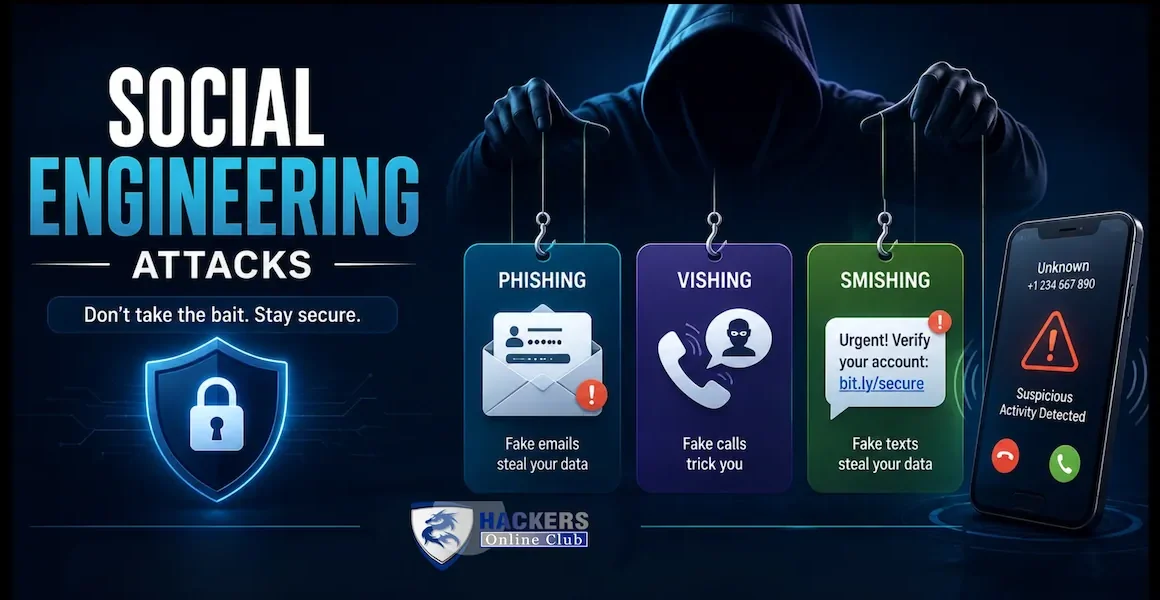
This guide covers every major social engineering technique — phishing, spear phishing, whaling, vishing, smishing, pretexting, BEC fraud, quid pro quo, baiting, and 2026's most dangerous new variants (AI-generated deepfake voice fraud and LLM-powered personalised phishing at scale) — with real attack examples, annotated phishing email and SMS samples, psychological exploitation mechanisms, and a complete prevention framework for individuals and enterprises.
- The psychology of social engineering
- Phishing — anatomy, variants, and real examples
- Spear phishing and whaling
- Business Email Compromise (BEC)
- Vishing — voice phishing
- Smishing — SMS phishing
- Pretexting, baiting, and quid pro quo
- AI-powered social engineering — deepfakes and LLM phishing
- Technical prevention controls
- Human prevention — training and culture
- Enterprise social engineering prevention checklist
- Frequently asked questions
Social engineering attacks work because they exploit cognitive biases and psychological principles that are not bugs in human behaviour — they are features. The same mental shortcuts that let us function efficiently in a complex world make us vulnerable to deliberate manipulation. Understanding the principles attackers exploit explains why even intelligent, security-aware people fall for social engineering attacks.
People comply with requests from perceived authority figures without questioning them. An email appearing to come from the CEO, an IT administrator, or a government regulator triggers automatic compliance. Attackers impersonate executives (whaling), IT departments (helpdesk fraud), and institutions (HMRC, IRS, NHS, CISA) because the authority signal bypasses the critical evaluation that a request from a stranger would trigger.
"Your account will be suspended in 24 hours." "Immediate action required." "This offer expires today." Urgency short-circuits deliberate decision-making by triggering the fight-or-flight response. When we believe we must act now, we skip verification steps that would expose the attack. Every phishing email includes an urgency signal — the ones that perform best in A/B testing by phishing simulation platforms are the ones with the strongest urgency framing.
"Your colleague Sarah has already completed this security update." "Three members of your team have responded." Social proof reduces resistance by implying that complying is the normal, safe, expected thing to do. Attackers use it in spear phishing by referencing real colleagues, real projects, and real organisational events discovered through LinkedIn and public sources.
We comply more readily with requests from people we like or recognise. Attackers build rapport — a visher who spends the first few minutes of a call establishing common ground (mentioning the target's name, their manager, a recent company event) dramatically increases the probability of compliance when they make the request. This is why pretexting (establishing a false but plausible identity and context) precedes the attack.
Humans feel obligated to return favours. A social engineer who offers something valuable — help with a problem, useful information, sympathy — before making a request creates a sense of obligation that makes the request harder to refuse. Quid pro quo attacks explicitly use reciprocity: "I helped you fix that issue, can you help me with this access request?"
"We have detected suspicious activity on your account and your funds are at risk." "Your computer has been compromised and your files will be deleted." Fear triggers action without deliberation — the same emergency response that serves us well in physical danger causes poor decision-making when manipulated artificially. Tech support scams and ransomware-related vishing calls are built entirely on manufactured fear.
Phishing is the most common form of social engineering — a mass email campaign impersonating a trusted brand (Microsoft, Apple, Amazon, HMRC, a bank, a delivery company) to trick recipients into clicking a link, entering credentials on a fake site, or opening a malicious attachment. Unlike spear phishing, mass phishing sends the same or slightly varied email to thousands or millions of addresses, relying on volume rather than personalisation to achieve a high absolute number of victims.
Modern phishing kits are sophisticated: adversary-in-the-middle proxies (Evilginx, Modlishka) present the real login page proxied in real time, bypassing MFA by intercepting both the credential and the authenticated session cookie. The phishing site has a valid TLS certificate (Let's Encrypt, free), appears at a convincing domain (micros0ft-login.com, amazon-security-alert.co), and the email passes basic spam filters because the sending infrastructure is a freshly registered domain with no prior reputation.
From: Microsoft Security Alert <security@microsoift-alerts.com> ← domain is "microsoift" not "microsoft" — typosquat
To: john.smith@yourcompany.com
Subject: [URGENT] Your Microsoft account has been locked — action required within 24 hours ← urgency signal
Dear Microsoft User, ← no personalisation — mass phishing
We have detected suspicious sign-in activity on your account from an unrecognised device in Moscow, Russia. ← fear trigger: account compromised, foreign location
To prevent permanent suspension of your account, you must verify your identity within 24 hours. ← urgency + loss aversion: permanent suspension threatened
[Verify My Account Now] ← link goes to microsoftsecurity-login.pages.dev, not microsoft.com
If you do not verify within 24 hours, your account access will be permanently revoked and your data may be lost.
Microsoft Security Team
© 2026 Microsoft Corporation. One Microsoft Way, Redmond, WA ← real address copied to appear legitimate
- Sender domain: microsoift-alerts.com (not microsoft.com)
- Greeting "Dear Microsoft User" — no name
- Artificial urgency: 24-hour deadline
- Threat of permanent loss: "data may be lost"
- Link does not go to microsoft.com
- Hover the link — URL is a .pages.dev subdomain
- Sender: @microsoft.com or @accountprotection.microsoft.com
- Addressed with your full name
- Links hover to microsoft.com or login.microsoftonline.com
- No threat of permanent account loss in security emails
- Security alerts verifiable in account.microsoft.com directly
- No deadline pressure for routine security checks
| Variant | Description | Example |
|---|---|---|
| Clone phishing | Attacker takes a legitimate email the target previously received, replaces links with malicious ones, and resends it appearing to come from the original sender | A real shipping notification from DHL replicated with the tracking link replaced by a credential harvesting page |
| Angler phishing | Attackers monitor social media for customers complaining about a brand, then reply impersonating the brand's support account with a "help link" | Tweet to @BankName complaining about a transaction; fake @BankNameSupport account replies with a phishing link |
| Search engine phishing | Attacker creates fake websites that rank in search results for queries like "bank login" or "HMRC tax refund" — victims click from search rather than an email | Search "Barclays online banking login" — top sponsored result is a typosquat |
| QR code phishing (quishing) | A QR code in an email or physical flyer leads to a phishing page — QR codes bypass email link scanners because the link is embedded in an image | Email with "Scan to verify your account" QR code; link inside is not inspectable by email gateway |
| AiTM phishing | Adversary-in-the-Middle proxy (Evilginx) relays the real login page, capturing both credentials and the authenticated session cookie — bypasses MFA | Phishing link sends victim to a perfect replica of the Microsoft login page because it IS the Microsoft login page, proxied |
Spear phishing invests reconnaissance time in a specific target to create an email so contextually accurate that even a vigilant recipient may not question it. The attacker researches the target using LinkedIn (role, connections, recent activity), the company website (org chart, announcements, technology stack), social media (travel, interests, recent events), and public data breaches (email format, previous passwords). The resulting email references the target by name, mentions a real colleague, a real project, or a real event — and is far more convincing than mass phishing.
From: Sarah Chen <s.chen@acmecorp-london.co.uk> ← real colleague name, fake domain (acmecorp-london vs acmecorp)
Subject: Re: Q3 budget proposal — quick approval needed before board meeting
Hi James,
Following up on the Q3 budget discussion we had in Edinburgh last week — Marcus asked me to get your sign-off on the supplier payment before the board meeting Thursday. ← uses real names, real meeting, real context from LinkedIn
I've shared the updated proposal in the SharePoint folder — can you review and approve via the link below? Marcus needs confirmation before 3 PM. ← deadline creates urgency; SharePoint context makes link plausible
[Review Q3 Budget Proposal — SharePoint]
Thanks
Sarah
← signs off naturally; no suspicious sign-off or footer anomalies
This email is far more dangerous than the mass phishing example: it uses the target's name, references a real colleague (Marcus, the CFO), a real event (the Edinburgh meeting, visible on LinkedIn), and a plausible workflow (SharePoint budget approval). The only detectable anomaly is the sender domain — acmecorp-london.co.uk rather than acmecorp.co.uk. Many recipients would not notice this difference, particularly on a mobile device where the full sender address is often truncated.
Whaling is spear phishing specifically targeting senior executives. The value proposition for attackers is asymmetric: a CEO's credentials provide access to board communications, M&A discussions, financial systems with large transaction authorities, and the ability to authorise transfers that a junior employee cannot. Whaling emails are researched exhaustively — attackers may monitor a CEO's LinkedIn, Twitter/X, and conference appearances for months before crafting the approach. The email references board agenda items, specific strategic initiatives, or recent media coverage — context only an insider would know, but which is often publicly available to a patient researcher.
BEC is the most financially damaging form of social engineering. The FBI Internet Crime Complaint Center (IC3) reports BEC losses exceeding $2.9 billion annually in the US alone. Unlike phishing (which steals credentials), BEC often involves no malware and no credential theft — the attacker either spoofs or compromises a legitimate email account and uses it to issue fraudulent payment instructions, change payroll direct deposit details, or redirect supplier invoice payments.
- CEO fraud / executive impersonation: An email appearing to come from the CEO or CFO instructs the finance team to make an urgent wire transfer to a new supplier account. "Do not discuss this with anyone — it's sensitive" (prevents the target from calling to verify). "Process before close of business today." The urgency and authority combination typically bypasses normal approval procedures. Average loss: $137,000 per incident.
- Supplier invoice fraud: The attacker compromises or spoofs a regular supplier's email address and sends an updated bank account notification — "Please update our payment details from 1 April. All future invoices should be paid to the new account." The next legitimate invoice is paid to the attacker's account. Often not discovered until the real supplier chases for payment weeks later.
- Payroll diversion: An email appearing to come from an employee (or the HR system) requests a change to payroll direct deposit details — the employee's salary is redirected to the attacker's account next pay run. Because payroll changes are routine, the request is processed without a callback verification to the employee's known number.
- Attorney/legal impersonation: An email claiming to be from the company's law firm instructs the finance team to make a confidential wire transfer related to ongoing legal proceedings or an M&A transaction. The legal context and confidentiality instruction prevent verification by invoking the sensitivity of the matter.
From: David Walsh <d.walsh@acmecorp.co.uk> ← attacker has compromised the real CEO email account, or domain is spoofed
To: finance@acmecorp.co.uk
Subject: Urgent — Confidential wire transfer required today
Hi Claire,
I need you to process an urgent wire transfer today for a supplier acquisition we are finalising. This is commercially sensitive — please do not discuss with any colleagues or copy anyone. ← isolation tactic prevents callback verification
Amount: £87,500
Bank: Barclays
Sort code: 20-45-67
Account: 83917462
Reference: ACQN-2026-047
I need confirmation of transfer by 4 PM today. I'm in meetings all day — please do not call, just confirm by email when done. ← prevents callback; urgency deadline
David
Vishing (voice phishing) uses phone calls to manipulate targets into revealing credentials, approving MFA prompts, or transferring funds. The caller typically spoofs a trusted phone number (caller ID spoofing is trivial and free — the receiving phone displays any number the attacker sets). A caller claiming to be from "Microsoft IT Security" whose number appears to be an internal extension is significantly more convincing than a random unknown number.
The 2022 Uber breach began with a vishing call. The attacker contacted a contractor via WhatsApp, claimed to be from Uber IT security, explained that the contractor's credentials had been compromised and needed to be verified, then began repeatedly triggering MFA push notifications. When the contractor expressed confusion at the repeated notifications, the attacker — still on the call — explained they were from IT and the contractor needed to approve the next one. The contractor approved. This combined vishing, MFA fatigue, and social engineering into a single attack chain that took under an hour from first contact to network access.
- Bank fraud vishing: Caller claims to be from the fraud department of the target's bank. "We've detected suspicious transactions on your account and need to verify your identity." Requests account number, sort code, online banking password, and one-time passcode from an SMS the caller "just sent." The SMS was triggered by the attacker using the target's credentials on the real bank website — the OTP is for the attacker's account takeover, not a legitimate bank verification.
- IT helpdesk impersonation: Caller claims to be from the IT department. "We've detected malware on your computer and need remote access to remove it." Target is directed to install AnyDesk or TeamViewer, giving the attacker full remote access to the device, corporate network, and any credentials stored in the browser.
- HMRC/IRS tax scam: Caller claims to be from HMRC (UK) or IRS (US) and threatens immediate arrest, fines, or asset seizure unless a tax debt is paid immediately by gift card or wire transfer. Fear and authority combined with a concrete immediate threat produces payment without verification.
- Tech support scam callback: A browser pop-up (often triggered by malvertising) displays a fake Windows error message and a phone number "for Microsoft support." The target calls the number — the attacker takes the call and follows the same remote access script.
Smishing exploits the higher trust users extend to SMS messages compared to email — SMS historically had a lower phishing rate, so many people are less sceptical of unexpected text messages. SMS also reaches people on personal devices where security controls (email gateway, endpoint protection) may not be active. Click rates on smishing messages are consistently higher than equivalent phishing emails — some campaigns achieve 30–50% click rates versus 3–5% for mass email phishing.
Example 1 — Parcel delivery (most common UK smishing template):
Royal Mail: Your parcel is on hold. A customs charge of £2.99 is due. Pay now to avoid return: rmdelivery-uk.com/pay
↑ Domain is rmdelivery-uk.com — not royalmail.com. The £2.99 is trivial enough that many people pay without thinking. The payment page harvests full card details.
Example 2 — Bank fraud alert:
LLOYDS BANK: We've detected unusual activity. Your account has been temporarily suspended. Verify now: lloyds-secure-verify.co.uk
↑ Legitimate banks text from short codes or verified numbers, never link to .co.uk domains they don't own. Lloyds sends from a registered short code, not a mobile number.
Example 3 — HMRC tax refund:
HMRC: You are eligible for a tax refund of £847.20. Claim before 31/08/2026: hmrc-refunds-gov.uk/claim
↑ HMRC never texts unsolicited refund notifications. The domain is hmrc-refunds-gov.uk — not hmrc.gov.uk. The .gov.uk suffix on a subdomain is a common trick.
Quishing embeds a phishing URL inside a QR code — delivered by email, SMS, or physically (stickers over legitimate QR codes on parking meters, restaurant menus, or office posters). QR codes are effective because: most email security gateways cannot inspect the URL inside an image; users have been conditioned to scan QR codes without examining the resulting URL; and mobile browsers provide less context (smaller address bar, no hover preview) than desktop browsers. Always preview the URL before navigating after scanning a QR code — iOS and Android both show the destination URL before opening it.
Pretexting is the creation of a fabricated scenario (a pretext) that justifies the attacker's presence and the information they need. The pretext is established before the actual attack — it is the reconnaissance and relationship-building phase. An attacker who calls the IT helpdesk having previously researched the target's name, department, manager, and employee ID has a far more convincing pretext than one who calls cold. Famous pretexting case: the Hewlett-Packard boardroom leak (2006), where private investigators hired by HP posed as board members and journalists to obtain their phone records from telecoms companies — a fully legal request at the time with appropriate pretexting.
Baiting exploits curiosity or greed by leaving something enticing — physical USB drives labelled "Salary Review Q3 2026" or "Confidential — Board Meeting Minutes" in car parks, lobbies, or rest rooms; or online lures offering free software, pirated movies, or prizes. When the USB is plugged in or the link clicked, malware is installed. A well-documented experiment dropped 297 USB drives across six organisations — 45% were plugged in and the contents opened. Drives with organisation logos were more likely to be plugged in than generic ones.
Quid pro quo attacks offer something in return for the target's assistance — exploiting reciprocity. The classic scenario: an attacker calls employees claiming to be from IT support, offering to fix a computer problem. Once the employee explains their issue (real or fabricated by the attacker), the attacker "helps" and in exchange requests the target's credentials, remote access, or the installation of a "diagnostic tool" (malware). The reciprocity trigger — they helped me — reduces the target's resistance to the follow-up request.
Tailgating is physically following an authorised person through a secure door without badging in — exploiting social awkwardness (people rarely challenge someone who follows them through a door) and the natural human instinct to hold doors open for others. A person in a delivery uniform carrying a large box, or an "employee" looking at their phone while following through a secure door, rarely triggers a challenge. Preventing tailgating requires: security awareness training that explicitly authorises and encourages challenging tailgaters; mantrap entries (two doors, only one open at a time); and CCTV with access monitoring.
AI voice cloning can now replicate a specific person's voice from as little as three seconds of audio — available publicly on YouTube, podcast appearances, company presentations, or earnings calls. Attackers clone the voice of a CEO, CFO, or trusted colleague and call a finance team member or employee, making requests that the real person would recognise as fraudulent but which are indistinguishable by voice alone. In 2019, criminals used AI voice cloning to impersonate the CEO of a UK energy company and instructed the finance director to transfer €220,000 — the finance director described the voice as identical to his CEO's, including his German accent. This was four years before current-generation voice cloning tools became freely available.
Real-time deepfake video — impersonating a specific person's face and voice in a live video call — was used in a high-profile 2024 case in Hong Kong where a finance employee was tricked into transferring HK$200 million ($25.6 million) after attending a video call with who appeared to be his company's CFO and several colleagues. All participants in the call except the employee were deepfakes. The employee had received an email prior to the call that he suspected was phishing — the video call reassured him. Real-time deepfake video quality is improving rapidly; by 2026, real-time face-swap quality is sufficient to deceive most viewers in a low-quality video call environment.
Large language models have removed the two biggest tells of mass phishing: poor grammar and lack of personalisation. An LLM can generate a grammatically perfect, contextually appropriate spear phishing email for any target given a LinkedIn profile, a few recent posts, and a company website. What previously required a skilled social engineer spending hours on a single target now takes 30 seconds of API calls. Researchers have demonstrated LLM-powered phishing pipelines that: scrape LinkedIn for target information, generate personalised phishing emails, register convincing typosquat domains, and send campaigns — fully automated, at scale. A/B testing found LLM-generated spear phishing emails achieved 3× higher click rates than manually written mass phishing.
- Safe word / verbal verification protocol: Establish a pre-agreed "safe word" between executives and finance teams — any payment or access request via an unfamiliar channel (unexpected call, different device on video call) must include the safe word before action is taken. A deepfake cannot know the safe word. Document this protocol in the financial controls policy.
- Out-of-band verification for large transactions: Any financial transaction above a defined threshold (e.g. £10,000) requires a callback to a known, independently verified phone number — not the number from the email or the inbound call. The callback must be initiated by the finance team, not the person making the request.
- Video call verification signals: Ask the caller to do something a deepfake struggles with in real time — turn sideways (deepfakes degrade in profile view), hold a piece of paper up to the camera with a specific word written on it, or move to a different room. These requests are unusual enough that a legitimate caller will comply; a deepfake pipeline will fail.
- AI detection tools: Tools like Microsoft Azure AI Content Safety, Reality Defender, and Pindrop analyse audio and video in real time for deepfake indicators — though the arms race between generation and detection tools makes this a partial countermeasure rather than a complete solution.
The email authentication trio blocks most domain spoofing at the protocol level. SPF (Sender Policy Framework) specifies which mail servers are authorised to send email for your domain. DKIM (DomainKeys Identified Mail) adds a cryptographic signature to outbound email that the receiver verifies. DMARC (Domain-based Message Authentication, Reporting and Conformance) tells receivers what to do with email that fails SPF and DKIM — quarantine it or reject it. An organisation with DMARC at enforcement (p=reject) blocks attackers from sending email that appears to come from its own domain.
- Safe Links / URL rewriting: Microsoft Defender for Office 365 Safe Links and equivalent tools rewrite every URL in incoming email — when the recipient clicks, the URL is checked in real time against threat intelligence before the redirect. AiTM phishing sites that were clean at delivery time are caught at click time.
- Safe Attachments / sandboxing: Attachments are detonated in an isolated sandbox before delivery. Malicious macro-enabled Word documents, PDF exploits, and malware droppers are caught before reaching the user's inbox.
- External email banner: A prominent banner on all externally sent email — "This email originated outside your organisation" — immediately signals to recipients that the sender is not a colleague, even if the display name suggests otherwise. Simple and highly effective at preventing display-name spoofing.
- Impersonation protection: Configure your email platform to flag emails where the display name matches an executive but the sending domain is external — the most common BEC spoofing technique.
MFA does not prevent phishing — it prevents account takeover after a credential is phished. An attacker who has stolen a username and password via phishing cannot use those credentials without the second factor. Phishing-resistant MFA (FIDO2 passkeys or hardware security keys) also prevents AiTM attacks by binding the authentication to the legitimate site's origin — a phishing proxy cannot relay a FIDO2 authentication because the origin check fails. For organisations that have not yet deployed MFA, it is the single highest-ROI control against social engineering: it converts a successful phishing attack from "account compromised" to "attacker has credentials that don't work."
DNS filtering blocks connections to known phishing domains, malware command-and-control servers, and newly registered domains (which are disproportionately malicious). Cisco Umbrella, Cloudflare Gateway, and Microsoft Defender for Endpoint DNS protection intercept the DNS query before the connection is made — the phishing page never loads. Newly registered domains (registered within the last 30 days) have a significantly higher maliciousness rate than established domains; blocking or warning on newly registered domains catches a large proportion of phishing infrastructure before it has developed a reputation.
Annual compliance-driven computer-based training (CBT) — the "watch this 45-minute video and click accept" model — produces minimal long-term behaviour change. Click-through rates on phishing simulations show only marginal improvement in organisations that rely solely on this approach. The problem is not the content — it is the frequency and context. Security knowledge fades within weeks; a training delivered in January does not affect decision-making in October. Annual CBT is a compliance exercise, not a security programme.
- Phishing simulations with immediate feedback: When a user clicks a simulated phishing link, they are immediately shown why the email was suspicious — in the moment, when the lesson is maximally relevant. Platforms: KnowBe4, Proofpoint Security Awareness, Cofense, Microsoft Attack Simulator. Organisations running monthly simulations see click rates drop from 25–30% initially to 4–6% within 12 months.
- Short, frequent micro-training modules: 3–5 minute training modules delivered monthly — tied to the current threat landscape or recent incidents — are significantly more effective than annual multi-hour sessions. "This week in phishing: the HMRC smishing campaign targeting our sector" is relevant; "Introduction to Social Engineering" is not.
- Positive reinforcement, not punishment: Organisations that shame or punish phishing simulation clickers achieve compliance, not security. People who are afraid to report mistakes hide them. Organisations with a positive reporting culture — where reporting a suspicious email is celebrated, not clicking it — achieve far better outcomes. "Thank you for reporting this — you've helped protect the organisation" creates security champions.
- Role-specific training: Finance teams get BEC-focused training; IT admins get credential harvesting and vishing training; executives get whaling awareness. Generic training for all roles wastes time on irrelevant threats and misses role-specific risks.
The single most impactful behavioural change is making verification feel normal rather than rude. In most organisations, calling to verify a payment request is felt as an implication that the requester is dishonest — socially awkward and professionally inappropriate. Attackers exploit this. Building a culture where "let me just call to verify before I do this" is the normal, expected, respected response to any unusual request is the difference between an organisation that loses $87,000 to BEC and one that does not. Scripts help: "I'm just following our security procedures — can I call you back on the number I have on file?" Nobody is offended by a colleague following procedures.
- ✓MFA for all users on all applications — no exceptions. Phishing-resistant MFA (FIDO2 / passkeys) for all privileged accounts and executives. Even weak push-notification MFA stops the vast majority of credential-phishing outcomes.
- ✓DMARC at p=reject for your own domain — prevents attackers sending email that appears to come from your domain. Start at p=none (monitoring), advance to p=quarantine, then p=reject. Use a DMARC reporting service (Dmarcian, Valimail) to track compliance.
- ✓External email banner on all inbound email — "This email originated outside your organisation." One of the cheapest, highest-value controls. Configure in your email platform in under 10 minutes.
- ✓BEC payment verification policy — any payment request by email above a defined threshold requires callback verification to a known number before processing. Any instruction not to verify is automatically escalated. Train finance teams specifically on this.
- ✓Block legacy authentication protocols — Exchange ActiveSync, IMAP, POP3 bypass MFA. Block them via Conditional Access Policy before MFA provides false assurance.
- ✓Run a baseline phishing simulation — measure click rate, report rate, and credential submission rate. This is the business case data for your security awareness programme. Use Microsoft Attack Simulator (included in Defender for Office 365 P2) or KnowBe4.
- ✓Implement monthly phishing simulations and immediate feedback training — not annual CBT. Target click rates below 5% within 12 months. Celebrate reporters, not punish clickers.
- ✓Deploy email gateway with Safe Links and Safe Attachments — Microsoft Defender for Office 365 or Proofpoint/Mimecast. URL rewriting catches AiTM phishing sites that were clean at delivery time.
- ✓DNS filtering for all endpoints — Cloudflare Gateway (free), Cisco Umbrella, or Microsoft Defender DNS. Block known phishing domains and newly registered domains. Enforce on corporate devices including remote workers via split-tunnel VPN.
- ✓Executive and finance team-specific training — BEC scenarios, deepfake voice fraud awareness, whaling recognition, and the safe word / callback protocol for high-value payment requests.
- ✓Privileged account protection — executives and admins must use FIDO2 hardware keys (YubiKey, Google Titan). Their credentials are the highest-value phishing targets. Standard push-notification MFA is insufficient for these accounts.
- ✓Establish a clear, easy phishing report button — Microsoft Report Message button or a simple forwarding address (phishing@company.com). Make reporting trivially easy. Measure report rates alongside click rates. High report rate + low click rate = strong security culture.
- ✓Implement impersonation protection and display-name spoofing detection — configure your email platform to flag emails where the display name matches an executive but the sending domain is external.
- ✓Implement a deepfake voice and video awareness programme — brief all finance, HR, and executive teams on deepfake voice fraud. Establish the safe-word verification protocol. Include deepfake scenarios in the annual tabletop exercise.
- ✓USB and removable media controls — disable USB storage ports on corporate endpoints via endpoint management (Intune, Jamf). Eliminates baiting attack vector at source. Allow only approved devices (FIDO2 keys, company-issued peripherals).
- ✓Supplier communication verification — any change to supplier bank details received by email must be verified by calling the supplier's known number (from your existing records, not from the email). No exceptions. One callback prevents the average £50,000 supplier fraud loss.
⚡ Protect your organisation — start this week
- Check your DMARC record right now — it takes 30 seconds. Go to mxtoolbox.com/dmarc/ and enter your domain. If the result shows p=none (monitoring only) or no DMARC record at all, attackers can send email that appears to come from your domain to your customers, suppliers, and employees. Moving to p=reject is the single most impactful zero-cost action for preventing domain spoofing. The implementation takes one DNS change.
- Add the external email banner to your email platform this week. In Microsoft 365: Security & Compliance → Mail Flow → Rules → Add rule → "Prepend disclaimer" for messages received from outside the organisation. This one change, taking 10 minutes to configure, prevents display-name spoofing from deceiving your employees. It is the most consistently underused, highest-value email security control.
- Run a phishing simulation before anything else — measure your baseline. Use Microsoft Attack Simulator (included in Defender P2) or the free trial of KnowBe4. Send a single plausible phishing email (delivery notification or IT support reset request) to all staff. The click rate you get is the business case number for everything else on this list. Present it to leadership with the cost of a BEC incident alongside it.
- Write a one-page BEC prevention policy for your finance team. It needs two rules: (1) any payment instruction received by email above £5,000 requires a callback to a known number before processing; (2) any instruction not to verify is automatically escalated to the CFO or security team. Print it, sign it from the CFO, and put it above the finance team's desks. This prevents the average £137,000 BEC incident. MFA guide → | Incident response → | SIEM for detecting phishing →
Social engineering is the manipulation of people rather than systems to gain unauthorised access, extract sensitive information, or cause harmful actions. Instead of exploiting a software vulnerability, a social engineer exploits human psychology — trust, authority, fear, urgency, and helpfulness. Social engineering attacks include phishing (email-based credential theft), vishing (voice calls), smishing (SMS), pretexting (fabricated scenarios), BEC (business email compromise for financial fraud), baiting (physical USB drops or enticing downloads), and quid pro quo (offering help in exchange for access or credentials). Social engineering is the #1 initial access technique for ransomware and business email compromise, which together account for the majority of cybercrime losses globally. MFA and security awareness training are the two most effective countermeasures.
Phishing is a mass campaign sending the same (or slightly varied) malicious email to thousands or millions of addresses — it relies on volume and impersonates common brands (Microsoft, Amazon, HMRC). Spear phishing is targeted at a specific individual, using OSINT-gathered personal context (their name, role, colleagues, current projects, manager) to create a convincing, personalised email that the recipient is far more likely to trust. Whaling is spear phishing specifically targeting C-suite executives (CEO, CFO, CISO) — the highest-value targets because their credentials provide the broadest access and their authority enables fraudulent payment approvals. Whaling campaigns invest weeks of reconnaissance for a single target. The click rate on whaling emails is typically 3–5× higher than mass phishing because the level of personalisation and context is significantly harder to identify as fraudulent.
Business Email Compromise (BEC) is a fraud technique where an attacker impersonates a trusted party — a CEO, a supplier, a lawyer — via email to authorise fraudulent wire transfers, change payroll details, or divert invoice payments. BEC does not require malware or credential theft — the attacker either compromises a real email account or spoofs the sender address convincingly enough that the recipient does not question it. The FBI IC3 reports BEC causes over $2.9 billion in annual US losses alone. Prevention requires: a verified callback policy for all payment instructions above a threshold (any payment change must be confirmed by calling a known number, not a number from the email); training finance and HR teams to recognise the specific red flags (urgency, instruction not to verify, request for new bank details); DMARC enforcement to prevent domain spoofing; and for organisations with international payments, a requirement that changes to supplier bank details are confirmed via a second independent channel before the first payment is made to the new details.
Vishing (voice phishing) uses phone calls instead of email to manipulate targets. The caller typically spoofs a trusted phone number (caller ID spoofing is trivial) and impersonates IT support, a bank, HMRC/IRS, or a senior colleague. Vishing is more effective than email phishing in certain scenarios because voice communication builds rapport faster, creates stronger authority signals, and triggers more immediate urgency. The key countermeasure is the callback protocol: never provide credentials, approve authentication requests, or process payments based on an inbound call — hang up and call back on a number you independently look up. Deepfake voice technology in 2026 can replicate a specific person's voice from seconds of public audio, enabling attackers to impersonate executives convincingly. The safe word protocol — a pre-agreed phrase that must be spoken for any unusual request — provides a countermeasure that deepfakes cannot replicate without prior knowledge of the word.
Standard MFA (push notifications, TOTP codes) does not prevent phishing — it prevents account takeover after a credential is phished. An attacker with a stolen username and password still cannot use them without the second factor, making phishing significantly less damaging. However, adversary-in-the-middle (AiTM) phishing proxies (Evilginx) can bypass standard MFA by intercepting the authenticated session cookie in real time — the user logs in through the proxy, MFA completes, and the attacker steals the session. Only phishing-resistant MFA (FIDO2 hardware keys or passkeys) defeats AiTM attacks, because the authentication is cryptographically bound to the legitimate site's origin domain — a proxy at a different domain cannot relay a valid FIDO2 authentication. For most organisations, any MFA is a major improvement over password-only; for high-risk accounts (executives, IT admins, finance), phishing-resistant FIDO2 MFA should be mandatory.
Key indicators of a phishing email: the sender domain does not match the organisation being impersonated (microsoft-security-alerts.com vs microsoft.com — always check the full email address, not just the display name); artificial urgency or threats of negative consequences for inaction ("your account will be suspended in 24 hours"); links that do not go to the legitimate organisation's domain (hover over the link before clicking — the destination URL should match the claimed sender); requests for credentials or financial action via email rather than through the organisation's established processes; generic greeting ("Dear Customer") rather than your name; and instructions not to verify the request with colleagues or via a callback. AI-generated phishing in 2026 is grammatically perfect and personalised, making grammar errors an unreliable sole indicator. The most reliable check: hover the link and inspect the full domain before clicking, and verify any financial request through an independent channel regardless of how convincing the email appears.