


Cloud Security Fundamentals: AWS, Azure, GCP & Career Path (2026)
Today, hacker’s best friend is an unpatched CVE or an exposed RDP port. You found the perimeter, you breached the firewall, and you were in.
In the cloud, the rules of engagement have completely changed. There is no traditional perimeter. The firewall is an API. The network is software-defined. And the most devastating breaches in 2026 aren't happening because of zero-day exploits—they are happening because a developer left an S3 bucket public, or an administrator granted AdministratorAccess to a misconfigured IAM role.
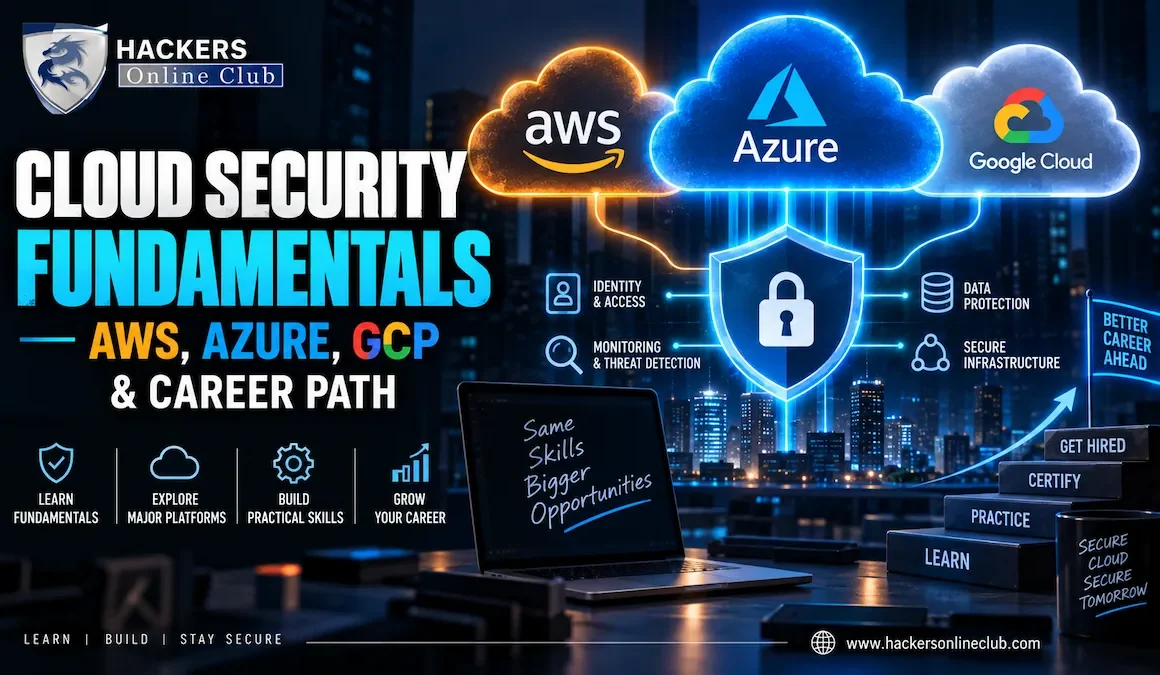
Cloud security is not just "network security in the sky." It is a fundamentally different discipline centered around identity, APIs, and automation. If you want to break into one of the most lucrative and high-demand fields in tech, you need to understand how the Big Three (AWS, Azure, GCP) actually work under the hood—and how attackers exploit them.
Also read: Cloud Penetration Testing: Methodology, Tools and Legal Requirements.
This guide breaks down cloud security fundamentals from a hacker’s perspective, compares the attack surfaces of AWS, Azure, and GCP, and provides a definitive, step-by-step career roadmap to becoming a Cloud Security Engineer in 2026.
Cloud Adoption: 94% of enterprises use at least one cloud service.
Primary Attack Vector: Misconfigurations and Identity/IAM flaws (account for 80%+ of cloud breaches).
Average Cloud Security Engineer Salary (US): $145,000 - $170,000.
Top Cloud Security Certifications: AWS Certified Security - Specialty, AZ-500, GCP Pro Cloud Security.
Market Leaders: AWS (31%), Microsoft Azure (25%), Google Cloud Platform (11%).
- The Paradigm Shift: Identity is the New Perimeter
- The Shared Responsibility Model (The Golden Rule)
- The Big Three: AWS vs. Azure vs. GCP (A Hacker's Perspective)
- IAM: The Crown Jewels of Cloud Security
- What Does a Cloud Security Engineer Actually Do?
- The Cloud Security Career Path (Step-by-Step)
- Cloud Security Jobs & Salaries in 2026
- How to Build a Cloud Hacking Lab (For Free/Cheap)
- First Actions to Start Your Journey Today
- Frequently Asked Questions
1. The Paradigm Shift: Identity is the New Perimeter
To understand cloud security, you must unlearn traditional network security. In a corporate data center, you rely on network segmentation (VLANs, physical firewalls) to keep bad guys out. In the cloud, resources are spun up and down via APIs in seconds. Network boundaries are fluid.
2. The Shared Responsibility Model (The Golden Rule)
Every cloud security professional must memorize the Shared Responsibility Model. It defines exactly who is responsible for what when a breach occurs.
- The Cloud Provider (AWS/Azure/GCP) is responsible for "Security OF the Cloud": The physical data centers, the hardware, the host operating systems, the hypervisors, and the physical network cabling. You cannot hack the AWS hypervisor (they spend billions securing it).
- You (The Customer) are responsible for "Security IN the Cloud": Your data, your IAM policies, your firewall rules (Security Groups), your operating system patching (for EC2/VMs), and your application code.
When Capital One was breached in 2019, it wasn't because AWS's physical servers were hacked. It was because Capital One misconfigured a Web Application Firewall (WAF) and granted overly permissive IAM roles to it. That falls squarely on the customer's side of the shared responsibility line.
3. The Big Three: AWS vs. Azure vs. GCP (A Hacker's Perspective)
While the core concepts are similar, AWS, Azure, and GCP have entirely different architectures, terminologies, and attack surfaces. Here is how a security professional (or attacker) views them.
| Concept | AWS Amazon Web Services | Azure Microsoft | GCP Google Cloud |
|---|---|---|---|
| Core Identity System | IAM: Highly granular, JSON-based policies. The absolute core of AWS security. | Entra ID (Azure AD): Deeply integrated with Microsoft 365 and on-prem Active Directory. OAuth/SAML heavy. | Cloud IAM & Workspace: Tied to Google accounts. Uses hierarchical project-level bindings. |
| Compute | EC2 (Instances), Lambda (Serverless) | Virtual Machines, Azure Functions | Compute Engine (GCE), Cloud Run, Cloud Functions |
| Object Storage | S3 Buckets: Historically the #1 source of data leaks due to public ACLs. | Blob Storage: Containers within Storage Accounts. | Cloud Storage: Buckets with uniform or fine-grained access. |
| Logging & SIEM | CloudTrail & GuardDuty: CloudTrail logs API calls (who did what). GuardDuty is the threat detection engine. | Log Analytics & Defender for Cloud: Centralized logging via Log Analytics workspaces. Defender provides CSPM/CWPP. | Cloud Audit Logs & Security Command Center: Logs admin and data access. SCC provides posture management. |
| Primary Attack Vector | IAM Privilege Escalation, exposed S3, SSRF via EC2 metadata (IMDSv1). | Entra ID phishing, overly broad Resource Group permissions, exposed management ports (RDP/3389). | Over-permissive Service Accounts, exposed GKE (Kubernetes) clusters, project-level IAM leaks. |
4. IAM: The Crown Jewels of Cloud Security
If you only study one thing for your cloud security career, make it Identity and Access Management (IAM). In the cloud, IAM dictates who can do what, to which resource, under what conditions.
Also read: What is IAM? Identity and Access Management Explained for Enterprise
⚠️ The Most Dangerous Cloud Misconfigurations
- Wildcard Permissions: Granting
"Action": "*"and"Resource": "*"in AWS IAM. This is the equivalent of giving a user Domain Admin rights. - Hardcoded Credentials: Developers committing AWS Access Keys or Azure Connection Strings directly into public GitHub repositories. Attackers use automated scrapers to find these in seconds.
- Over-privileged Service Accounts: A background service that only needs to read from a database is granted full "Storage Admin" rights. If the service is compromised, the attacker inherits those massive privileges.
- Public Access Blocks Disabled: Leaving S3 buckets, Azure Blobs, or GCP Storage buckets accessible to "Everyone" (the internet).
5. What Does a Cloud Security Engineer Actually Do?
A Cloud Security Engineer is not a traditional SOC analyst staring at firewall logs all day. They are builders, automators, and architects. Their daily responsibilities include:
- Cloud Security Posture Management (CSPM): Writing policies to automatically detect and remediate misconfigurations (e.g., "If an S3 bucket is made public, automatically revert it to private and alert the SOC").
- Infrastructure as Code (IaC) Security: Scanning Terraform, CloudFormation, or Bicep templates for security flaws before they are deployed to production (Shift-Left security).
- Identity Architecture: Designing secure Single Sign-On (SSO), federated identity, and least-privilege RBAC (Role-Based Access Control) models.
- Incident Response in the Cloud: Using cloud-native forensics to isolate compromised EC2 instances, snapshot compromised EBS volumes, and trace attacker API calls via CloudTrail.
6. The Cloud Security Career Path (Step-by-Step)
You cannot secure what you do not understand. You cannot become a Cloud Security Engineer without first understanding how to build and administer cloud infrastructure.
🚀 The 4-Phase Cloud Security Roadmap
- Phase 1: The Foundation (Months 1-3)
Master Linux command line, basic networking (DNS, TCP/IP, HTTP, Subnetting), and Python scripting. You must be comfortable in a terminal. - Phase 2: Cloud Administration (Months 4-6)
Pick ONE cloud (AWS is recommended for beginners). Learn how to deploy VPCs, EC2 instances, S3 buckets, and IAM roles. Target Certification: AWS Certified Solutions Architect – Associate (SAA-C03). - Phase 3: Security Specialization & Automation (Months 7-9)
Learn Infrastructure as Code (Terraform). Learn how to secure the cloud. Study cloud-native threat detection, encryption (KMS), and logging. Target Certification: AWS Certified Security - Specialty or Microsoft Cybersecurity Architect (SC-100). - Phase 4: Offensive Cloud & Portfolio Building (Months 10-12)
Learn how to attack the cloud to better defend it. Use tools like Pacu, CloudGoat, and Stratus Red Team. Build a GitHub portfolio showcasing your Terraform security scans and automated remediation scripts.
7. Cloud Security Jobs & Salaries in 2026
Cloud security professionals are among the highest-paid in the tech industry due to a massive global talent shortage. Here is the job landscape in 2026:
| Job Title | Experience Level | Average US Salary | Core Responsibilities |
|---|---|---|---|
| Cloud Security Analyst | Entry (1-3 years) | $90,000 - $120,000 | Monitoring cloud SIEM alerts (GuardDuty/Defender), triaging CSPM misconfigurations, basic IAM troubleshooting. |
| Cloud Security Engineer | Mid (3-5 years) | $130,000 - $170,000 | Writing Terraform security policies, automating incident response, managing cloud cryptography (KMS), configuring WAFs. |
| Cloud Penetration Tester | Mid/Senior (4+ years) | $140,000 - $190,000 | Simulating attacks on AWS/Azure environments, IAM privilege escalation, container/Kubernetes exploitation. |
| Cloud Security Architect | Senior (7+ years) | $180,000 - $250,000+ | Designing multi-cloud security architectures, zero-trust implementations, aligning cloud strategy with enterprise risk. |
8. How to Build a Cloud Hacking Lab (For Free/Cheap)
Reading about cloud security is not enough. You must build, break, and fix cloud environments. Here is how to practice without bankrupting yourself.
🛠️ Essential Cloud Security Tools to Learn
- Pacu: The "Metasploit for AWS." An open-source exploitation framework designed specifically to find and exploit IAM misconfigurations and escalate privileges in AWS.
- CloudGoat: A "Vulnerable by Design" AWS deployment tool by Rhino Security Labs. It spins up intentionally broken AWS environments for you to hack and fix.
- Stratus Red Team: A tool by Datadog that allows you to safely detonate realistic cloud attack techniques (mapped to MITRE ATT&CK) in your own AWS/Azure/GCP account to test your detection rules.
- ScoutSuite / Prowler: Open-source multi-cloud security auditing tools. Run these against your account to instantly find hundreds of misconfigurations.
9. First Actions to Start Your Journey Today
Don't get overwhelmed by the sheer size of the cloud. Take these four steps this week:
- Create a Free Tier Account: Sign up for an AWS Free Tier account. Secure the root user immediately (enable MFA, lock away the credentials) and create an IAM Admin user for yourself.
- Set Up a Billing Alarm: Go to AWS CloudWatch or Azure Cost Management and create a budget alert for $10. Do not skip this.
- Deploy Your First Resource: Use the console to launch a simple Linux EC2 instance or Azure VM. SSH into it. Understand how Security Groups (firewalls) control inbound traffic.
- Run an Open-Source Audit: Install Prowler on your local machine, configure your AWS CLI credentials, and run a scan against your new Free Tier account. Read the output to see exactly what security flaws exist in a default cloud setup.
10. Frequently Asked Questions
What are the core fundamentals of cloud security?
The core fundamentals of cloud security revolve around Identity and Access Management (IAM) as the new perimeter, the Shared Responsibility Model (understanding what the cloud provider secures vs. what you secure), data encryption at rest and in transit, infrastructure as code (IaC) security, and continuous cloud posture management (CSPM).
How do hackers view AWS, Azure, and GCP differently?
Hackers view cloud providers through their unique attack surfaces. In AWS, the focus is on IAM privilege escalation and exposed S3 buckets. In Azure, the primary target is Entra ID (formerly Azure AD) and misconfigured Resource Groups. In GCP, attackers target project-level IAM bindings and exposed Kubernetes (GKE) clusters. Across all three, misconfigurations, not zero-days, are the primary attack vector.
How do I become a Cloud Security Engineer in 2026?
To become a Cloud Security Engineer, follow a 4-step path: 1) Master networking and Linux fundamentals. 2) Learn general cloud administration (AWS SAA or Azure AZ-104). 3) Specialize in cloud security (AWS Security Specialty, Azure AZ-500) and learn Infrastructure as Code (Terraform). 4) Build a portfolio using tools like CloudGoat or Stratus Red Team to demonstrate practical attack and defense skills.
What is the salary for Cloud Security jobs in 2026?
In 2026, Cloud Security jobs are among the highest-paying in IT. Entry-level Cloud Security Analysts earn $90,000–$120,000. Mid-level Cloud Security Engineers earn $130,000–$170,000. Senior Cloud Security Architects and Managers command $180,000 to $250,000+, especially in finance, tech, and healthcare sectors.
Which cloud provider is best to learn first for security?
AWS (Amazon Web Services) is generally the best cloud provider to learn first for security. It holds the largest market share, has the most mature security tooling (like GuardDuty and Security Hub), and its IAM (Identity and Access Management) concepts translate well to understanding identity-based security in Azure and GCP.
Do I need to know how to code to work in cloud security?
You do not need to be a software developer, but you must know how to script and automate. Proficiency in Python (for writing custom security scripts and Lambda functions) and HCL (HashiCorp Configuration Language for Terraform) is mandatory for modern Cloud Security Engineers to manage Infrastructure as Code (IaC) and automate remediation.
Written by the HOC Team at Hackers Online Club — a cybersecurity community trusted by cloud architects, penetration testers, and security engineers since 2010. 15+ years of practical cybersecurity guides, cloud infrastructure tutorials, and career roadmaps.Learn more about HOC →