


Cybersecurity Risk Assessment: Step-by-Step Guide + Free Template
Here is the uncomfortable truth about cybersecurity risk assessments: 60% of organizations that suffer a major data breach had a "completed" risk assessment on file.
How is that possible? Because most risk assessments are treated as a compliance checkbox. They are done once a year to satisfy an ISO 27001 auditor or an insurance underwriter, filed away in a dusty SharePoint folder, and never looked at again. They don't reflect reality, they don't drive security spending, and they certainly don't stop hackers.
A real cybersecurity risk assessment is not a compliance exercise. It is the foundational business process that tells you exactly where your organization is most vulnerable, how much it would cost if those vulnerabilities were exploited, and exactly what you need to do to fix it.
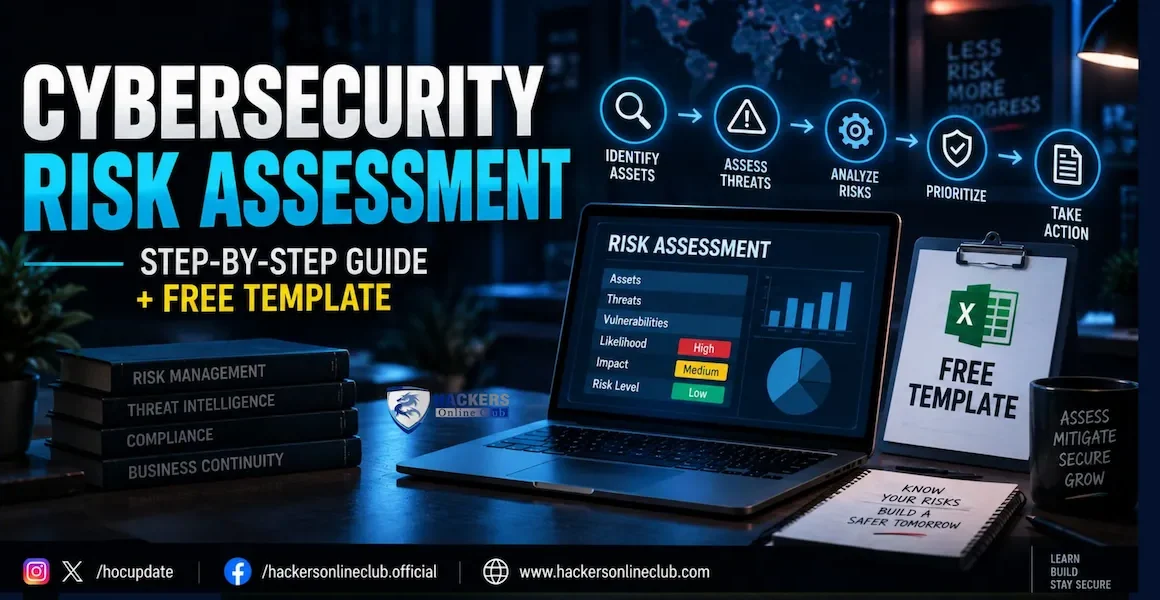
This guide strips away the academic jargon. We will walk through the exact 6-step methodology used by top CISOs, show you how to build a 5x5 risk matrix, and provide a free, copy-pasteable risk register template that you can use today. Whether you are building your first program or overhauling a broken one, this is your blueprint.
Average Cost of a Data Breach: $4.88 Million (IBM 2025)
Organizations with Mature Risk Programs: 32% lower breach costs
#1 Driver for Risk Assessments: Cyber Insurance Requirements (74% of insurers)
#2 Driver: Regulatory Compliance (GDPR, SEC, DORA)
Time to Complete Initial Assessment: 4-8 weeks for mid-sized organizations
Recommended Review Frequency: Annually, or upon major infrastructure changes
- Why Most Risk Assessments Fail (The Compliance Trap)
- The 6-Step Risk Assessment Methodology
- Step 1: Asset Identification (Know What You're Protecting)
- Step 2 & 3: Threat and Vulnerability Identification
- Step 4: Risk Analysis and the 5x5 Matrix
- Step 5: Risk Treatment (The 4 Options)
- Step 6: Monitoring and Continuous Improvement
- The Free Cybersecurity Risk Register Template
- Common Mistakes That Invalidate Your Assessment
- Tools: Excel vs. GRC Platforms
- First Actions: Start Your Assessment Today
- Frequently Asked Questions
1. Why Most Risk Assessments Fail (The Compliance Trap)
Before we build the assessment, we need to understand why most of them fail. If you fall into these traps, your risk register is just a piece of fiction.
- The "Boil the Ocean" Trap: Trying to assess every single laptop, printer, and cable in the organization. You end up with 10,000 risks, no one reads it, and the actual critical risks get buried.
- The "IT-Only" Trap: Treating risk assessment as an IT problem. True cybersecurity risk must include business context. A vulnerability on a test server is not the same risk as a vulnerability on the payment gateway.
- The "Set and Forget" Trap: Doing the assessment in January and ignoring it until December. Cyber risk changes daily. Your assessment must be a living document.
- The "Subjective Guessing" Trap: Scoring risks based on what the IT manager "feels" is high risk, rather than using a standardized, repeatable methodology.
2. The 6-Step Risk Assessment Methodology
Whether you are using NIST SP 800-30, ISO 27005, or FAIR, the underlying methodology is always the same. Here is the 6-step framework we use.
| Step | Phase | The Core Question |
|---|---|---|
| 1 | Asset Identification | What information, systems, and people do we need to protect? |
| 2 | Threat Identification | Who or what could harm these assets? (Hackers, insiders, natural disasters) |
| 3 | Vulnerability Identification | What weaknesses exist that the threat could exploit? (Unpatched servers, no MFA) |
| 4 | Risk Analysis & Scoring | What is the Likelihood of this happening, and what is the Business Impact? |
| 5 | Risk Evaluation & Treatment | Is this risk acceptable? If not, do we mitigate, transfer, accept, or avoid it? |
| 6 | Monitoring & Review | Are our controls working? Has the threat landscape changed? |
3. Step 1: Asset Identification (Know What You're Protecting)
You cannot protect what you cannot see. The first step is creating an inventory of your critical information assets. Do not list every piece of hardware—list the information and the systems that process it.
📋 How to Categorize Assets
- Data Assets: Customer PII, intellectual property, financial records, employee data.
- Software Assets: Core ERP system, customer portal, email platform, custom applications.
- Hardware Assets: Domain controllers, production web servers, core network switches.
- Human Assets: System administrators, developers, finance team (people with high-level access).
4. Step 2 & 3: Threat and Vulnerability Identification
Now that you know what you are protecting, you need to identify what could go wrong.
⚠️ Identifying Threats (The "Who" and "What")
Use the STRIDE model or review threat intelligence reports. Common threats include:
- External Cyber Attacks: Ransomware gangs, nation-states, opportunistic hackers.
- Internal Threats: Disgruntled employees, accidental data deletion, social engineering victims.
- Third-Party/Supply Chain: A critical vendor gets breached, exposing your data.
- Environmental: Power outages, floods, fires affecting the data center.
🔍 Identifying Vulnerabilities (The "Weaknesses")
Vulnerabilities are the gaps in your defenses. You identify these through:
- Technical Scans: Vulnerability scanners (Tenable, Qualys), penetration testing reports.
- Audit Findings: Previous SOC 2 or ISO 27001 audit reports.
- Process Reviews: Lack of an incident response plan, no background checks for admins.
5. Step 4: Risk Analysis and the 5x5 Matrix
This is where you calculate the risk score. The standard formula is simple: Risk = Likelihood × Impact.
📊 The 5x5 Risk Matrix
Score both Likelihood and Impact on a scale of 1 to 5. Multiply them to get your Risk Score (1 to 25).
| Likelihood \ Impact | 1 - Negligible | 2 - Minor | 3 - Moderate | 4 - Major | 5 - Critical |
|---|---|---|---|---|---|
| 5 - Almost Certain | 5 (Low) | 10 (Med) | 15 (High) | 20 (Critical) | 25 (Critical) |
| 4 - Likely | 4 (Low) | 8 (Med) | 12 (High) | 16 (Critical) | 20 (Critical) |
| 3 - Possible | 3 (Low) | 6 (Med) | 9 (High) | 12 (High) | 15 (High) |
| 2 - Unlikely | 2 (Low) | 4 (Low) | 6 (Med) | 8 (Med) | 10 (Med) |
| 1 - Rare | 1 (Low) | 2 (Low) | 3 (Low) | 4 (Low) | 5 (Low) |
📏 Defining the Scales (Crucial for Consistency)
Do not let people guess. Give them exact definitions.
- Impact 5 (Critical): Existential threat. >$1M financial loss, massive regulatory fine, loss of customer trust, business halts for >1 week.
- Impact 3 (Moderate): Significant disruption. $50k-$100k loss, regulatory notification required, operations degraded for 1-2 days.
- Impact 1 (Negligible): Minor annoyance. <$10k loss, no regulatory impact, internal workaround exists.
6. Step 5: Risk Treatment (The 4 Options)
Once you have your risk score, you must decide what to do about it. You have exactly four options. Every risk in your register must have one of these assigned.
| Treatment Option | Definition | When to Use It |
|---|---|---|
| 🛡️ Mitigate (Reduce) | Implement security controls to lower the likelihood or impact of the risk. | For High and Critical risks. (e.g., Implement MFA to reduce the likelihood of account takeover). |
| 🤝 Transfer (Share) | Shift the financial impact to a third party. | When risk cannot be fully mitigated. (e.g., Buy cyber insurance, or add indemnification clauses to vendor contracts). |
| ✅ Accept | Acknowledge the risk and take no action because it falls within the company's "risk appetite." | For Low and Medium risks where the cost of fixing it is higher than the potential loss. Must be signed off by senior management. |
| 🛑 Avoid | Stop the activity or process that creates the risk entirely. | When the risk is too high and cannot be mitigated. (e.g., Shutting down a legacy, unpatchable server because the business doesn't actually need it). |
7. Step 6: Monitoring and Continuous Improvement
A risk assessment is not a project; it is a lifecycle. Once you have treated your risks, you must monitor them.
- Track Control Effectiveness: If you implemented a WAF to mitigate SQL injection, run penetration tests every 6 months to prove the WAF is actually working.
- Review the Risk Register Quarterly: Bring the top 10 risks to the executive team. Have the risk landscape changed? Did a mitigation fail?
- Trigger-Based Reviews: Immediately update the risk register if you migrate to a new cloud provider, acquire a company, or suffer a near-miss security incident.
8. The Free Cybersecurity Risk Register Template
You don't need expensive software to start. Below is the exact structure of a professional Risk Register. You can copy this table directly into Excel, Google Sheets, or Notion.
📋 Cybersecurity Risk Register (Copy to Excel)
| Risk ID | Asset / Process | Threat & Vulnerability Description | Likelihood (1-5) | Impact (1-5) | Inherent Risk Score (L x I) | Current Controls | Residual Risk Score | Treatment Plan | Risk Owner |
|---|---|---|---|---|---|---|---|---|---|
| RSK-001 | Customer Payment DB | SQL Injection via legacy web portal leading to PII exfiltration. | 4 | 5 | 20 (Critical) | WAF (outdated rules), basic input validation. | 8 (Med) | Mitigate: Rewrite portal code to use parameterized queries. Update WAF rules. | CTO |
| RSK-002 | Employee Laptops | Phishing leading to credential theft and ransomware deployment. | 5 | 4 | 20 (Critical) | EDR deployed, Security Awareness Training. | 10 (Med) | Mitigate: Enforce Phishing-Resistant MFA (FIDO2) for all email and VPN access. | CISO |
| RSK-003 | Third-Party Payroll Vendor | Vendor breach exposes employee SSNs and bank details. | 3 | 4 | 12 (High) | Annual SOC 2 report review, NDA signed. | 6 (Med) | Transfer: Require vendor to maintain $5M cyber insurance. Add SLA penalties. | VP HR |
| RSK-004 | Marketing Website | Defacement or DDoS causing minor reputational damage. | 3 | 2 | 6 (Med) | Hosted on managed AWS, Cloudflare CDN. | 2 (Low) | Accept: Risk is low. Current controls are sufficient. Reviewed annually. | CMO |
How to use this: Highlight the table above, copy it (Ctrl+C), open a blank Excel sheet, click cell A1, and paste (Ctrl+V). You now have a fully formatted, professional risk register.
9. Common Mistakes That Invalidate Your Assessment
| Mistake | Why It's Dangerous | The Fix |
|---|---|---|
| Ignoring Third-Party Risk | Most breaches happen via vendors (e.g., Target, SolarWinds). If you only assess internal systems, you have a blind spot. | Include your top 10 critical vendors in the risk register. Require their SOC 2 reports or conduct questionnaires. |
| Calculating "Inherent" but not "Residual" Risk | Inherent risk is the risk before controls. Residual risk is the risk after controls. Auditors care about residual risk. | Always score the risk twice: once assuming no security exists, and once factoring in your current firewalls, MFA, and training. |
| Letting IT Own the Risk | If the IT Director owns the risk of "Customer Data Breach," they will naturally downplay the impact to avoid looking bad. | The business owner (e.g., VP of Sales) must own the risk and sign off on the risk acceptance. IT just implements the controls. |
| Using Vague Language | "Hackers might steal data." This means nothing to a board of directors. | Be specific: "Threat actors exploiting unpatched Exchange servers to exfiltrate 50,000 customer records, resulting in a potential $2M GDPR fine." |
10. Tools: Excel vs. GRC Platforms
When should you upgrade from a spreadsheet to dedicated software?
- Excel / Google Sheets (Free - $50): Perfect for organizations with < 50 employees or < 100 identified risks. It's flexible, free, and everyone knows how to use it. Downside: No version control, hard to track remediation progress, manual updates.
- Compliance Automation (Vanta, Drata - $10k+/yr): Great for startups needing SOC 2 or ISO 27001. They automate evidence collection and map risks to controls. Downside: Less customizable for deep, complex risk modeling.
- Enterprise GRC (ServiceNow, RSA Archer, OneTrust - $50k+/yr): Built for Fortune 500s. Handles thousands of risks, complex workflows, and deep integrations. Downside: Requires dedicated administrators and months to implement.
⚡ Start Your Risk Assessment: 4 Immediate Actions
- Copy the template from Section 8. Open Excel, paste it, and save it as your "Master Risk Register." Do not wait for the perfect tool. Start with a spreadsheet today.
- Identify your Top 10 Critical Assets. Don't try to list everything. Sit down with the executive team and agree on the 10 systems or data sets that, if compromised, would put the company out of business or cause massive financial damage.
- Score the Top 10 Risks. For each of those 10 assets, identify the most likely threat, score the inherent risk using the 5x5 matrix, and document what controls you currently have in place.
- Get Executive Sign-Off. Present the top 5 highest residual risks to the CEO or Board. Ask them: "Are you comfortable accepting this level of risk, or should we allocate budget to mitigate it?" This single conversation transforms risk management from an IT task into a business strategy.
11. Frequently Asked Questions
What are the 6 steps of a cybersecurity risk assessment?
The 6 standard steps are: 1. Asset Identification (what do we have?), 2. Threat Identification (what could go wrong?), 3. Vulnerability Identification (what are our weaknesses?), 4. Risk Analysis and Scoring (Likelihood x Impact), 5. Risk Evaluation (determining risk appetite), and 6. Risk Treatment and Monitoring (mitigating, transferring, accepting, or avoiding the risk).
How often should a cybersecurity risk assessment be conducted?
A full enterprise risk assessment should be conducted annually. However, risk management is a continuous process. You should trigger a targeted reassessment whenever there is a major change in the environment, such as deploying a new cloud infrastructure, adopting a new third-party vendor, experiencing a security incident, or following a major new threat disclosure.
What is the difference between a risk assessment and a vulnerability scan?
A vulnerability scan is an automated technical process that identifies missing patches or misconfigurations on specific systems. A risk assessment is a broader, business-focused process that evaluates the likelihood and business impact of those vulnerabilities being exploited, factoring in asset criticality, threat intelligence, and existing security controls.
What are the 4 risk treatment options?
The four standard risk treatment options are: 1. Mitigate (implement security controls to reduce likelihood or impact), 2. Transfer (shift the financial risk to a third party, like cyber insurance), 3. Accept (acknowledge the risk and do nothing because it falls within the organization's risk appetite), and 4. Avoid (stop the activity or process that creates the risk entirely).
Which frameworks should I use for a risk assessment?
The most widely used frameworks are NIST SP 800-30 (Risk Assessment for Information Security Systems), NIST CSF 2.0 (for overall program structure), ISO 27005 (the risk management companion to ISO 27001), and FAIR (Factor Analysis of Information Risk) for quantitative, financial risk modeling.
Do I need specialized software for a risk assessment?
No. For small to mid-sized organizations, a well-structured Excel or Google Sheets risk register is perfectly adequate and often preferred for its flexibility. As the organization scales and the number of risks exceeds 500+, migrating to a dedicated GRC (Governance, Risk, and Compliance) platform like ServiceNow, Archer, or Vanta becomes necessary for automation and reporting.
Written by the HOC Team at Hackers Online Club — a cybersecurity community trusted by CISOs, compliance managers, GRC professionals, and security engineers since 2010. 15+ years of practical cybersecurity guides, compliance roadmaps, and enterprise security resources. Learn more about HOC →